 BRASIL
Texto para imagem
Gere imagens a partir de prompts de texto.
Para comparar modelos e escolher o modelo certo, consulte Modelos de imagem. Experimente on-line: QwenCloud.
Desempenho do modelo
Qwen-Image
<table style={{width: "100%", borderCollapse: "separate", borderSpacing: "8px 0", tableLayout: "fixed"}}> <tr> <th style={{textAlign: "left", width: "33%", paddingBottom: "8px"}}>Texto complexo</th> <th style={{textAlign: "left", width: "33%", paddingBottom: "8px"}}>Parágrafos longos</th> <th style={{textAlign: "left", width: "34%", paddingBottom: "8px"}}>Layouts complexos</th> </tr>
<tr>
<td style={{verticalAlign: "top"}}>
 </td>
<td style={{verticalAlign: "top"}}>
</td>
<td style={{verticalAlign: "top"}}>
</td>
</tr>
<tr> <td style={{verticalAlign: "top"}}> Design de pôster </td>
<td style={{verticalAlign: "top"}}>
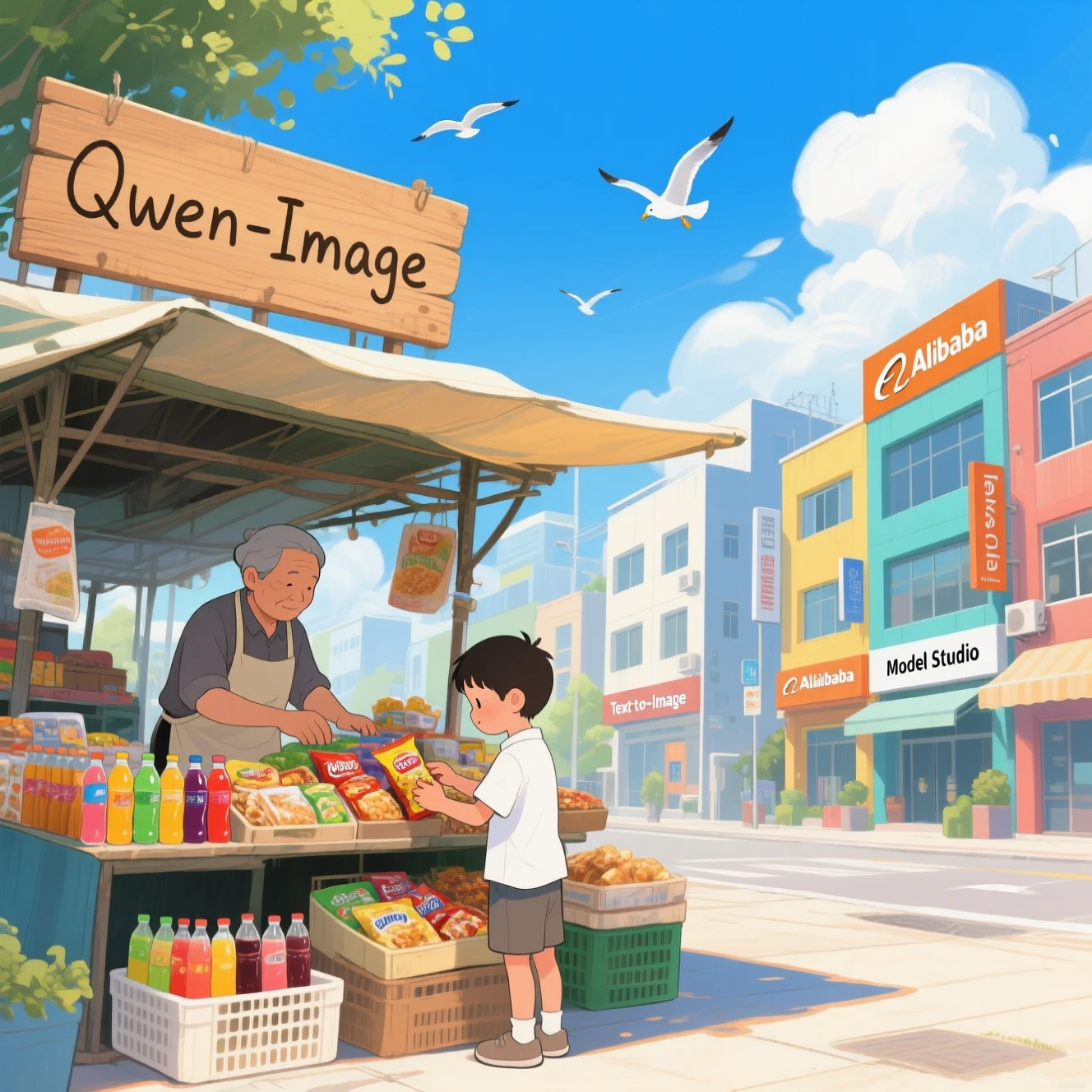
  Desenho de ilustração
</td>

<td style={{verticalAlign: "top"}}>
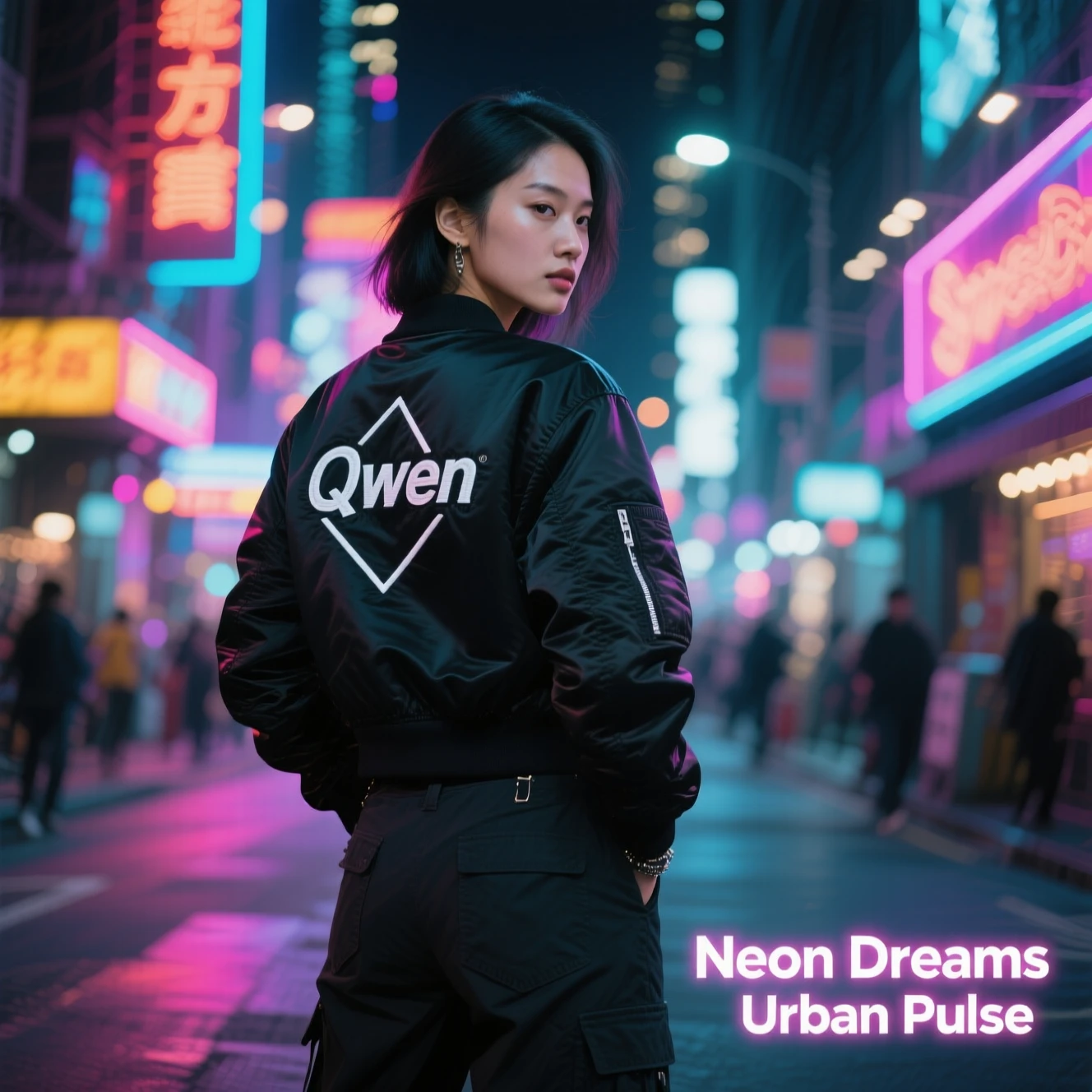
  Fotografia realista
</td>
</tr>
<tr>
<td style={{verticalAlign: "top"}}>
 </td>
<td style={{verticalAlign: "top"}}>
</td>
<td style={{verticalAlign: "top"}}>
</td>
</tr> </table>
Clique para ver as instruções.
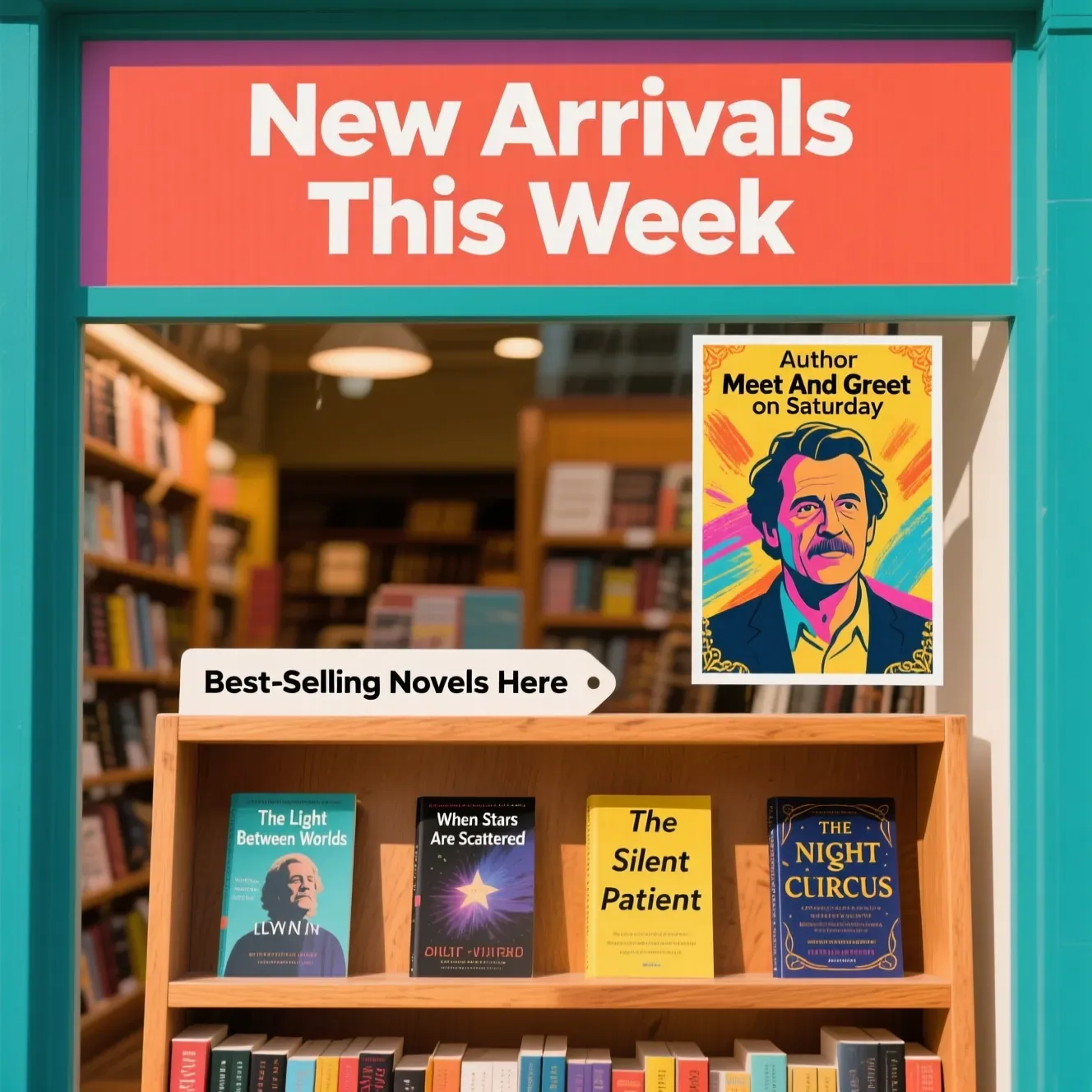
Texto complexo: Vitrine da livraria. Uma placa exibe "Novidades esta semana". Abaixo, uma etiqueta de prateleira com o texto “Novelas mais vendidas aqui”. Ao lado, um pôster colorido anuncia "Author Meet And Greet on Saturday" com um retrato central do autor. Existem quatro livros na estante, nomeadamente “A luz entre os mundos” “Quando as estrelas se espalham” “O paciente silencioso” “O circo noturno”
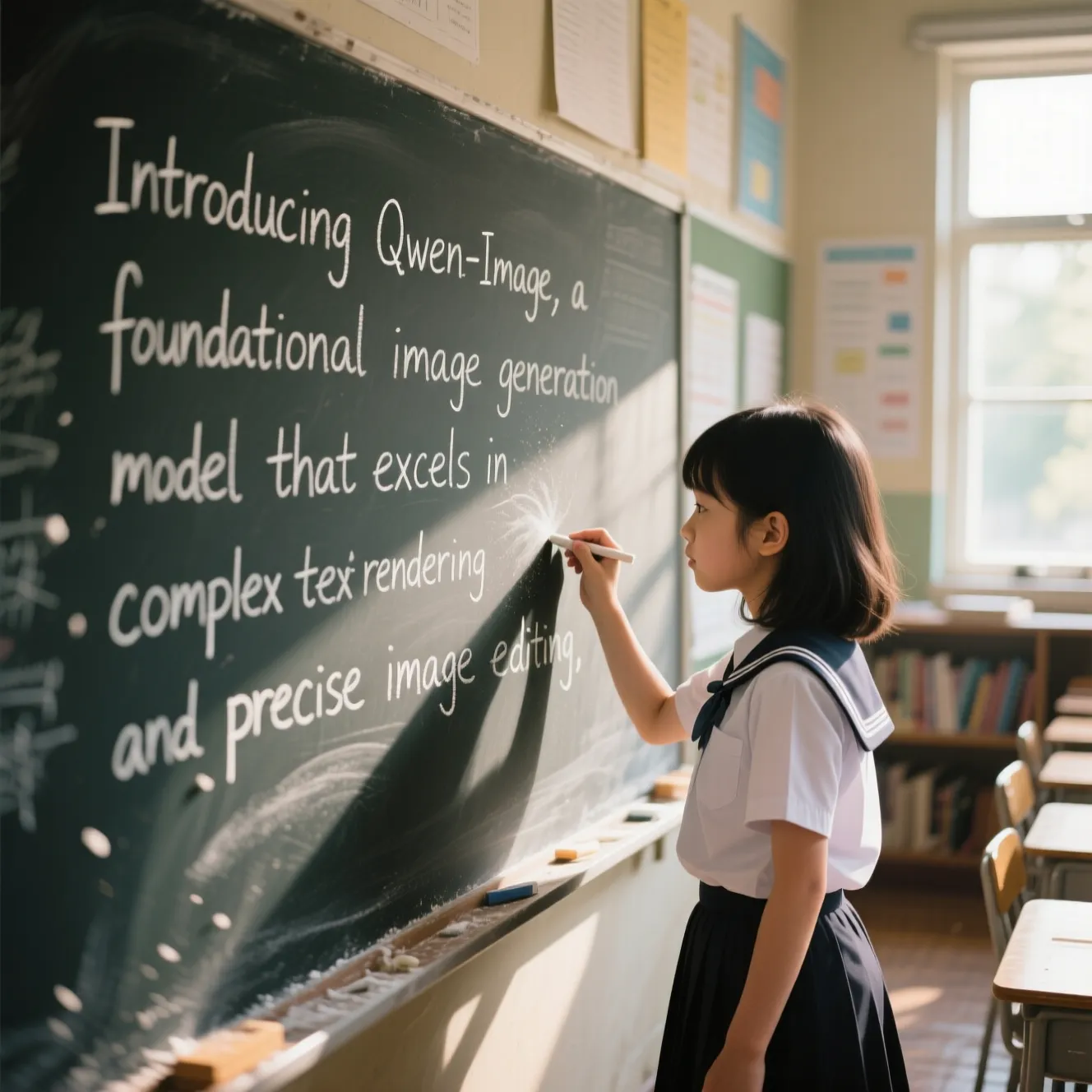
Parágrafos longos: Uma jovem vestida com uniforme escolar está em uma sala de aula, escrevendo no quadro-negro. Centrado no quadro, cuidadosamente inscrito com giz branco, está o texto: "Apresentando Qwen-Image, um modelo básico de geração de imagens que se destaca na renderização de textos complexos e na edição precisa de imagens." A luz natural suave entra pelas janelas, lançando sombras suaves. A cena é renderizada em um estilo fotográfico realista, com texturas finamente detalhadas, profundidade de campo rasa e tons quentes. A expressão focada da menina e o pó de giz suspenso no ar acrescentam uma sensação de movimento e vitalidade. Os elementos de fundo - incluindo carteiras de alunos e cartazes educacionais - estão ligeiramente desfocados para enfatizar a ação central. Resolução ultra-alta de 32K, imagens com qualidade DSLR, efeito bokeh suave e composição em estilo documentário.
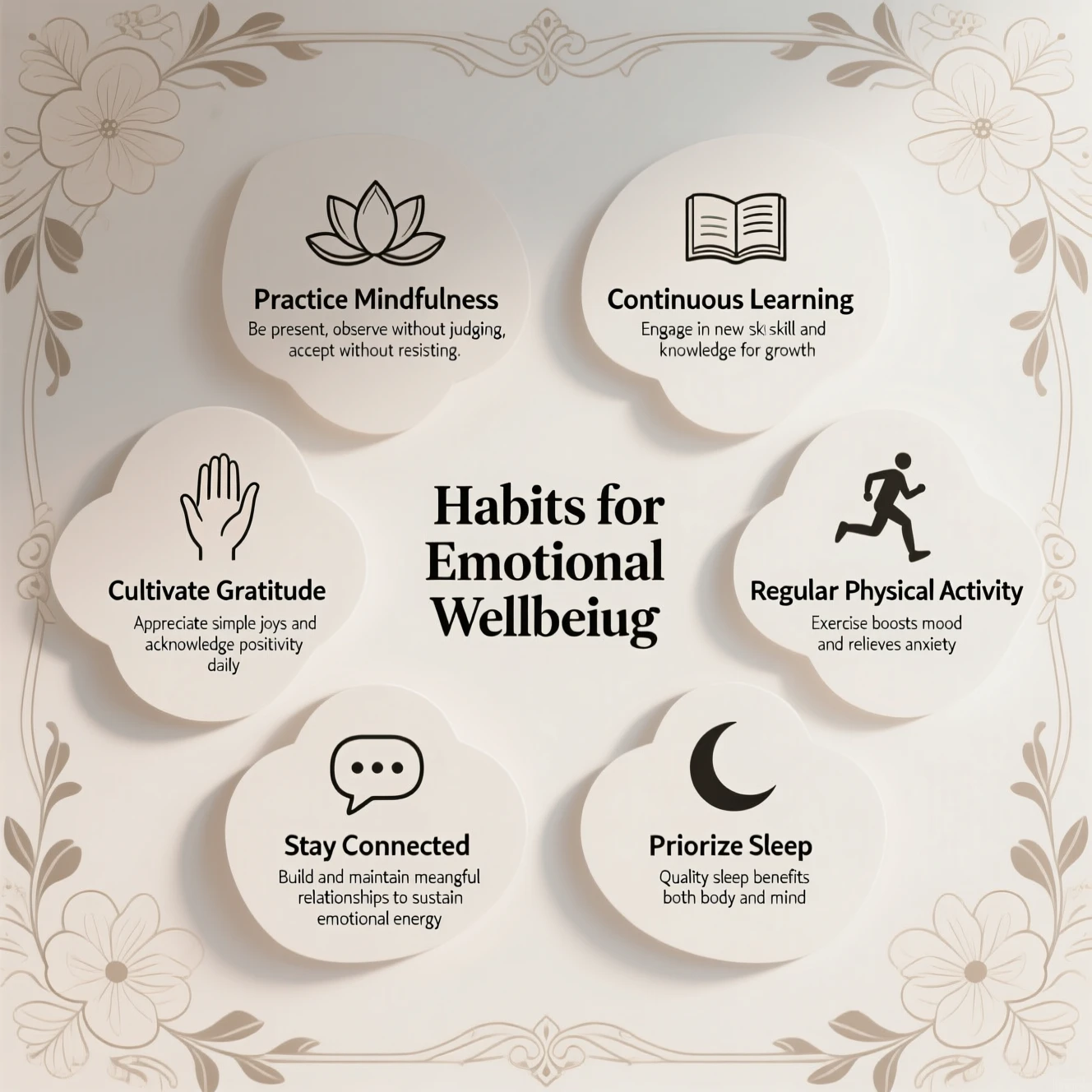
Layouts complexos: crie um slide PPT em sala de aula para um discurso. Apresenta formas artísticas e decorativas que enquadram informações textuais bem organizadas como um infográfico elegante. Título central: 'Hábitos para o bem-estar emocional', rodeado por um padrão floral simétrico. Superior esquerdo: 'Pratique Mindfulness' + ícone de lótus minimalista + texto 'Esteja presente, observe sem julgar, aceite sem resistir'. Para baixo: 'Cultive a Gratidão' + ilustração de mão aberta + texto 'Aprecie as alegrias simples e reconheça a positividade diariamente'. Parte inferior esquerda: 'Fique conectado' + ícone de balão de bate-papo minimalista + texto 'Construa e mantenha relacionamentos significativos para sustentar a energia emocional'. Canto inferior direito: ‘Priorizar o sono’ + ilustração de lua crescente + texto ‘Sono de qualidade beneficia corpo e mente’. Acima, à direita: 'Atividade física regular' + ícone de corredor de corrida + texto 'O exercício melhora o humor e alivia a ansiedade'. Canto superior direito: 'Aprendizagem Contínua' + ícone de livro + texto 'Envolva-se em novas habilidades e conhecimentos para crescer'. O layout equilibra clareza e arte, guiando os espectadores naturalmente. --ar 16:9 --estilo limpo - apresentação.
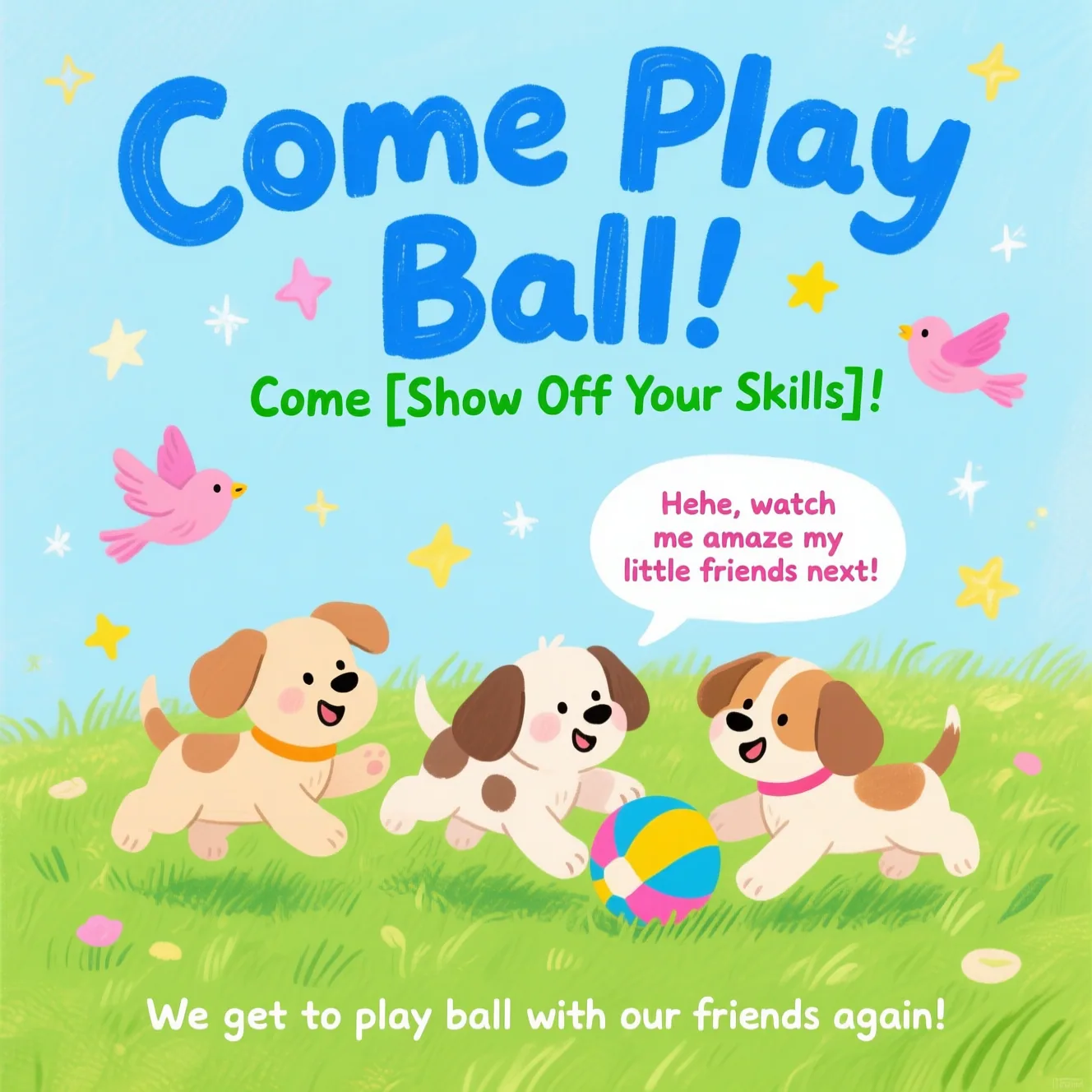
Design de pôster: pôster desenhado à mão em estilo de cura apresentando três cachorrinhos brincando com uma bola na grama verdejante, adornado com elementos decorativos como pássaros e estrelas. O título principal "Venha jogar bola!" é exibido com destaque na parte superior em negrito, fonte de desenho animado azul. Abaixo dele, o subtítulo "Venha [Mostre Suas Habilidades]!" aparece em fonte verde. Um balão de fala adiciona charme lúdico com o texto: "Hehe, veja como vou surpreender meus amiguinhos a seguir!" Na parte inferior, o texto suplementar diz: “Vamos voltar a jogar bola com nossos amigos!” A paleta de cores centra-se em verdes e azuis frescos, acentuados com tons brilhantes de rosa e amarelo para realçar uma atmosfera alegre e infantil.
Design de ilustração: uma ilustração vibrante e animada de uma cena de rua comercial ensolarada e movimentada, um pedaço da vida. Em primeiro plano, um menino de camisa branca e shorts escolhe atentamente itens de uma barraca de mercado. A barraca está repleta de lanches, bebidas e produtos diários. O dono da barraca, um homem de meia idade e de avental, está organizando os produtos. Uma placa de madeira com "Qwen-Image"em estilo manuscrito está pendurado acima da barraca. O fundo apresenta edifícios modernos e coloridos com placas proeminentes para "QwenCloud" "Texto para imagem". O céu é azul celeste com nuvens brancas fofas e gaivotas voando. Estilo de arte: ilustração de realismo, delicada e suave, cores vibrantes, camadas ricas, textura sutil desenhada à mão, luz e sombra detalhadas e fortes, composição completa, forte senso de profundidade, atmosfera alegre e relaxante.
Fotografia realista: uma fotografia realista e de estilo de rua de alta moda de uma jovem asiática. Ela fica confiante em uma rua vibrante e iluminada por neon à noite. Ela está vestindo uma jaqueta preta elegante com um logotipo geométrico branco sutil e a palavra "Qwen"bordado nas costas, combinado com calças cargo escuras. O fundo é preenchido com letreiros brilhantes e bokeh suave das luzes da cidade, criando um clima cinematográfico e atmosférico. A iluminação é dramática, com destaques dos letreiros de néon lançando cores em seu rosto e jaqueta. No canto inferior direito, o texto sobreposto diz "Neon Dreams" e "Urban Pulse". O texto está em uma fonte sem serifa moderna e elegante com um leve efeito de brilho neon, perfeitamente integrado à composição. A imagem inteira deve ser uma obra-prima, ultradetalhada, 8K, UHD, com foco nítido e qualidade fotográfica profissional, capturando um momento urbano sincero, mas poderoso.
Wan série
<table style={{width: "100%", borderCollapse: "separate", borderSpacing: "8px 0", tableLayout: "fixed"}}> <tr> <th style={{textAlign: "left", width: "33%", paddingBottom: "8px"}}>Fotografia de retrato</th> <th style={{textAlign: "left", width: "33%", paddingBottom: "8px"}}>Fotografia realista</th> <th style={{textAlign: "left", width: "34%", paddingBottom: "8px"}}>Estilos de pintura</th> </tr>
<tr>
<td style={{verticalAlign: "top"}}>
 </td>
<td style={{verticalAlign: "top"}}>
</td>
<td style={{verticalAlign: "top"}}>
</td>
</tr>
<tr> <td style={{verticalAlign: "top"}}> Geração de texto </td>
<td style={{verticalAlign: "top"}}>
  Design de pôster
</td>

<td style={{verticalAlign: "top"}}>
  Geração de conjunto de imagens
</td>
</tr>
<tr>
<td style={{verticalAlign: "top"}}>
 </td>
<td style={{verticalAlign: "top"}}>
</td>
<td style={{verticalAlign: "top"}}>
</td>
</tr> </table>
Clique para ver as instruções.
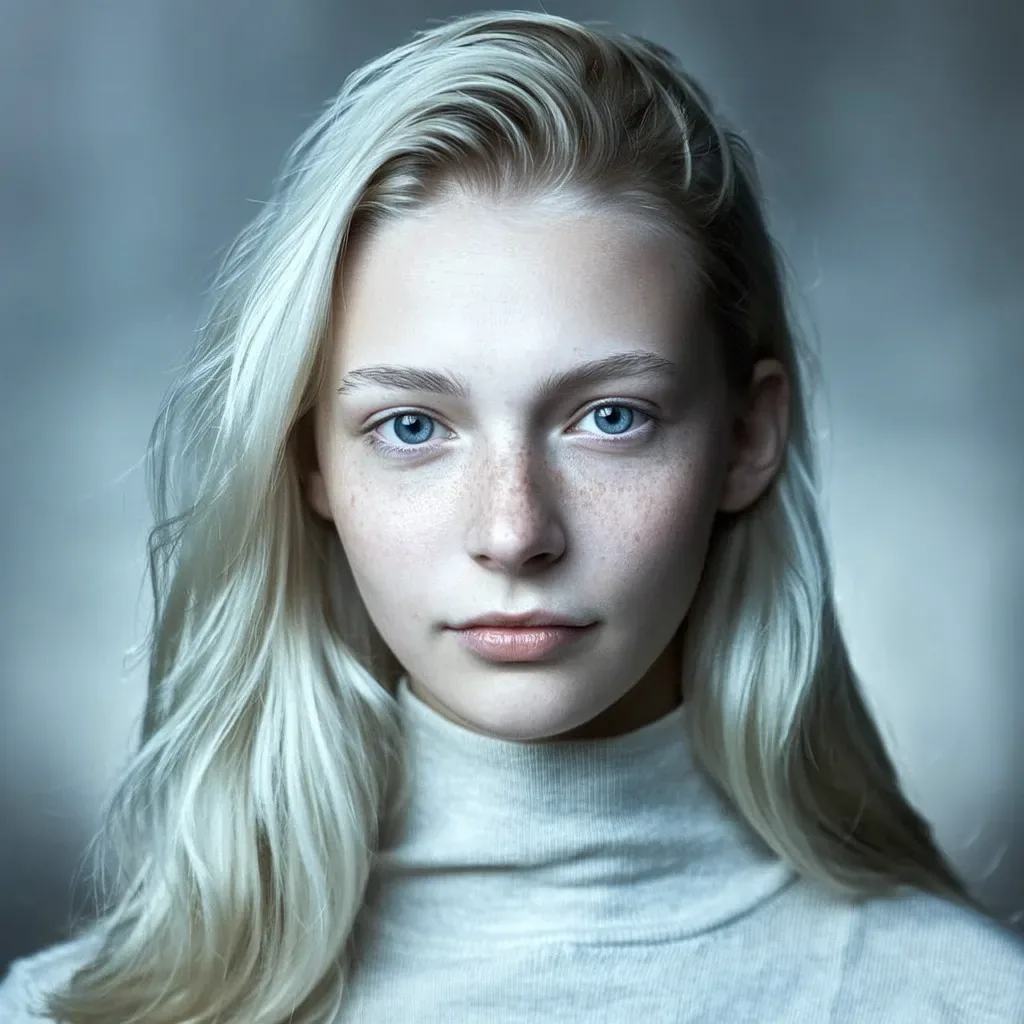
Fotografia de retratos: retrato hiper-realista de uma mulher escandinava, cabelo loiro platinado esvoaçante e olhos azuis penetrantes com sardas proeminentes, olhar intelectual aguçado, iluminação direcional nórdica em tons frios criando uma atmosfera gelada, estilo moderno e minimalista com linhas limpas, profundidade de campo rasa com fundo desfocado e gradiente frio, características faciais nórdicas autênticas e textura de pele de porcelana.
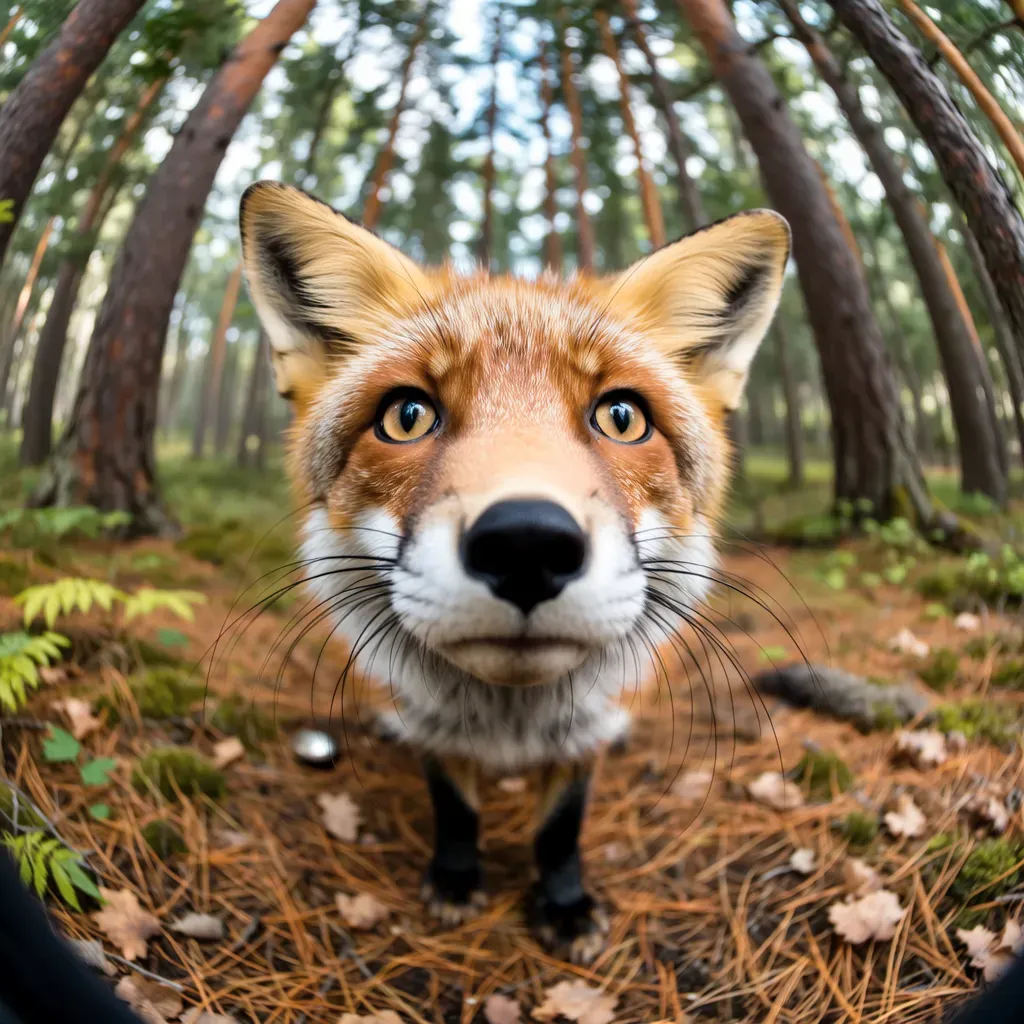
Fotografia realista: uma cena de floresta em perspectiva olho de peixe com distorção dramática de perspectiva, raposa vermelha ultradetalhada olhando para a lente com olhos âmbar penetrantes, textura de pelo hiper-realista mostrando pêlos protetores individuais e camadas de subpêlo, árvores radialmente deformadas formando padrões de fundo circulares, estilo de pintura em aquarela com lavagens translúcidas e sangramento de pigmento orgânico, paleta pastel suave de tons de verde musgo e ocre terra, iluminação pictórica com brilho atmosférico através das aberturas da copa
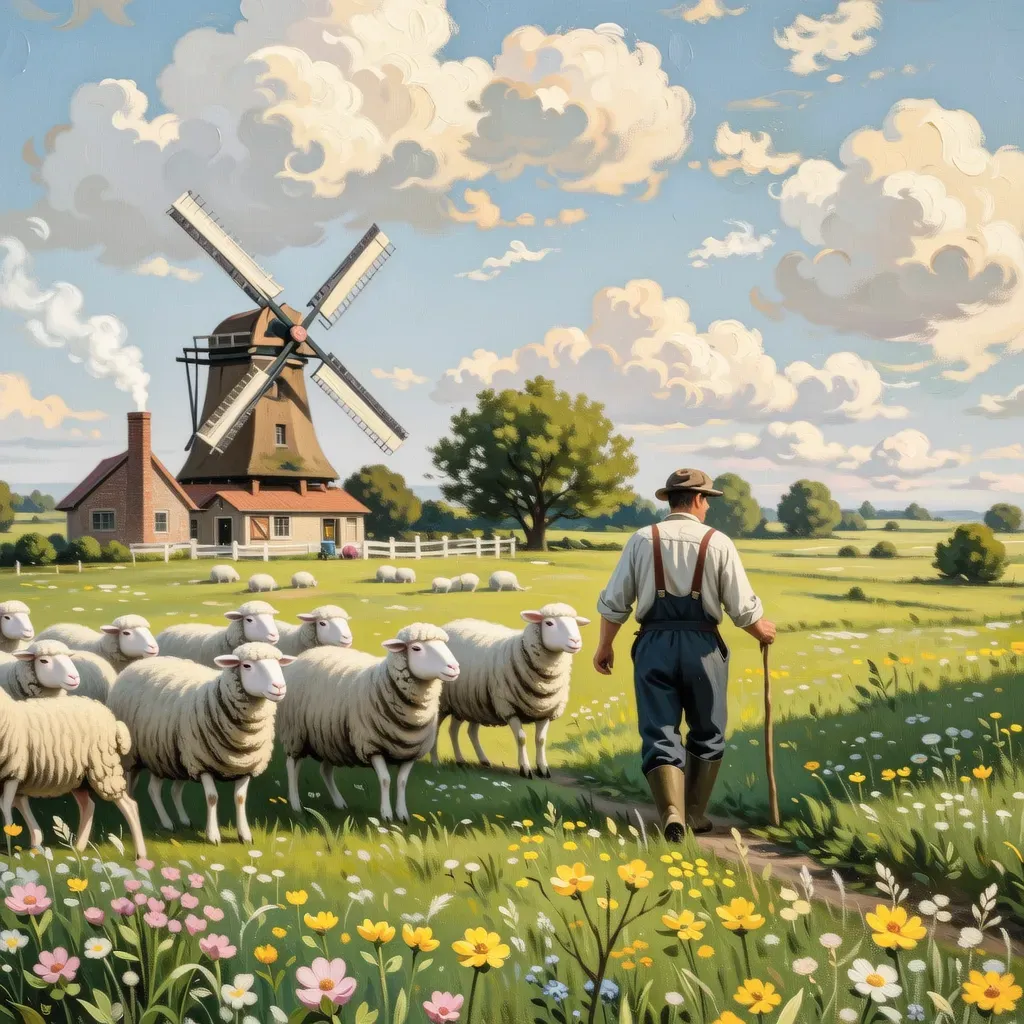
Estilos de pintura: Cena pastoral em estilo de pintura a óleo vintage, um fazendeiro pastoreando ovelhas em um prado cheio de flores silvestres, um moinho de vento ao longe girando sob o céu azul e nuvens brancas, fumaça saindo da chaminé de uma casa de madeira, cores brilhantes e suaves, cheias de tranquilidade e conforto.
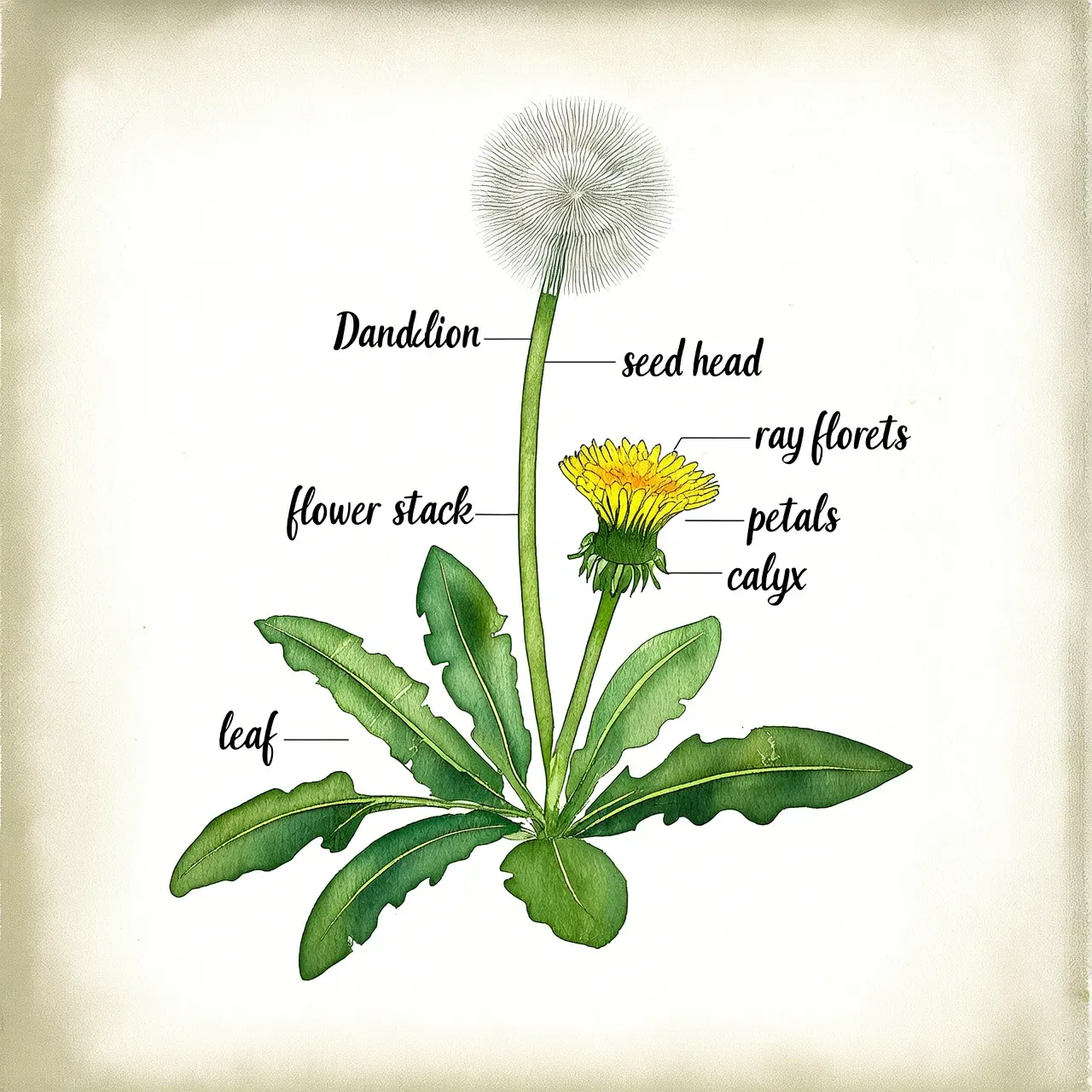
Geração de texto: uma página de um livro de ilustração botânica, estilo aquarela desenhada à mão, representando um "dente-de-leão" e rotulando suas diversas partes.
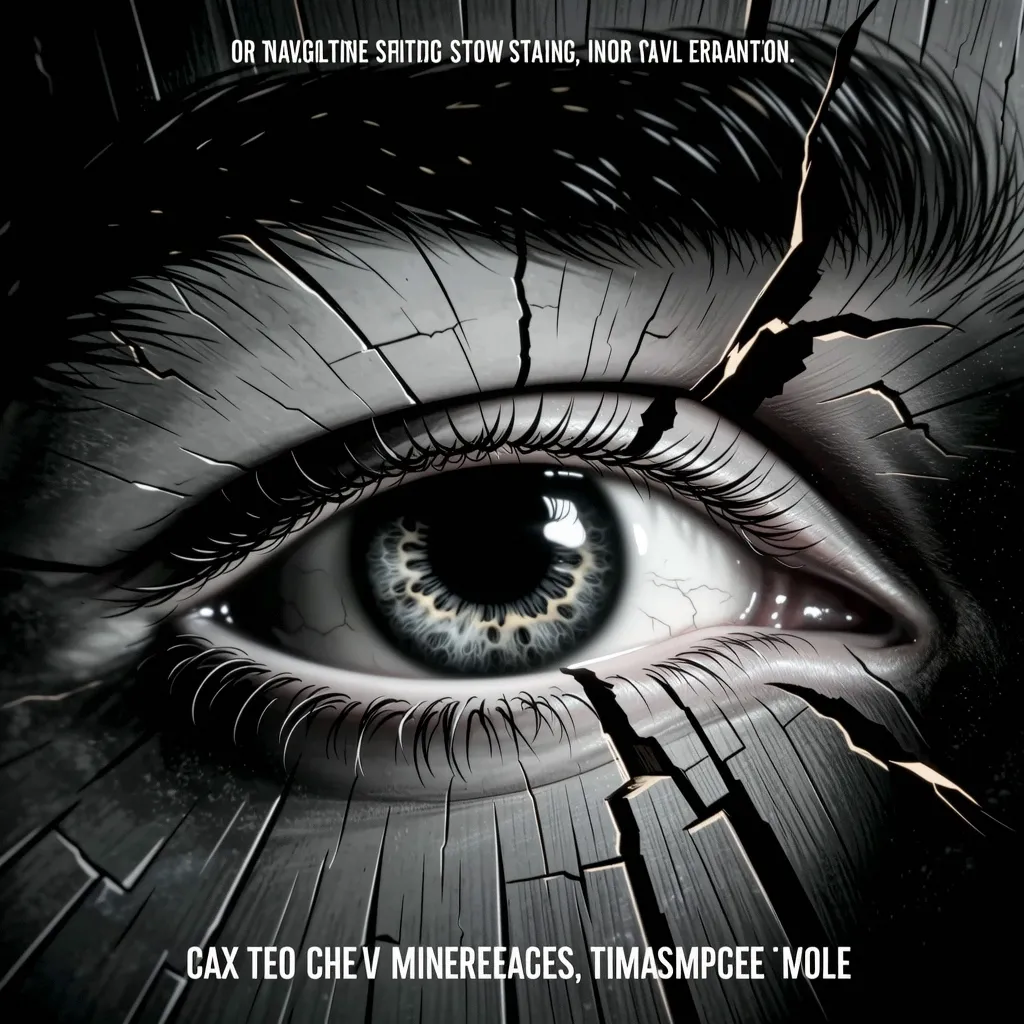
Design de pôster: Cena de pôster cinematográfico: Close macro extremo do olho em uma fenda de madeira. Monocromático minimalista, fusão aquarela-CGI, baixa saturação. Push-in lento com tremor para uma intensidade surreal. Vasto espaço negativo, título oculto. Otimizado para geração de vídeo envolvente.
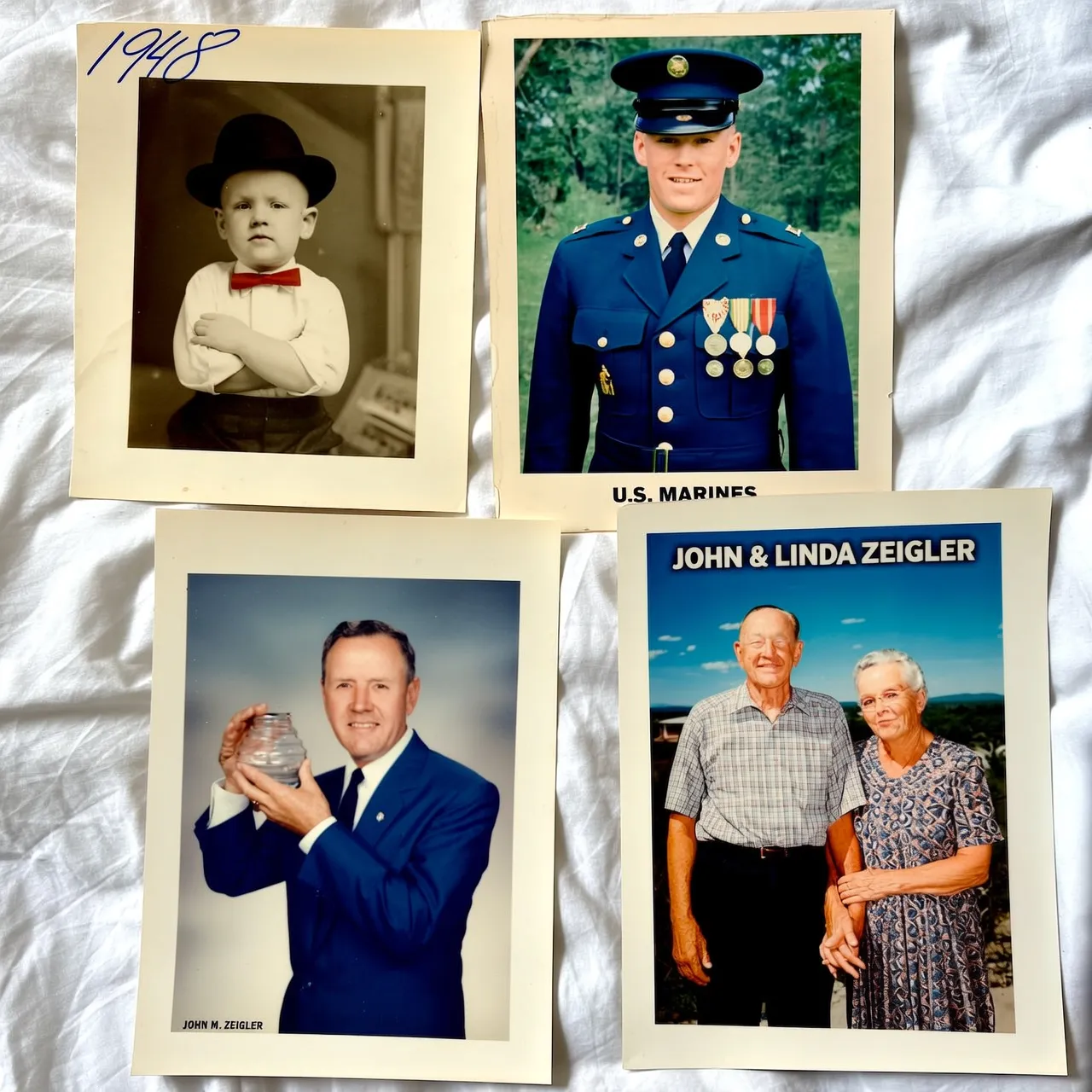
Geração de conjunto de imagens: Memórias da vida de um velho, quatro retratos em molduras diferentes, retratando sua infância (foto em preto e branco), juventude (foto de uniforme militar), meia-idade (foto de trabalho de terno) e velhice (foto com sua esposa).
Disponibilidade do modelo
Para detalhes e preços do modelo, consulte Modelos de imagem.
Primeiros passos
Pré-requisitos
Obtenha uma chave de API e exporte-o como uma variável de ambiente. Para usar o SDK, instale-o.
A versão do SDK 1.25.15+ (Python) ou 2.22.13+ (Java) é necessária.
Exemplo de código
Todos Wan modelos suportam chamadas assíncronas. wan2.7-image-pro, wan2.7-image, wan2.6-imagee wan2.6-t2i também oferece suporte a chamadas síncronas. Todos Qwen-Image modelos suportam chamadas síncronas e qwen-image-3.0 série e qwen-image-2.1-pro também oferece suporte a chamadas assíncronas.
Synchronous (Qwen-Image)
**Solicitar exemplo**


  ```python Python
  import json
  import os
  import dashscope
  from dashscope import MultiModalConversation

  dashscope.base_http_api_url = 'https://maas.qwencloudapi.com/api/v1'

  messages = [
    {
      "role": "user",
      "content": [
        {"text": "A vertical outdoor portrait photograph carrying the warm atmosphere of a late-afternoon street scene from top to bottom. The upper left and top of the frame are largely covered by dark green vines and small orange flowers cascading naturally from the building cornice; sunlit leaves catch yellow-green highlights while shaded ones deepen to dark green, forming a dense yet soft background layering. Across the upper-left to upper-centre area is a dark blue horizontal sign, its surface dim with a slightly matte texture, bearing the large white blackletter words Il Messaggero. The text sits slightly above centre on the left, partly veiled by the foreground foliage, set in a high-contrast typeface with decorative sharp terminals and pronounced stroke variation. Beneath the sign is the glass display window of a newsstand, its black metal framing dividing the case into multiple rectangular sections filled with newspapers, magazines and book covers, most of them illegible from the shallow depth of field and light reflections, creating a background texture of pale paper interlaced with dark frames. The upper right is a zone of strong backlight, sunlight pouring in from the end of the street, background buildings blurred into soft beige-grey planes with a pronounced shallow depth of field. Right of centre stands a young adult woman shown from above the knee up, glancing back at the camera with a smile, body turned slightly right, shoulders and back toward the viewer, her posture natural and relaxed. Her long, thick black wavy hair is traced with a golden rim light from the backlight, the ends fanning outward on the right, light and airy. Her skin is fair, her face a soft oval, brows finely shaped, eyes bright with sheer eye makeup and distinct lashes, natural highlights across her face, lips a soft coral red, smiling to show her teeth, expression warm and open. She wears small earrings and a black spaghetti-strap backless dress in deep black with a clean silhouette, the thin straps extending from shoulder to back, the line of her back clearly defined. From the lower left to the centre of the frame she holds a large bouquet of roses in both arms, mostly orange, apricot, pink and pale peach, petals curling in layers with sunlit edges, green leaves and long stems trailing from beneath, a vivid colour contrast against the black dress. The right background is a sunlit city street, its ground in warm grey and golden tones; distant buildings, street fixtures and a blurred red circular traffic sign sit in the lower-right distance, reduced by the out-of-focus falloff to colour blocks and outlines. The whole photograph carries a warm filmic treatment with fine grain, soft contrast and pronounced backlit edge light; the subject is the visual focus, while the newsstand, flowering vines, street and sunlight together create a romantic, bright, urban-stroll atmosphere."}
      ]
    }
  ]

  # If you haven't set the environment variable, replace the line below with: api_key="sk-xxx"
  api_key = os.getenv("DASHSCOPE_API_KEY")

  response = MultiModalConversation.call(
    api_key=api_key,
    model="qwen-image-3.0-pro",
    messages=messages,
    result_format='message',
    stream=False,
    watermark=False,
    prompt_extend=True,
    negative_prompt="Low resolution, low quality, distorted limbs, malformed fingers, oversaturated colors, wax-figure appearance, lack of facial detail, excessive smoothness, AI-looking artifacts, chaotic composition, blurry or warped text.",
    size='2048*2048'
  )

  if response.status_code == 200:
    print(json.dumps(response, ensure_ascii=False))
  else:
    print(f"HTTP status code: {response.status_code}")
    print(f"Error code: {response.code}")
    print(f"Error message: {response.message}")
  ```

  ```java Java
  import com.alibaba.dashscope.aigc.multimodalconversation.MultiModalConversation;
  import com.alibaba.dashscope.aigc.multimodalconversation.MultiModalConversationParam;
  import com.alibaba.dashscope.aigc.multimodalconversation.MultiModalConversationResult;
  import com.alibaba.dashscope.common.MultiModalMessage;
  import com.alibaba.dashscope.common.Role;
  import com.alibaba.dashscope.exception.ApiException;
  import com.alibaba.dashscope.exception.NoApiKeyException;
  import com.alibaba.dashscope.exception.UploadFileException;
  import com.alibaba.dashscope.utils.JsonUtils;
  import com.alibaba.dashscope.utils.Constants;

  import java.io.IOException;
  import java.util.Arrays;
  import java.util.Collections;
  import java.util.HashMap;
  import java.util.Map;

  public class QwenImage {

    static {
      Constants.baseHttpApiUrl = "https://maas.qwencloudapi.com/api/v1";
    }

    // If you haven't set the environment variable, replace the line below with: static String apiKey="sk-xxx"
    static String apiKey = System.getenv("DASHSCOPE_API_KEY");

    public static void call() throws ApiException, NoApiKeyException, UploadFileException, IOException {

      MultiModalConversation conv = new MultiModalConversation();

      MultiModalMessage userMessage = MultiModalMessage.builder().role(Role.USER.getValue())
          .content(Arrays.asList(
              Collections.singletonMap("text", "A vertical outdoor portrait photograph carrying the warm atmosphere of a late-afternoon street scene from top to bottom. The upper left and top of the frame are largely covered by dark green vines and small orange flowers cascading naturally from the building cornice; sunlit leaves catch yellow-green highlights while shaded ones deepen to dark green, forming a dense yet soft background layering. Across the upper-left to upper-centre area is a dark blue horizontal sign, its surface dim with a slightly matte texture, bearing the large white blackletter words Il Messaggero. The text sits slightly above centre on the left, partly veiled by the foreground foliage, set in a high-contrast typeface with decorative sharp terminals and pronounced stroke variation. Beneath the sign is the glass display window of a newsstand, its black metal framing dividing the case into multiple rectangular sections filled with newspapers, magazines and book covers, most of them illegible from the shallow depth of field and light reflections, creating a background texture of pale paper interlaced with dark frames. The upper right is a zone of strong backlight, sunlight pouring in from the end of the street, background buildings blurred into soft beige-grey planes with a pronounced shallow depth of field. Right of centre stands a young adult woman shown from above the knee up, glancing back at the camera with a smile, body turned slightly right, shoulders and back toward the viewer, her posture natural and relaxed. Her long, thick black wavy hair is traced with a golden rim light from the backlight, the ends fanning outward on the right, light and airy. Her skin is fair, her face a soft oval, brows finely shaped, eyes bright with sheer eye makeup and distinct lashes, natural highlights across her face, lips a soft coral red, smiling to show her teeth, expression warm and open. She wears small earrings and a black spaghetti-strap backless dress in deep black with a clean silhouette, the thin straps extending from shoulder to back, the line of her back clearly defined. From the lower left to the centre of the frame she holds a large bouquet of roses in both arms, mostly orange, apricot, pink and pale peach, petals curling in layers with sunlit edges, green leaves and long stems trailing from beneath, a vivid colour contrast against the black dress. The right background is a sunlit city street, its ground in warm grey and golden tones; distant buildings, street fixtures and a blurred red circular traffic sign sit in the lower-right distance, reduced by the out-of-focus falloff to colour blocks and outlines. The whole photograph carries a warm filmic treatment with fine grain, soft contrast and pronounced backlit edge light; the subject is the visual focus, while the newsstand, flowering vines, street and sunlight together create a romantic, bright, urban-stroll atmosphere.")
          )).build();

      Map<String, Object> parameters = new HashMap<>();
      parameters.put("watermark", false);
      parameters.put("prompt_extend", true);
      parameters.put("negative_prompt", "Low resolution, low quality, distorted limbs, malformed fingers, oversaturated colors, wax-figure appearance, lack of facial detail, excessive smoothness, AI-looking artifacts, chaotic composition, blurry or warped text.");
      parameters.put("size", "2048*2048");

      MultiModalConversationParam param = MultiModalConversationParam.builder()
          .apiKey(apiKey)
          .model("qwen-image-3.0-pro")
          .messages(Collections.singletonList(userMessage))
          .parameters(parameters)
          .build();

      MultiModalConversationResult result = conv.call(param);
      System.out.println(JsonUtils.toJson(result));
    }

    public static void main(String[] args) {
      try {
        call();
      } catch (ApiException | NoApiKeyException | UploadFileException | IOException e) {
        System.out.println(e.getMessage());
      }
      System.exit(0);
    }
  }
  ```

  ```bash curl
  curl --location 'https://maas.qwencloudapi.com/api/v1/services/aigc/multimodal-generation/generation' \
  --header 'Content-Type: application/json' \
  --header "Authorization: Bearer $DASHSCOPE_API_KEY" \
  --data '{
    "model": "qwen-image-3.0-pro",
    "input": {
          "messages": [
      {
              "role": "user",
              "content": [
        {
                  "text": "A vertical outdoor portrait photograph carrying the warm atmosphere of a late-afternoon street scene from top to bottom. The upper left and top of the frame are largely covered by dark green vines and small orange flowers cascading naturally from the building cornice; sunlit leaves catch yellow-green highlights while shaded ones deepen to dark green, forming a dense yet soft background layering. Across the upper-left to upper-centre area is a dark blue horizontal sign, its surface dim with a slightly matte texture, bearing the large white blackletter words Il Messaggero. The text sits slightly above centre on the left, partly veiled by the foreground foliage, set in a high-contrast typeface with decorative sharp terminals and pronounced stroke variation. Beneath the sign is the glass display window of a newsstand, its black metal framing dividing the case into multiple rectangular sections filled with newspapers, magazines and book covers, most of them illegible from the shallow depth of field and light reflections, creating a background texture of pale paper interlaced with dark frames. The upper right is a zone of strong backlight, sunlight pouring in from the end of the street, background buildings blurred into soft beige-grey planes with a pronounced shallow depth of field. Right of centre stands a young adult woman shown from above the knee up, glancing back at the camera with a smile, body turned slightly right, shoulders and back toward the viewer, her posture natural and relaxed. Her long, thick black wavy hair is traced with a golden rim light from the backlight, the ends fanning outward on the right, light and airy. Her skin is fair, her face a soft oval, brows finely shaped, eyes bright with sheer eye makeup and distinct lashes, natural highlights across her face, lips a soft coral red, smiling to show her teeth, expression warm and open. She wears small earrings and a black spaghetti-strap backless dress in deep black with a clean silhouette, the thin straps extending from shoulder to back, the line of her back clearly defined. From the lower left to the centre of the frame she holds a large bouquet of roses in both arms, mostly orange, apricot, pink and pale peach, petals curling in layers with sunlit edges, green leaves and long stems trailing from beneath, a vivid colour contrast against the black dress. The right background is a sunlit city street, its ground in warm grey and golden tones; distant buildings, street fixtures and a blurred red circular traffic sign sit in the lower-right distance, reduced by the out-of-focus falloff to colour blocks and outlines. The whole photograph carries a warm filmic treatment with fine grain, soft contrast and pronounced backlit edge light; the subject is the visual focus, while the newsstand, flowering vines, street and sunlight together create a romantic, bright, urban-stroll atmosphere."
        }
              ]
      }
          ]
    },
    "parameters": {
          "negative_prompt": "Low resolution, low quality, distorted limbs, malformed fingers, oversaturated colors, wax-figure appearance, lack of facial detail, excessive smoothness, AI-looking artifacts, chaotic composition, blurry or warped text.",
          "prompt_extend": true,
          "watermark": false,
          "size": "2048*2048"
    }
  }'
  ```


**Exemplo de resposta**
Resposta completa do JSON
  ```json
  {
    "status_code": 200,
    "request_id": "d2d1a8c0-325f-9b9d-8b90-xxxxxx",
    "code": "",
    "message": "",
    "output": {
      "text": null,
      "finish_reason": null,
      "choices": [
        {
          "finish_reason": "stop",
          "message": {
            "role": "assistant",
            "content": [
              {
                "image": "https://dashscope-result-intl.oss-cn-shanghai.aliyuncs.com/xxx.png?Expires=xxx"
              }
            ]
          }
        }
      ]
    },
    "usage": {
      "output_height": 2048,
      "output_width": 2048,
      "input_image_count": 0,
      "input_image_type": "qima_input_2k",
      "output_image_count": 1,
      "output_image_type": "qima_output_2k"
    }
  }
  ```
Asynchronous (Wan)
**Solicitar exemplo**


  Com curl, envie uma tarefa (POST) primeiro e depois consulte o resultado (GET) usando o retornado `task_id`. O `task_id` é válido por 24 horas.


  ```python Python
  import os
  import dashscope
  from dashscope.aigc.image_generation import ImageGeneration
  from dashscope.api_entities.dashscope_response import Message

  dashscope.base_http_api_url = 'https://maas.qwencloudapi.com/api/v1'

  # If you have not configured the environment variable, replace the following line with your API key: api_key="sk-xxx"
  api_key = os.getenv("DASHSCOPE_API_KEY")

  def main():
    message = Message(
      role="user",
      content=[
        {
          "text": "A young woman taking a casual selfie outdoors, natural lighting, warm tones, soft bokeh background with greenery"
        }
      ]
    )

    # Submit async task
    print("Submitting async task...")
    response = ImageGeneration.async_call(
      model="wan2.7-image-pro",
      api_key=api_key,
      messages=[message],
      enable_sequential=False,
      n=1,
      size="2K"
    )

    if response.status_code == 200:
      print(f"Task submitted, task ID: {response.output.task_id}")

      # Wait for task completion
      status = ImageGeneration.wait(task=response, api_key=api_key)

      if status.output.task_status == "SUCCEEDED":
        print("Task completed!")
        print(status)
      else:
        print(f"Task failed, status: {status.output.task_status}")
    else:
      print(f"Task creation failed: {response.code} - {response.message}")

  if __name__ == "__main__":
    try:
      main()
    except Exception as e:
      print(f"Error: {e}")
  ```

  ```java Java
  import com.alibaba.dashscope.aigc.imagegeneration.*;
  import com.alibaba.dashscope.exception.ApiException;
  import com.alibaba.dashscope.exception.NoApiKeyException;
  import com.alibaba.dashscope.exception.UploadFileException;
  import com.alibaba.dashscope.utils.Constants;
  import com.alibaba.dashscope.utils.JsonUtils;

  import java.util.Collections;

  public class Main {

    static {
      Constants.baseHttpApiUrl = "https://maas.qwencloudapi.com/api/v1";
    }

    // If you have not configured the environment variable, replace the following line with your API key: apiKey="sk-xxx"
    static String apiKey = System.getenv("DASHSCOPE_API_KEY");

    public static ImageGenerationResult waitTask(String taskId)
        throws ApiException, NoApiKeyException {
      ImageGeneration imageGeneration = new ImageGeneration();
      return imageGeneration.wait(taskId, apiKey);
    }

    public static void asyncCall() throws ApiException, NoApiKeyException, UploadFileException {
      ImageGenerationMessage message = ImageGenerationMessage.builder()
          .role("user")
          .content(Collections.singletonList(
              Collections.singletonMap("text", "A young woman taking a casual selfie outdoors, natural lighting, warm tones, soft bokeh background with greenery")
          )).build();

      ImageGenerationParam param = ImageGenerationParam.builder()
          .apiKey(apiKey)
          .model("wan2.7-image-pro")
          .messages(Collections.singletonList(message))
          .enableSequential(false)
          .n(1)
          .size("2K")
          .build();

      ImageGeneration imageGeneration = new ImageGeneration();
      ImageGenerationResult taskResult = null;
      try {
        System.out.println("---- Submitting async task ----");
        taskResult = imageGeneration.asyncCall(param);
      } catch (ApiException | NoApiKeyException | UploadFileException e) {
        throw new RuntimeException(e.getMessage());
      }
      System.out.println("Task created: " + JsonUtils.toJson(taskResult));

      // Wait for task completion
      String taskId = taskResult.getOutput().getTaskId();
      ImageGenerationResult result = waitTask(taskId);
      System.out.println(JsonUtils.toJson(result));
    }

    public static void main(String[] args) {
      try {
        asyncCall();
      } catch (ApiException | NoApiKeyException | UploadFileException e) {
        System.out.println(e.getMessage());
      }
    }
  }
  ```

  ```bash curl (Step 1: Submit task)
  curl --location 'https://maas.qwencloudapi.com/api/v1/services/aigc/image-generation/generation' \
  --header 'Content-Type: application/json' \
  --header "Authorization: Bearer $DASHSCOPE_API_KEY" \
  --header 'X-DashScope-Async: enable' \
  --data '{
    "model": "wan2.7-image-pro",
    "input": {
      "messages": [
        {
          "role": "user",
          "content": [
            {
              "text": "A young woman taking a casual selfie outdoors, natural lighting, warm tones, soft bokeh background with greenery"
            }
          ]
        }
      ]
    },
    "parameters": {
      "size": "2K",
      "n": 1,
      "watermark": false,
      "thinking_mode": true
    }
  }'
  ```

  ```bash curl (Step 2: Query result)
  curl -X GET https://maas.qwencloudapi.com/api/v1/tasks/{task_id} \
  --header "Authorization: Bearer $DASHSCOPE_API_KEY"
  ```


**Criar resposta de tarefa**
Resposta completa do JSON
  ```json
  {
    "output": {
      "task_status": "PENDING",
      "task_id": "0385dc79-5ff8-4d82-bcb6-xxxxxx"
    },
    "request_id": "4909100c-7b5a-9f92-bfe5-xxxxxx"
  }
  ```


**Resposta do resultado da consulta**
Resposta completa do JSON
  ```json
  {
    "status_code": 200,
    "request_id": "56e318fd-ed60-99e8-8ca1-cdef25ca4xxx",
    "code": "",
    "message": "",
    "output": {
      "text": null,
      "finish_reason": null,
      "choices": [
        {
          "finish_reason": "stop",
          "message": {
            "role": "assistant",
            "content": [
              {
                "image": "https://dashscope-result-intl.oss-cn-shanghai.aliyuncs.com/xxxxxx.png?Expires=xxxxxx",
                "type": "image"
              }
            ]
          }
        }
      ],
      "audio": null,
      "task_id": "77093787-a217-4c29-9cd4-ca7b5ac86xxx",
      "task_status": "SUCCEEDED",
      "submit_time": "2026-03-31 23:04:46.166",
      "scheduled_time": "2026-03-31 23:04:46.208",
      "end_time": "2026-03-31 23:05:11.664",
      "finished": true
    },
    "usage": {
      "input_tokens": 720,
      "output_tokens": 11,
      "characters": 0,
      "size": "2048*2048",
      "total_tokens": 731,
      "image_count": 1
    }
  }
  ```
Principais recursos
Instrução a seguir
Parâmetros:
-
Prompt (obrigatório): Descreve o conteúdo, estilo e composição desejados. Passe o prompt no seguinte formato:
- Qwen-Image, Wan 2.7, e
wan2.6-t2i: Usarinput.messages[].content[].text. Veja o código de exemplo na guia correspondente em Código de exemplo. - Wan 2.5 e anteriores: Use
input.prompt.
- Qwen-Image, Wan 2.7, e
-
negative_prompt (opcional): Descreve elementos a serem excluídos da imagem, como "embaçado" ou "dedos extras". Definir via
parameters.negative_prompt. Compatível com todos os modelos excetowan2.7-image-proewan2.7-image.wan2.7-image-proewan2.7-imagenão apoianegative_prompt. Use um prompt positivo para orientar a geração.
Dicas de redação: prompts estruturados tendem a produzir melhores resultados. Consulte Guia de prompt de texto para imagem.
Ativar reescrita de prompt
Parâmetro: parameters.prompt_extend (bool, padrão: true).
Expande automaticamente prompts curtos para melhorar a qualidade da imagem, adicionando 3 a 4 segundos de latência.
wan2.7-image-pro e wan2.7-image não apoia prompt_extend. Usar thinking_mode em vez disso - veja Wan 2.7 parâmetros.
Quando usar:
- Ative quando sua solicitação for simples ou ampla — isso pode melhorar significativamente a qualidade.
- Desativar (
false) quando você precisa de controle refinado, já escreveu um prompt detalhado ou é sensível à latência.
Escolha o modo de reescrita de prompt
Parâmetro: parameters.prompt_extend_mode (string, padrão: direct). Apoiado pelo qwen-image-3.0 série e qwen-image-2.1-pro apenas e entra em vigor quando prompt_extend é true.
| Valor | Descrição | Quando usar |
|---|---|---|
direct |
Aprimoramento de prompt direto (DPE). O padrão. | A maioria dos cenários |
agent |
Aprimoramento de prompt do agente (APE). Reescrita mais refinada. | Avisos muito curtos onde o modelo precisa preencher muitos detalhes |
agent é compatível apenas com conversão de texto em imagem. Passá-lo para edição de imagem retorna um erro 400.
Ative o modo de pensamento
Parâmetro: parameters.enable_thinking (booleano, padrão: true). Apoiado pelo qwen-image-3.0 série e qwen-image-2.1-pro somente para edição direta de imagem e texto para imagem — não há suporte para edição de imagem no modo de agente. Requer prompt_extend=true.
Aprimora o raciocínio do modelo para melhorar a qualidade da imagem, mas aumenta o tempo de geração.
Defina a resolução da imagem de saída
Parâmetro: parameters.size (string), no formato "width*height".
| Modelo | Formato de tamanho | Gama suportada | Padrão | Proporção |
|---|---|---|---|---|
| qwen-image-3.0 série, qwen-image-2.1-pro | Personalizado "width*height" |
512*512 – 2048*2048 | Recomendado automaticamente no prompt | 1:8 – 8:1 |
| qwen-image-2.0 série | Personalizado "width*height" |
512*512 – 2048*2048 | 2048*2048 (1:1) | — |
wan2.7-image-pro |
Abreviação ou "width*height" |
768*768 – 4096*4096 | "2K" (2048*2048) |
1:8 – 8:1 |
wan2.7-image |
Abreviação ou "width*height" |
768*768 – 2048*2048 | "2K" (2048*2048) |
1:8 – 8:1 |
wan2.6-image |
Personalizado "width*height" |
768*768 – 1280*1280 | Corresponde à entrada (≤1280*1280) | 1:4 – 4:1 |
wan2.6-t2i, wan2.5-t2i-preview |
Personalizado "width*height" |
1280*1280 – 1440*1440 | 1280*1280 | 1:4 – 4:1 |
| wan2.2 e modelos t2i anteriores | Personalizado "width*height" |
[512, 1440] por lado, ≤1440*1440 | 1024*1024 (1:1) | — |
wan2.6-image está listado aqui apenas para seu modo de geração de imagem de texto intercalado. Para edição de imagens, consulte Edição de imagens.
Tamanhos abreviados (wan2.7 apenas; não pode misturar com valores de pixel):
| Taquigrafia | Resolução | wan2.7-image-pro | wan2.7-image |
|---|---|---|---|
"1K" |
1024*1024 | Suportado | Suportado |
"2K" |
2048*2048 | Suportado (padrão) | Suportado (padrão) |
"4K" |
4096*4096 | Suportado | Não suportado |
Resoluções recomendadas por faixa de pixels:
| Proporção | 4K | 2K | 1K |
|---|---|---|---|
| 1:1 | 4096*4096 | 2048*2048 | 1280*1280 |
| 16:9 | 4096*2304 | 2688*1536 | 1696*960 |
| 9:16 | 2304*4096 | 1536*2688 | 960*1696 |
| 4:3 | 4096*3072 | 2368*1728 | 1472*1104 |
| 3:4 | 3072*4096 | 1728*2368 | 1104*1472 |
- 4K: wan2.7-image-pro apenas.
- 2K: wan2.7-image-pro, wan2.7-image, qwen-image-2.0/3.0 série, qwen-image-2.1-pro.
- 1K: Wan modelos t2i.
Defina o número de imagens
Parâmetro: parameters.n (inteiro).
| Modelo | Alcance | Padrão |
|---|---|---|
wan2.7 (enable_sequential=false) |
1–4 | 4 |
wan2.7 (enable_sequential=true) |
1–12 | 12 |
| qwen-image-2.0/3.0 série, qwen-image-2.1-pro | 1–6 | 1 |
wan2.6-image (enable_interleave=false) |
1–4 | 4 |
wan2.6-image (enable_interleave=true) |
1 apenas | 1 |
| wan2.6-t2i / wan2.5 e anteriores | 1–4 | 4 |
Custo = preço unitário x número de imagens geradas com sucesso. Definir n para 1 durante o teste.
Ao usar wan2.6-image no modo texto-imagem intercalado (enable_interleave=true), n deve ser 1. Para controlar o número máximo de imagens geradas, use parameters.max_images (intervalo: 1–5, padrão: 5). A contagem real é determinada pelo modelo e pode ser menor que o máximo especificado.
Wan 2.7 parâmetros
Os seguintes parâmetros são exclusivos para wan2.7-image-pro e wan2.7-image.
-
enable_sequential(bool, padrão:false): permite a geração de conjunto de imagens. Quandotrue, você pode gerar de 1 a 12 imagens coerentes por solicitação definindonentre 1 e 12.Quando
enable_sequentialestá definido paratrue,thinking_modeecolor_paletteestão indisponíveis. -
thinking_mode(bool, padrão:true): permite um raciocínio aprimorado para melhor compreensão imediata e qualidade de imagem. Disponível apenas quandoenable_sequentialéfalse. -
color_palette(matriz): Define um tema de cores personalizado. Especifique de 3 a 10 cores (8 recomendadas), cada uma com um valor hexadecimal e uma proporção (sequência de porcentagem). Os índices devem somar 100%. Disponível apenas quandoenable_sequentialéfalse.
Exemplo de paleta de cores
"color_palette": [
  {"hex": "#C2D1E6", "ratio": "23.51%"},
  {"hex": "#CDD8E9", "ratio": "20.13%"},
  {"hex": "#B5C8DB", "ratio": "15.88%"},
  {"hex": "#C0B5B4", "ratio": "13.27%"},
  {"hex": "#DAE0EC", "ratio": "10.11%"},
  {"hex": "#636574", "ratio": "8.93%"},
  {"hex": "#CACAD2", "ratio": "5.55%"},
  {"hex": "#CBD4E4", "ratio": "2.62%"}
]
Ao vivo
Tolerância a falhas
- Limites de taxa: A
Throttlingcódigo de erro ou HTTP 429 significa que a limitação de taxa está ativa. Consulte Limites de taxa. - Pesquisa de tarefa assíncrona: pesquise a cada 3 segundos durante os primeiros 30 segundos e, em seguida, aumente o intervalo. Defina um tempo limite final (por exemplo, 2 minutos) e trate a tarefa como falhada se ela expirar.
Prevenção de riscos
- Persistência de resultados: os URLs das imagens expiram após 24 horas. Baixe e armazene imagens em seu próprio armazenamento (por exemplo, OSS) imediatamente após a recuperação.
- Moderação de conteúdo: Todos
promptenegative_promptas entradas são moderadas. A entrada não conforme é bloqueada com umDataInspectionFailederro. - Direitos autorais e conformidade: solicitações que fazem referência a marcas registradas, imagens de celebridades ou propriedade intelectual protegida por direitos autorais podem representar riscos de violação. Você é responsável por quaisquer responsabilidades resultantes.
Referência de API
- Qwen - Síncrono
- Imagem Z
- Wan 2.7 - Geração e edição de imagens
- Wan 2.6 - Geração e edição de imagens
- Wan - texto para imagem V2
Códigos de erro
Se uma chamada falhar, consulte Mensagens de erro.