 BRASIL
Referência para vídeo
Replicar movimento e olhar
Wan-R2V aceita entrada multimodal (texto, imagem, vídeo e áudio) para gerar vídeos de desempenho. Usem prompts para moldar pessoas ou objetos como os personagens principais.
** Links rápidos**: [Referência API] (/api-reference/video-generation/wan27-reference-to-video/create-task(Guia de Prompt) (/developer-guides/accuracy-tuning/video-generation)
Começando.
Antes de começar, pegue uma chave API e a defina como uma variável de ambiente. Para usar um SDK, instale o DashScope SDK.
"O vídeo 1 entra do lado esquerdo da moldura. Então o tiro corta para um close da imagem 1. O vídeo 1 está encostado na parede enferrujada do lado direito da imagem 2. Ouvindo os passos, ela lentamente vira a cabeça. Depois de ver a imagem 1, o vídeo 1 diz: "Por que você ainda veio?" A imagem 1 responde: "Vamos conversar."
| Entrada | Tipo | Papel |
|---|---|---|
| wan-r2v-girl-en.mp4+Voz de referência | Vídeo | Vídeo 1 (caractere) |
| wan-r2v-boy-en.jpg+Voz de referência | Imagem | Imagem 1 (caractere) |
| wan-r2v-bg-en.jpg | Imagem | Imagem 2 (fundo) |
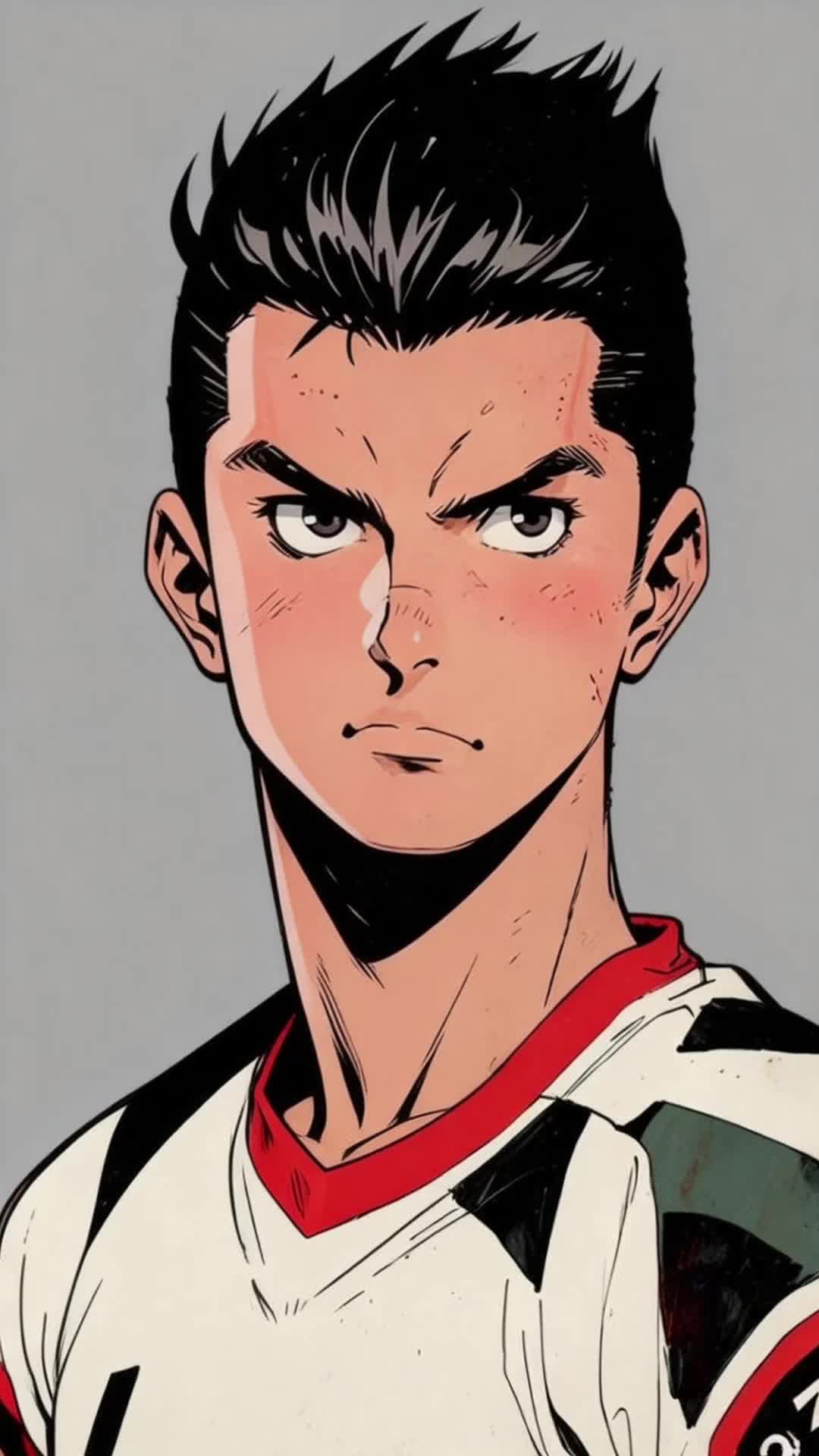
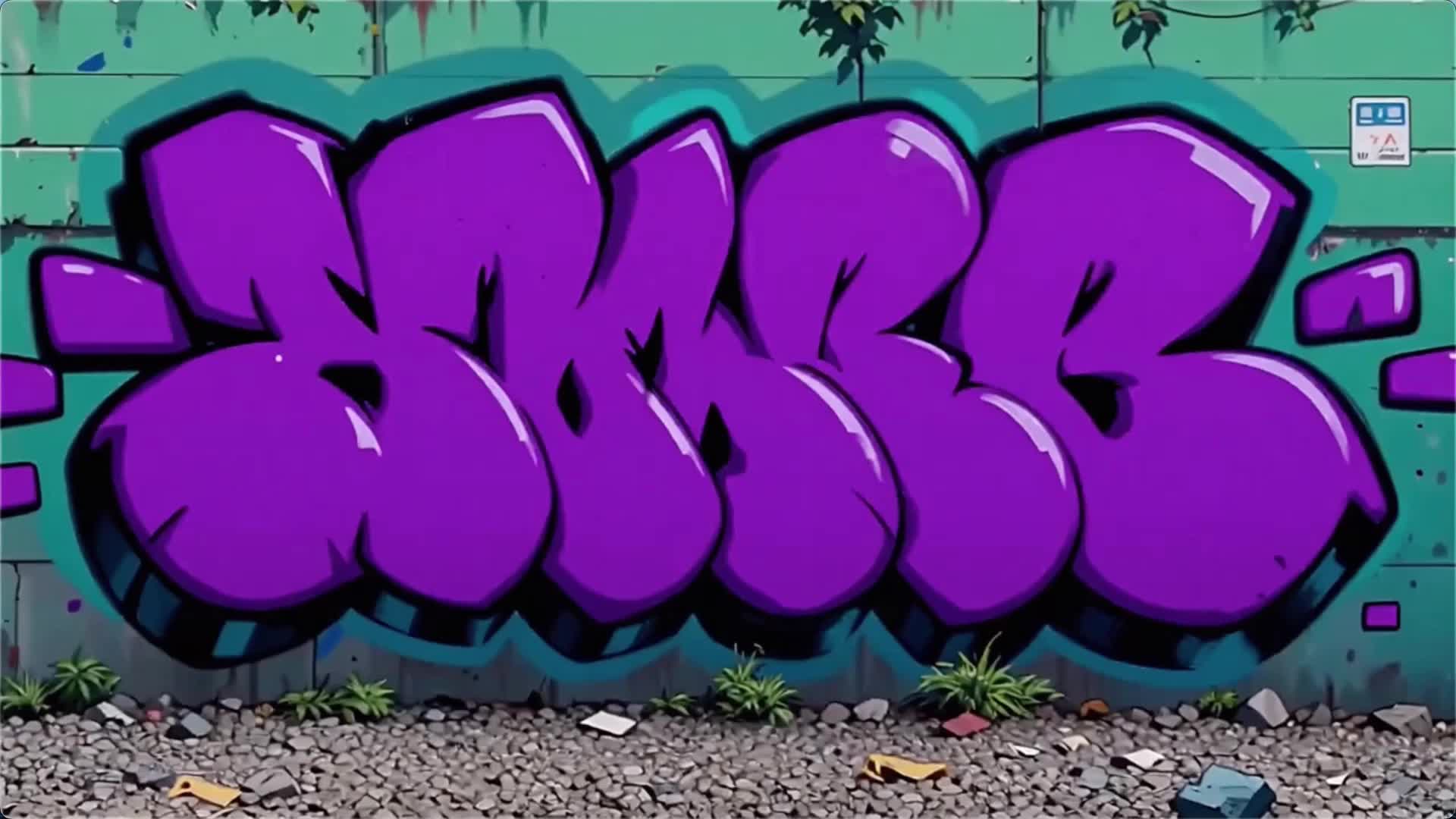
Saída: vídeo multi-shot com áudio.
Python
Certifique-se que a versão da DashScope Python SDK seja pelo menos 1.25.16.
```python
# -*- coding: utf-8 -*-
from http import HTTPStatus
from dashscope import VideoSynthesis
import dashscope
import os

# Set the base URL
dashscope.base_http_api_url = 'https://maas.qwencloudapi.com/api/v1'

# Set your API key
api_key = os.getenv("DASHSCOPE_API_KEY")

media = [
  {
    "type": "reference_video",
    "url": "https://help-static-aliyun-doc.aliyuncs.com/file-manage-files/zh-CN/20260416/pfgcuv/wan-r2v-girl-en.mp4",
    "reference_voice": "https://help-static-aliyun-doc.aliyuncs.com/file-manage-files/zh-CN/20260416/exiikq/wan-r2v-girl-demo-voice-en.mp3"
  },
  {
    "type": "reference_image",
    "url": "https://help-static-aliyun-doc.aliyuncs.com/file-manage-files/zh-CN/20260416/skhalj/wan-r2v-boy-en.jpg",
    "reference_voice": "https://help-static-aliyun-doc.aliyuncs.com/file-manage-files/zh-CN/20260416/pqxdoi/wan-r2v-boy-voice-en.mp3"
  },
  {
    "type": "reference_image",
    "url": "https://help-static-aliyun-doc.aliyuncs.com/file-manage-files/zh-CN/20260416/vyqjxd/wan-r2v-bg-en.jpg"
  }
]

print('please wait...')
rsp = VideoSynthesis.call(
  api_key=api_key,
  model="wan2.7-r2v",
  media=media,
  resolution="720P",
  ratio="16:9",
  duration=10,
  prompt_extend=False,
  watermark=True,
  prompt="Video 1 walks in from the deep left side of the frame. Then the shot cuts to a close-up of Image 1. Video 1 is leaning against the rusty wall on the right side from Image 2. Hearing the footsteps, she slowly turns her head. After seeing Image 1, Video 1 says, \"Why did you still come?\" Image 1 replies, \"Let's talk.\"",
)
print(rsp)
if rsp.status_code == HTTPStatus.OK:
  print("video_url:", rsp.output.video_url)
else:
  print('Failed, status_code: %s, code: %s, message: %s' % (rsp.status_code, rsp.code, rsp.message))
```
Java
Certifique-se de que a versão Java SDK da DashScope seja pelo menos 2.22.14.
```java
// Copyright (c) Alibaba, Inc. and its affiliates.

import com.alibaba.dashscope.aigc.videosynthesis.VideoSynthesis;
import com.alibaba.dashscope.aigc.videosynthesis.VideoSynthesisParam;
import com.alibaba.dashscope.aigc.videosynthesis.VideoSynthesisResult;
import com.alibaba.dashscope.exception.ApiException;
import com.alibaba.dashscope.exception.InputRequiredException;
import com.alibaba.dashscope.exception.NoApiKeyException;
import com.alibaba.dashscope.utils.Constants;
import com.alibaba.dashscope.utils.JsonUtils;

import java.util.ArrayList;
import java.util.List;

public class Ref2Video {

    static {
        // Set the base URL
        Constants.baseHttpApiUrl = "https://maas.qwencloudapi.com/api/v1";
    }

    // Set your API key
    static String apiKey = System.getenv("DASHSCOPE_API_KEY");

    public static void ref2video() throws ApiException, NoApiKeyException, InputRequiredException {
        VideoSynthesis vs = new VideoSynthesis();
        final String prompt = "Video 1 walks in from the deep left side of the frame. Then the shot cuts to a close-up of Image 1. Video 1 is leaning against the rusty wall on the right side from Image 2. Hearing the footsteps, she slowly turns her head. After seeing Image 1, Video 1 says, \"Why did you still come?\" Image 1 replies, \"Let's talk.\"";
        List<VideoSynthesisParam.Media> media = new ArrayList<VideoSynthesisParam.Media>(){{
            add(VideoSynthesisParam.Media.builder()
                    .url("https://help-static-aliyun-doc.aliyuncs.com/file-manage-files/zh-CN/20260416/pfgcuv/wan-r2v-girl-en.mp4")
                    .type("reference_video")
                    .referenceVoice("https://help-static-aliyun-doc.aliyuncs.com/file-manage-files/zh-CN/20260416/exiikq/wan-r2v-girl-demo-voice-en.mp3")
                    .build());
            add(VideoSynthesisParam.Media.builder()
                    .url("https://help-static-aliyun-doc.aliyuncs.com/file-manage-files/zh-CN/20260416/skhalj/wan-r2v-boy-en.jpg")
                    .type("reference_image")
                    .referenceVoice("https://help-static-aliyun-doc.aliyuncs.com/file-manage-files/zh-CN/20260416/pqxdoi/wan-r2v-boy-voice-en.mp3")
                    .build());
            add(VideoSynthesisParam.Media.builder()
                    .url("https://help-static-aliyun-doc.aliyuncs.com/file-manage-files/zh-CN/20260416/vyqjxd/wan-r2v-bg-en.jpg")
                    .type("reference_image")
                    .build());
        }};
        VideoSynthesisParam param =
                VideoSynthesisParam.builder()
                        .apiKey(apiKey)
                        .model("wan2.7-r2v")
                        .prompt(prompt)
                        .media(media)
                        .watermark(true)
                        .duration(10)
                        .resolution("720P")
                        .ratio("16:9")
                        .promptExtend(false)
                        .build();
        System.out.println("please wait...");
        VideoSynthesisResult result = vs.call(param);
        System.out.println(JsonUtils.toJson(result));
    }

    public static void main(String[] args) {
        try {
            ref2video();
        } catch (ApiException | NoApiKeyException | InputRequiredException e) {
            System.out.println(e.getMessage());
        }
        System.exit(0);
    }
}
```
curl
 Passo 1: Crie uma tarefa e obtenha a identificação da tarefa

```bash
curl --location 'https://maas.qwencloudapi.com/api/v1/services/aigc/video-generation/video-synthesis' \
    -H 'X-DashScope-Async: enable' \
    -H "Authorization: Bearer $DASHSCOPE_API_KEY" \
    -H 'Content-Type: application/json' \
    -d '{
    "model": "wan2.7-r2v",
    "input": {
        "prompt": "Video 1 walks in from the deep left side of the frame. Then the shot cuts to a close-up of Image 1. Video 1 is leaning against the rusty wall on the right side from Image 2. Hearing the footsteps, she slowly turns her head. After seeing Image 1, Video 1 says, \"Why did you still come?\" Image 1 replies, \"Let's talk.\" ",
        "media": [
            {
                "type": "reference_video",
                "url": "https://help-static-aliyun-doc.aliyuncs.com/file-manage-files/zh-CN/20260416/pfgcuv/wan-r2v-girl-en.mp4",
                "reference_voice": "https://help-static-aliyun-doc.aliyuncs.com/file-manage-files/zh-CN/20260416/exiikq/wan-r2v-girl-demo-voice-en.mp3"
            },
            {
                "type": "reference_image",
                "url": "https://help-static-aliyun-doc.aliyuncs.com/file-manage-files/zh-CN/20260416/skhalj/wan-r2v-boy-en.jpg",
                "reference_voice": "https://help-static-aliyun-doc.aliyuncs.com/file-manage-files/zh-CN/20260416/pqxdoi/wan-r2v-boy-voice-en.mp3"
            },
            {
                "type": "reference_image",
                "url": "https://help-static-aliyun-doc.aliyuncs.com/file-manage-files/zh-CN/20260416/vyqjxd/wan-r2v-bg-en.jpg"
            }
        ]
    },
    "parameters": {
        "resolution": "720P",
        "ratio": "16:9",
        "duration": 10,
        "prompt_extend": false,
        "watermark": true
    }
}'
```

 Passo 2: Recuperar o resultado usando a identificação da tarefa

 Substituir `{task_id}` com o `task_id` O valor retornado pela chamada anterior da API.

```bash
curl -X GET 'https://maas.qwencloudapi.com/api/v1/tasks/{task_id}' \
    -H "Authorization: Bearer $DASHSCOPE_API_KEY"
```
Modelos apoiados.
Veja [Modelos de geração de vídeo] (/developer-guides/getting-started/video-models) para uma lista completa de modelos disponíveis.
Capacidades essenciais (wan2.7)
Referência de uma única imagem (imagem multi-panel)
Modelos apoiados: wan2.7 series.
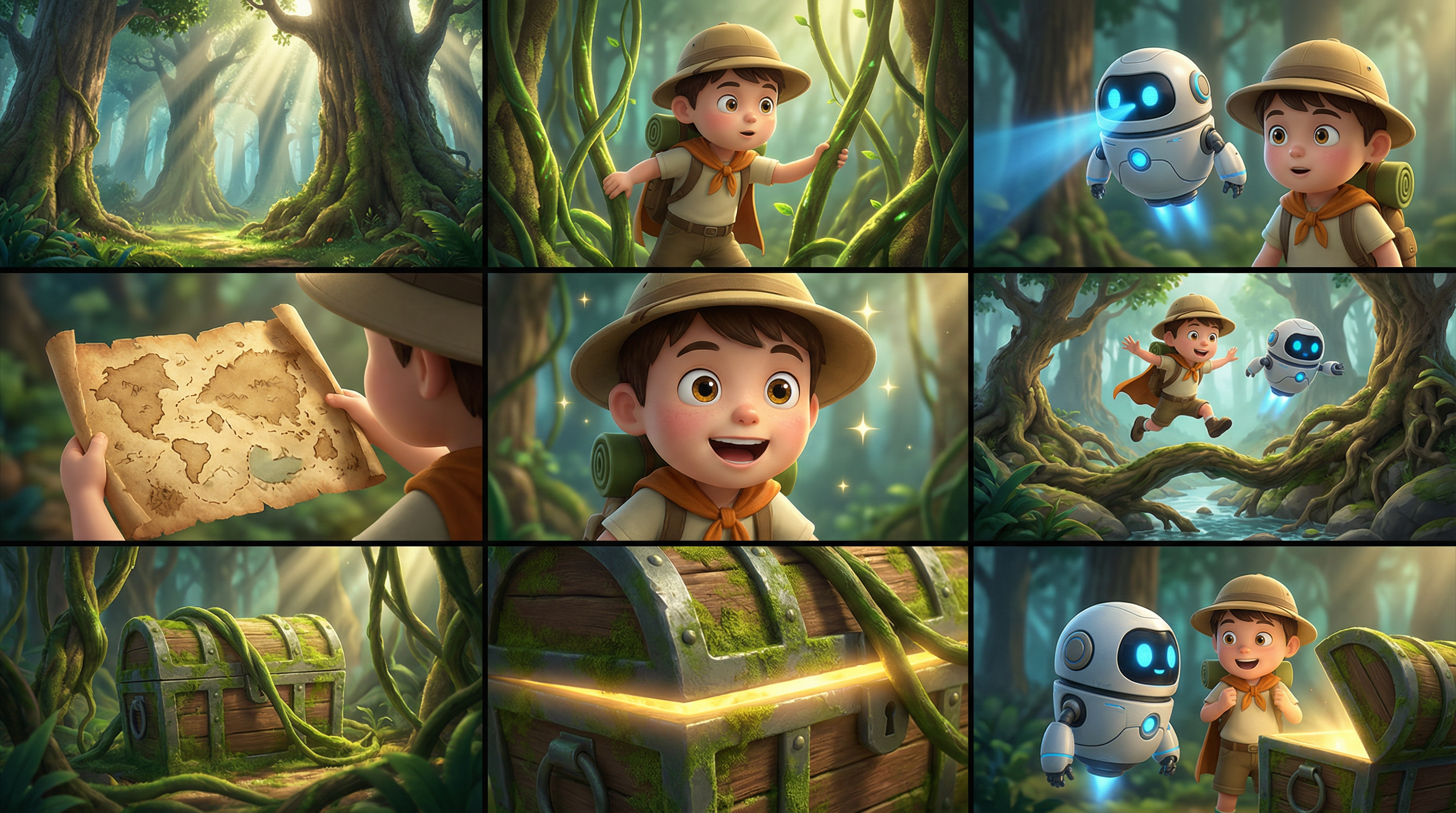
Você pode inserir uma imagem de vários painéis (placa de história). O modelo detecta automaticamente o layout de vários painéis e gera um vídeo com personagens consistentes, cenas e fotos. Você pode inserir apenas uma imagem de vários painéis de cada vez.
- Parâmetros *:
media.type- Pronto parareference_image.media.urlA URL ou string codificada pela base 64 da imagem multi-panel.promptSe você fornecer apenas uma imagem de referência ou vídeo, use "referência de imagem" ou "referência de vídeo".
*"Imagem de referência, estilo de filme de aventura de desenhos animados 3D, personagens de chibi com texturas detalhadas, ações suaves e cores vibrantes. Mantenha os personagens e a cena florestal consistentes. Não adicione texto. Atmosfera: adventuoso, leve, misterioso, caprichoso. Caracteres: explorador de meninos: chapéu redondo, mochila, capa curta. Um robô voador com um corpo redondo e olhos azuis brilhantes. Cena: Floresta de fantasia com raízes de árvores gigantes, cogumelos, videiras, uma entrada de cavernas de tesouro, e raios de sol. Quadro: 1. Árvores altas e feixes de luz entrelaçados em uma misteriosa e brilhante floresta de fantasia. 2. O garoto afasta as videiras para explorar. O robô pequeno voa ao lado dele, escaneando com uma luz azul. 4. Um mapa antigo do tesouro se desdobra nas mãos do garoto. Ele mostra uma expressão animada, seus olhos brilhando. Os dois pulam sobre as raízes das árvores e um riacho, continuando mais fundo na floresta. Um baú de tesouro coberto de musgo é revelado atrás das vinhas. Um brilho dourado brilha na borda do baú do tesouro. O garoto e o pequeno robô estão diante do baú do tesouro, olhando um para o outro em surpresa, cheio de aventura.
| Imagem de vários painéis de entrada. | Vídeo de saída |
|---|---|
 |
- O vídeo foi gerado. |
Python
Certifique-se que a versão da DashScope Python SDK seja pelo menos 1.25.16.
```python
# -*- coding: utf-8 -*-
from http import HTTPStatus
from dashscope import VideoSynthesis
import dashscope
import os

# Set the base URL
dashscope.base_http_api_url = 'https://maas.qwencloudapi.com/api/v1'

# Set your API key
api_key = os.getenv("DASHSCOPE_API_KEY")

media = [
  {
    "type": "reference_image",
    "url": "https://help-static-aliyun-doc.aliyuncs.com/file-manage-files/zh-CN/20260403/wgjaxy/banana_storyboard_00000020.png"
  }
]

def sample_sync_call():
  print('----sync call, please wait a moment----')
  rsp = VideoSynthesis.call(
    api_key=api_key,
    model="wan2.7-r2v",
    media=media,
    resolution="720P",
    ratio="16:9",
    duration=10,
    prompt_extend=False,
    watermark=True,
    prompt="Reference image, 3D cartoon adventure movie style, chibi characters with detailed textures, smooth actions, and vibrant colors. Keep the characters and forest scene consistent. Do not add text. Atmosphere: Adventurous, lighthearted, mysterious, whimsical. Characters: Boy explorer: round hat, backpack, short cloak. Sidekick: a flying small robot with a round body and blue glowing eyes. Scene: Fantasy forest with giant tree roots, mushrooms, vines, a treasure cave entrance, and sunbeams. Storyboard: 1. Wide shot: Tall trees and interlaced light beams in a mysterious and bright fantasy forest. 2. Medium shot: The boy pushes aside vines to explore. 3. Medium shot: The small robot flies beside him, scanning ahead with a blue light. 4. Close-up: An old treasure map unfolds in the boy's hands. 5. Close-up: He shows an excited expression, his eyes lighting up. 6. Action shot: The two jump over tree roots and a stream, continuing deeper into the forest. 7. Medium shot: A moss-covered treasure chest is revealed behind the vines. 8. Close-up: A golden glow shines from the edge of the treasure chest. 9. Final shot: The boy and the small robot stand before the treasure chest, looking at each other in surprise, full of adventure.",
  )
  if rsp.status_code == HTTPStatus.OK:
    print(rsp.output.video_url)
  else:
    print('Failed, status_code: %s, code: %s, message: %s' %
      (rsp.status_code, rsp.code, rsp.message))

if __name__ == '__main__':
  sample_sync_call()
```
Java
Certifique-se de que a versão Java SDK da DashScope seja pelo menos 2.22.14.
```java
// Copyright (c) Alibaba, Inc. and its affiliates.

import com.alibaba.dashscope.aigc.videosynthesis.VideoSynthesis;
import com.alibaba.dashscope.aigc.videosynthesis.VideoSynthesisParam;
import com.alibaba.dashscope.aigc.videosynthesis.VideoSynthesisResult;
import com.alibaba.dashscope.exception.ApiException;
import com.alibaba.dashscope.exception.InputRequiredException;
import com.alibaba.dashscope.exception.NoApiKeyException;
import com.alibaba.dashscope.utils.Constants;
import com.alibaba.dashscope.utils.JsonUtils;

import java.util.ArrayList;
import java.util.List;

public class Ref2Video {

    static {
        // Set the base URL
        Constants.baseHttpApiUrl = "https://maas.qwencloudapi.com/api/v1";
    }

    // Set your API key
    static String apiKey = System.getenv("DASHSCOPE_API_KEY");

    public static void syncCall() {
        VideoSynthesis videoSynthesis = new VideoSynthesis();
        final String prompt = "Reference image, 3D cartoon adventure movie style, chibi characters with detailed textures, smooth actions, and vibrant colors. Keep the characters and forest scene consistent. Do not add text. Atmosphere: Adventurous, lighthearted, mysterious, whimsical. Characters: Boy explorer: round hat, backpack, short cloak. Sidekick: a flying small robot with a round body and blue glowing eyes. Scene: Fantasy forest with giant tree roots, mushrooms, vines, a treasure cave entrance, and sunbeams. Storyboard: 1. Wide shot: Tall trees and interlaced light beams in a mysterious and bright fantasy forest. 2. Medium shot: The boy pushes aside vines to explore. 3. Medium shot: The small robot flies beside him, scanning ahead with a blue light. 4. Close-up: An old treasure map unfolds in the boy's hands. 5. Close-up: He shows an excited expression, his eyes lighting up. 6. Action shot: The two jump over tree roots and a stream, continuing deeper into the forest. 7. Medium shot: A moss-covered treasure chest is revealed behind the vines. 8. Close-up: A golden glow shines from the edge of the treasure chest. 9. Final shot: The boy and the small robot stand before the treasure chest, looking at each other in surprise, full of adventure.";
        List<VideoSynthesisParam.Media> media = new ArrayList<VideoSynthesisParam.Media>(){{
            add(VideoSynthesisParam.Media.builder()
                    .url("https://help-static-aliyun-doc.aliyuncs.com/file-manage-files/zh-CN/20260403/wgjaxy/banana_storyboard_00000020.png")
                    .type("reference_image")
                    .build());
        }};
        VideoSynthesisParam param =
                VideoSynthesisParam.builder()
                        .apiKey(apiKey)
                        .model("wan2.7-r2v")
                        .prompt(prompt)
                        .media(media)
                        .watermark(true)
                        .duration(10)
                        .resolution("720P")
                        .ratio("16:9")
                        .promptExtend(false)
                        .build();
        VideoSynthesisResult result = null;
        try {
            System.out.println("---sync call, please wait a moment----");
            result = videoSynthesis.call(param);
        } catch (ApiException | NoApiKeyException e){
            throw new RuntimeException(e.getMessage());
        } catch (InputRequiredException e) {
            throw new RuntimeException(e);
        }
        System.out.println(JsonUtils.toJson(result));
    }

    public static void main(String[] args) {
        syncCall();
    }
}
```
curl
 Passo 1: Crie uma tarefa e obtenha a identificação da tarefa

```bash
curl --location 'https://maas.qwencloudapi.com/api/v1/services/aigc/video-generation/video-synthesis' \
    -H 'X-DashScope-Async: enable' \
    -H "Authorization: Bearer $DASHSCOPE_API_KEY" \
    -H 'Content-Type: application/json' \
    -d '{
    "model": "wan2.7-r2v",
    "input": {
        "prompt": "Reference image, 3D cartoon adventure movie style, chibi characters with detailed textures, smooth actions, and vibrant colors. Keep the characters and forest scene consistent. Do not add text. Atmosphere: Adventurous, lighthearted, mysterious, whimsical. Characters: Boy explorer: round hat, backpack, short cloak. Sidekick: a flying small robot with a round body and blue glowing eyes. Scene: Fantasy forest with giant tree roots, mushrooms, vines, a treasure cave entrance, and sunbeams. Storyboard: 1. Wide shot: Tall trees and interlaced light beams in a mysterious and bright fantasy forest. 2. Medium shot: The boy pushes aside vines to explore. 3. Medium shot: The small robot flies beside him, scanning ahead with a blue light. 4. Close-up: An old treasure map unfolds in the boy'\''s hands. 5. Close-up: He shows an excited expression, his eyes lighting up. 6. Action shot: The two jump over tree roots and a stream, continuing deeper into the forest. 7. Medium shot: A moss-covered treasure chest is revealed behind the vines. 8. Close-up: A golden glow shines from the edge of the treasure chest. 9. Final shot: The boy and the small robot stand before the treasure chest, looking at each other in surprise, full of adventure.",
        "media": [
            {
                "type": "reference_image",
                "url": "https://help-static-aliyun-doc.aliyuncs.com/file-manage-files/zh-CN/20260403/wgjaxy/banana_storyboard_00000020.png"
            }
        ]
    },
    "parameters": {
        "resolution": "720P",
        "ratio": "16:9",
        "duration": 10,
        "prompt_extend": false,
        "watermark": true
    }
}'
```

 Passo 2: Recuperar o resultado usando a identificação da tarefa

 Substituir `{task_id}` com o `task_id` O valor retornado pela chamada anterior da API.

```bash
curl -X GET 'https://maas.qwencloudapi.com/api/v1/tasks/{task_id}' \
    -H "Authorization: Bearer $DASHSCOPE_API_KEY"
```
Referência de multientidade e personalização de voz
Modelos apoiados: wan2.7 series.
Você pode inserir várias imagens de referência e vídeos como materiais de entidade. Você também pode especificar uma voz única para cada entidade para permitir interação de múltiplos caracteres e diferenciação de voz.
- Parâmetros *:
-
mediaUma série de materiais de referência.-
media.type- Suporta.reference_imageereference_videoO número total de imagens e vídeos de referência não pode exceder 5**. -
media.urlA URL do material. As imagens também suportam cordas codificadas com base 64. -
media.reference_voiceO URL de áudio para especificar a voz da entidade. Use isso comreference_imageOureference_video.Se a lógica do áudio
reference_videocontém áudio ereference_voiceNão é especificado, o áudio original é usado por padrão. Se ambos forem fornecidos,reference_voiceSobrescrever o áudio original do vídeo.
-
-
promptConsulte os materiais de referência no alerta de acordo com as seguintes regras:- Use identificadores como Imagem 1, Imagem 2
reference_imageE o que é isso?reference_video-Ativos. - A ordem de referência dos materiais é definida pelo
mediaArray. Imagens e vídeos são contados separadamente.
- Use identificadores como Imagem 1, Imagem 2
"O vídeo 1 entra do lado esquerdo da moldura. Então o tiro corta para um close da imagem 1. O vídeo 1 está encostado na parede enferrujada do lado direito da imagem 2. Ouvindo os passos, ela lentamente vira a cabeça. Depois de ver a imagem 1, o vídeo 1 diz: "Por que você ainda veio?" A imagem 1 responde: "Vamos conversar."
| Entrada | Tipo | Papel |
|---|---|---|
| wan-r2v-girl-en.mp4+Voz de referência | Vídeo | Vídeo 1 (caractere) |
| wan-r2v-boy-en.jpg+Voz de referência | Imagem | Imagem 1 (caractere) |
| wan-r2v-bg-en.jpg | Imagem | Imagem 2 (fundo) |
Saída: vídeo multi-shot com áudio.
Python
Certifique-se que a versão da DashScope Python SDK seja pelo menos 1.25.16.
```python
# -*- coding: utf-8 -*-
from http import HTTPStatus
from dashscope import VideoSynthesis
import dashscope
import os

# Set the base URL
dashscope.base_http_api_url = 'https://maas.qwencloudapi.com/api/v1'

# Set your API key
api_key = os.getenv("DASHSCOPE_API_KEY")

media = [
  {
    "type": "reference_video",
    "url": "https://help-static-aliyun-doc.aliyuncs.com/file-manage-files/zh-CN/20260416/pfgcuv/wan-r2v-girl-en.mp4",
    "reference_voice": "https://help-static-aliyun-doc.aliyuncs.com/file-manage-files/zh-CN/20260416/exiikq/wan-r2v-girl-demo-voice-en.mp3"
  },
  {
    "type": "reference_image",
    "url": "https://help-static-aliyun-doc.aliyuncs.com/file-manage-files/zh-CN/20260416/skhalj/wan-r2v-boy-en.jpg",
    "reference_voice": "https://help-static-aliyun-doc.aliyuncs.com/file-manage-files/zh-CN/20260416/pqxdoi/wan-r2v-boy-voice-en.mp3"
  },
  {
    "type": "reference_image",
    "url": "https://help-static-aliyun-doc.aliyuncs.com/file-manage-files/zh-CN/20260416/vyqjxd/wan-r2v-bg-en.jpg"
  }
]

def sample_sync_call():
  print('----sync call, please wait a moment----')
  rsp = VideoSynthesis.call(
    api_key=api_key,
    model="wan2.7-r2v",
    media=media,
    resolution="720P",
    ratio="16:9",
    duration=10,
    prompt_extend=False,
    watermark=True,
    prompt="Video 1 walks in from the deep left side of the frame. Then the shot cuts to a close-up of Image 1. Video 1 is leaning against the rusty wall on the right side from Image 2. Hearing the footsteps, she slowly turns her head. After seeing Image 1, Video 1 says, \"Why did you still come?\" Image 1 replies, \"Let's talk.\"",
  )
  if rsp.status_code == HTTPStatus.OK:
    print(rsp.output.video_url)
  else:
    print('Failed, status_code: %s, code: %s, message: %s' %
      (rsp.status_code, rsp.code, rsp.message))

if __name__ == '__main__':
  sample_sync_call()
```
Java
Certifique-se de que a versão Java SDK da DashScope seja pelo menos 2.22.14.
```java
// Copyright (c) Alibaba, Inc. and its affiliates.

import com.alibaba.dashscope.aigc.videosynthesis.VideoSynthesis;
import com.alibaba.dashscope.aigc.videosynthesis.VideoSynthesisParam;
import com.alibaba.dashscope.aigc.videosynthesis.VideoSynthesisResult;
import com.alibaba.dashscope.exception.ApiException;
import com.alibaba.dashscope.exception.InputRequiredException;
import com.alibaba.dashscope.exception.NoApiKeyException;
import com.alibaba.dashscope.utils.Constants;
import com.alibaba.dashscope.utils.JsonUtils;

import java.util.ArrayList;
import java.util.List;

public class Ref2Video {

    static {
        // Set the base URL
        Constants.baseHttpApiUrl = "https://maas.qwencloudapi.com/api/v1";
    }

    // Set your API key
    static String apiKey = System.getenv("DASHSCOPE_API_KEY");

    public static void syncCall() {
        VideoSynthesis videoSynthesis = new VideoSynthesis();
        final String prompt = "Video 1 walks in from the deep left side of the frame. Then the shot cuts to a close-up of Image 1. Video 1 is leaning against the rusty wall on the right side from Image 2. Hearing the footsteps, she slowly turns her head. After seeing Image 1, Video 1 says, \"Why did you still come?\" Image 1 replies, \"Let's talk.\"";
        List<VideoSynthesisParam.Media> media = new ArrayList<VideoSynthesisParam.Media>(){{
            add(VideoSynthesisParam.Media.builder()
                    .url("https://help-static-aliyun-doc.aliyuncs.com/file-manage-files/zh-CN/20260416/pfgcuv/wan-r2v-girl-en.mp4")
                    .type("reference_video")
                    .referenceVoice("https://help-static-aliyun-doc.aliyuncs.com/file-manage-files/zh-CN/20260416/exiikq/wan-r2v-girl-demo-voice-en.mp3")
                    .build());
            add(VideoSynthesisParam.Media.builder()
                    .url("https://help-static-aliyun-doc.aliyuncs.com/file-manage-files/zh-CN/20260416/skhalj/wan-r2v-boy-en.jpg")
                    .type("reference_image")
                    .referenceVoice("https://help-static-aliyun-doc.aliyuncs.com/file-manage-files/zh-CN/20260416/pqxdoi/wan-r2v-boy-voice-en.mp3")
                    .build());
            add(VideoSynthesisParam.Media.builder()
                    .url("https://help-static-aliyun-doc.aliyuncs.com/file-manage-files/zh-CN/20260416/vyqjxd/wan-r2v-bg-en.jpg")
                    .type("reference_image")
                    .build());
        }};
        VideoSynthesisParam param =
                VideoSynthesisParam.builder()
                        .apiKey(apiKey)
                        .model("wan2.7-r2v")
                        .prompt(prompt)
                        .media(media)
                        .watermark(true)
                        .duration(10)
                        .resolution("720P")
                        .ratio("16:9")
                        .promptExtend(false)
                        .build();
        VideoSynthesisResult result = null;
        try {
            System.out.println("---sync call, please wait a moment----");
            result = videoSynthesis.call(param);
        } catch (ApiException | NoApiKeyException e){
            throw new RuntimeException(e.getMessage());
        } catch (InputRequiredException e) {
            throw new RuntimeException(e);
        }
        System.out.println(JsonUtils.toJson(result));
    }

    public static void main(String[] args) {
        syncCall();
    }
}
```
curl
 Passo 1: Crie uma tarefa e obtenha a identificação da tarefa

```bash
curl --location 'https://maas.qwencloudapi.com/api/v1/services/aigc/video-generation/video-synthesis' \
    -H 'X-DashScope-Async: enable' \
    -H "Authorization: Bearer $DASHSCOPE_API_KEY" \
    -H 'Content-Type: application/json' \
    -d '{
    "model": "wan2.7-r2v",
    "input": {
        "prompt": "Video 1 walks in from the deep left side of the frame. Then the shot cuts to a close-up of Image 1. Video 1 is leaning against the rusty wall on the right side from Image 2. Hearing the footsteps, she slowly turns her head. After seeing Image 1, Video 1 says, \"Why did you still come?\" Image 1 replies, \"Let's talk.\" ",
        "media": [
            {
                "type": "reference_video",
                "url": "https://help-static-aliyun-doc.aliyuncs.com/file-manage-files/zh-CN/20260416/pfgcuv/wan-r2v-girl-en.mp4",
                "reference_voice": "https://help-static-aliyun-doc.aliyuncs.com/file-manage-files/zh-CN/20260416/exiikq/wan-r2v-girl-demo-voice-en.mp3"
            },
            {
                "type": "reference_image",
                "url": "https://help-static-aliyun-doc.aliyuncs.com/file-manage-files/zh-CN/20260416/skhalj/wan-r2v-boy-en.jpg",
                "reference_voice": "https://help-static-aliyun-doc.aliyuncs.com/file-manage-files/zh-CN/20260416/pqxdoi/wan-r2v-boy-voice-en.mp3"
            },
            {
                "type": "reference_image",
                "url": "https://help-static-aliyun-doc.aliyuncs.com/file-manage-files/zh-CN/20260416/vyqjxd/wan-r2v-bg-en.jpg"
            }
        ]
    },
    "parameters": {
        "resolution": "720P",
        "ratio": "16:9",
        "duration": 10,
        "prompt_extend": false,
        "watermark": true
    }
}'
```

 Passo 2: Recuperar o resultado usando a identificação da tarefa

 Substituir `{task_id}` com o `task_id` O valor retornado pela chamada anterior da API.

```bash
curl -X GET 'https://maas.qwencloudapi.com/api/v1/tasks/{task_id}' \
    -H "Authorization: Bearer $DASHSCOPE_API_KEY"
```
Referência de multientidade e controle de primeira estrutura
Modelos apoiados: wan2.7 series.
Descrição: Este recurso adiciona controle de primeira estrutura ao recurso de referência da entidade, que lhe dá mais controle sobre a composição e fluxo de conteúdo do vídeo.
- Parâmetros *:
-
mediaUma série de materiais de referência.-
media.type- Suporta.first_frame,reference_image, ereference_video.Você pode fornecer um máximo de uma imagem de primeira imagem. Você deve fornecer pelo menos uma imagem de referência ou vídeo. ** O número total de imagens de referência e vídeos não pode exceder 5**.
-
media.urlA URL do material. As imagens também suportam cordas codificadas com base 64.
-
-
promptConsulte os materiais de referência no alerta de acordo com as seguintes regras:- Use "Imagem 1, Imagem 2" para se referir
reference_imageAtivos e "Vídeo 1, Vídeo 2" para se referir areference_video-Ativos. - A ordem de referência dos materiais é definida pelo
mediaArray. Imagens e vídeos são contados separadamente. - Não precisa fazer referência ao primeiro quadro no prompt.
- Use "Imagem 1, Imagem 2" para se referir
Um tiro aéreo captura um planeta azul. A câmera gradualmente se aproxima da superfície e corta para um close da imagem 1, que está segurando a imagem 2 e comendo-a enquanto diz: por que ninguém vem para sair comigo?
| Entrada | Tipo | Papel |
|---|---|---|
 |
Primeiro quadro. | Referência do primeiro quadro |
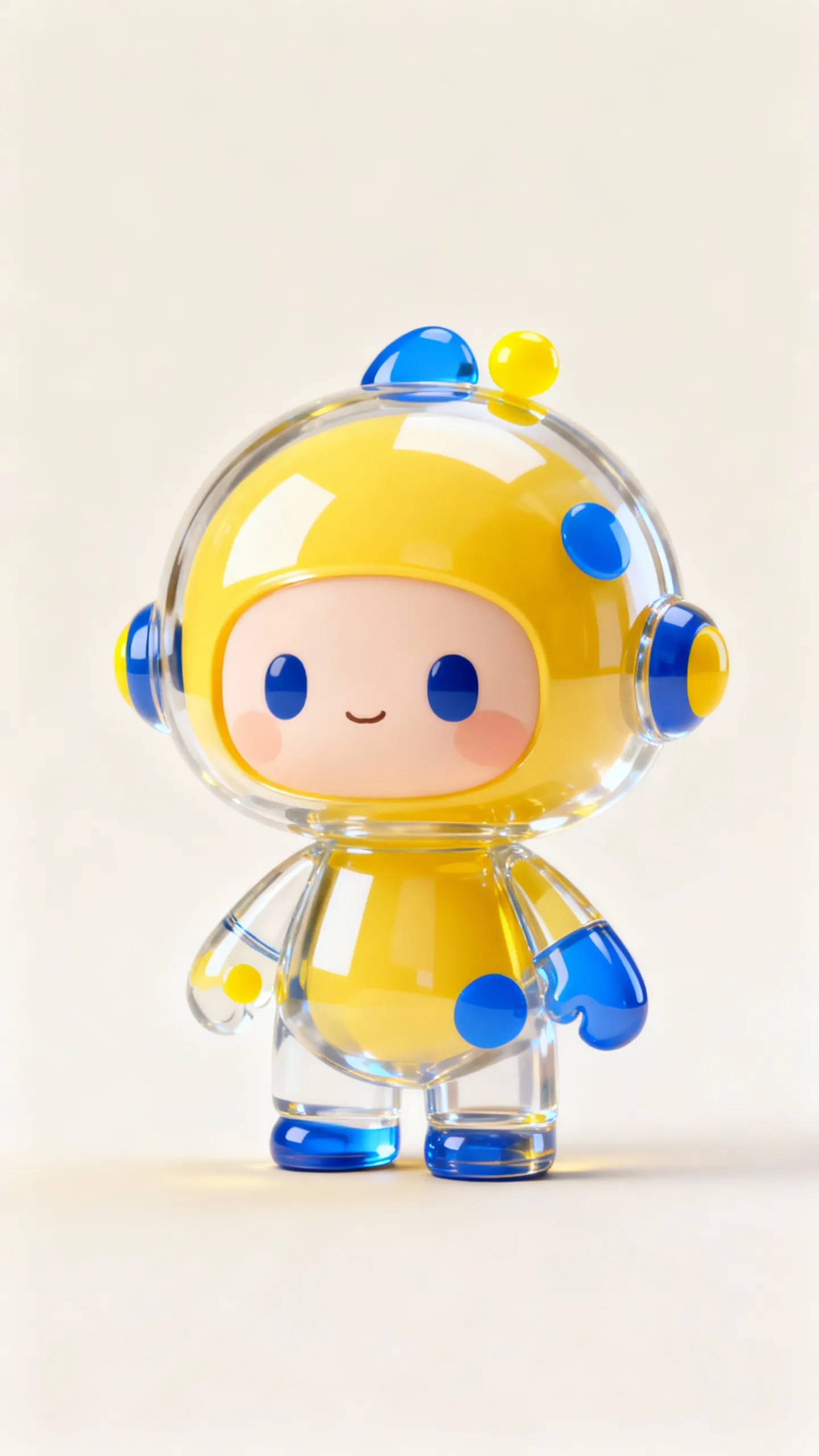 |
Imagem | Imagem 1 (entidade) |
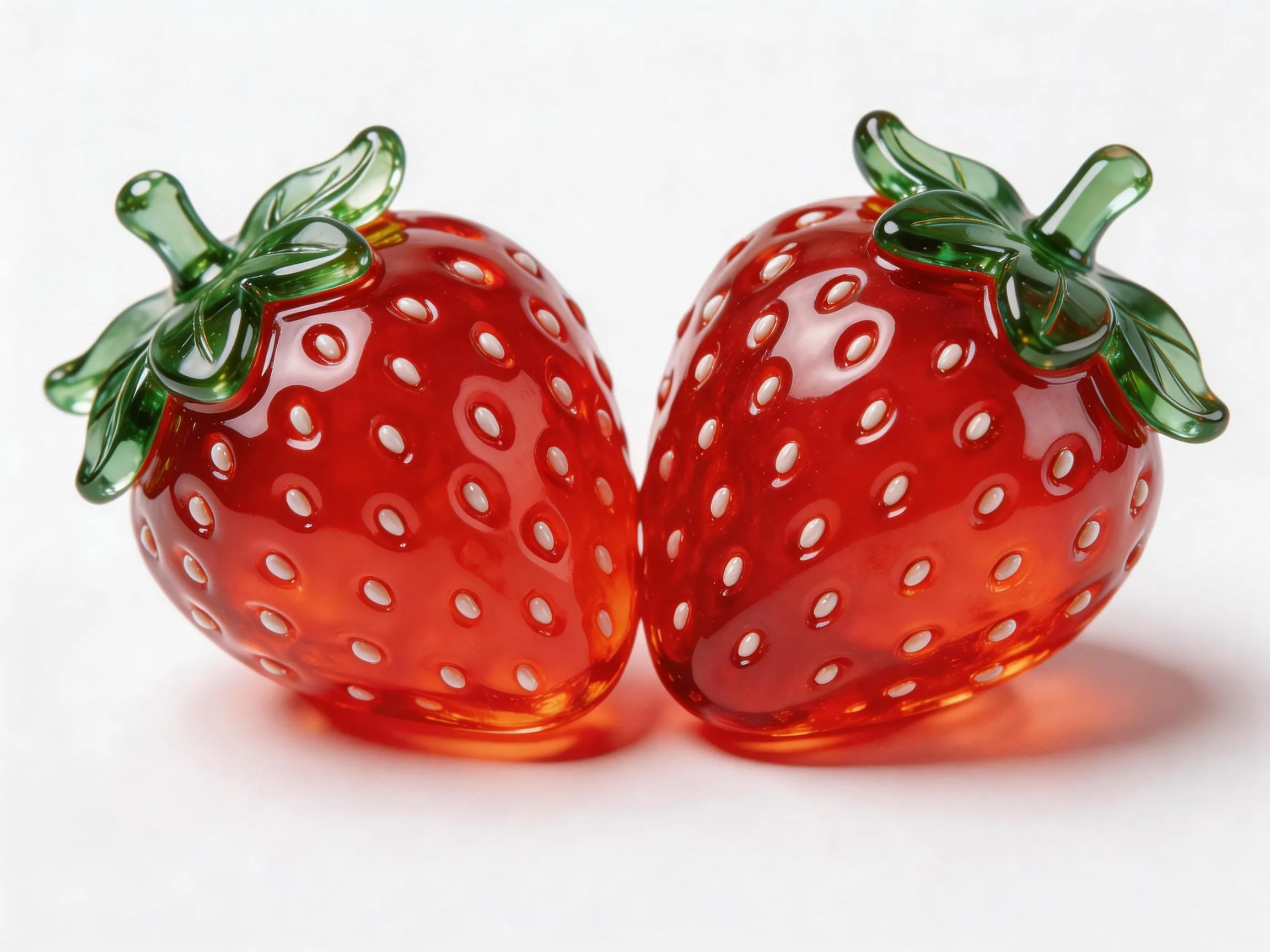 |
Imagem | Imagem 2 (objeto) |
Vídeo gerado com a proporção de aspecto do primeiro quadro.
Python
Certifique-se que a versão da DashScope Python SDK seja pelo menos 1.25.16.
```python
# -*- coding: utf-8 -*-
from http import HTTPStatus
from dashscope import VideoSynthesis
import dashscope
import os

# Set the base URL
dashscope.base_http_api_url = 'https://maas.qwencloudapi.com/api/v1'

# Set your API key
api_key = os.getenv("DASHSCOPE_API_KEY")

media = [
  {
    "type": "first_frame",
    "url": "https://help-static-aliyun-doc.aliyuncs.com/file-manage-files/zh-CN/20260414/ixwovg/wan2.7-r2v-first-frame.webp"
  },
  {
    "type": "reference_image",
    "url": "https://help-static-aliyun-doc.aliyuncs.com/file-manage-files/zh-CN/20260414/fkltfw/wan2.7-r2v-image-qq.webp"
  },
  {
    "type": "reference_image",
    "url": "https://help-static-aliyun-doc.aliyuncs.com/file-manage-files/zh-CN/20260414/kxkbsv/wan2.7-r2v-image-ob.webp"
  }
]

def sample_sync_call():
  print('----sync call, please wait a moment----')
  rsp = VideoSynthesis.call(
    api_key=api_key,
    model="wan2.7-r2v",
    media=media,
    resolution="720P",
    duration=10,
    prompt_extend=False,
    watermark=True,
    prompt="An overhead shot captures a blue planet. The camera gradually zooms in toward the surface and cuts to a close-up of Image 1, who is holding Image 2 and eating it while saying: Why is not anyone coming to hang out with me?",
  )
  if rsp.status_code == HTTPStatus.OK:
    print(rsp.output.video_url)
  else:
    print('Failed, status_code: %s, code: %s, message: %s' %
      (rsp.status_code, rsp.code, rsp.message))

if __name__ == '__main__':
  sample_sync_call()
```
Java
Certifique-se de que a versão Java SDK da DashScope seja pelo menos 2.22.14.
```java
// Copyright (c) Alibaba, Inc. and its affiliates.

import com.alibaba.dashscope.aigc.videosynthesis.VideoSynthesis;
import com.alibaba.dashscope.aigc.videosynthesis.VideoSynthesisParam;
import com.alibaba.dashscope.aigc.videosynthesis.VideoSynthesisResult;
import com.alibaba.dashscope.exception.ApiException;
import com.alibaba.dashscope.exception.InputRequiredException;
import com.alibaba.dashscope.exception.NoApiKeyException;
import com.alibaba.dashscope.utils.Constants;
import com.alibaba.dashscope.utils.JsonUtils;

import java.util.ArrayList;
import java.util.List;

public class Ref2Video {

    static {
        // Set the base URL
        Constants.baseHttpApiUrl = "https://maas.qwencloudapi.com/api/v1";
    }

    // Set your API key
    static String apiKey = System.getenv("DASHSCOPE_API_KEY");

    public static void syncCall() {
        VideoSynthesis videoSynthesis = new VideoSynthesis();
        final String prompt = "An overhead shot captures a blue planet. The camera gradually zooms in toward the surface and cuts to a close-up of Image 1, who is holding Image 2 and eating it while saying: Why is not anyone coming to hang out with me?";
        List<VideoSynthesisParam.Media> media = new ArrayList<VideoSynthesisParam.Media>(){{
            add(VideoSynthesisParam.Media.builder()
                    .url("https://help-static-aliyun-doc.aliyuncs.com/file-manage-files/zh-CN/20260414/ixwovg/wan2.7-r2v-first-frame.webp")
                    .type("first_frame")
                    .build());
            add(VideoSynthesisParam.Media.builder()
                    .url("https://help-static-aliyun-doc.aliyuncs.com/file-manage-files/zh-CN/20260414/fkltfw/wan2.7-r2v-image-qq.webp")
                    .type("reference_image")
                    .build());
            add(VideoSynthesisParam.Media.builder()
                    .url("https://help-static-aliyun-doc.aliyuncs.com/file-manage-files/zh-CN/20260414/kxkbsv/wan2.7-r2v-image-ob.webp")
                    .type("reference_image")
                    .build());
        }};
        VideoSynthesisParam param =
                VideoSynthesisParam.builder()
                        .apiKey(apiKey)
                        .model("wan2.7-r2v")
                        .prompt(prompt)
                        .media(media)
                        .watermark(true)
                        .duration(10)
                        .resolution("720P")
                        .promptExtend(false)
                        .build();
        VideoSynthesisResult result = null;
        try {
            System.out.println("---sync call, please wait a moment----");
            result = videoSynthesis.call(param);
        } catch (ApiException | NoApiKeyException e){
            throw new RuntimeException(e.getMessage());
        } catch (InputRequiredException e) {
            throw new RuntimeException(e);
        }
        System.out.println(JsonUtils.toJson(result));
    }

    public static void main(String[] args) {
        syncCall();
    }
}
```
curl
 Passo 1: Crie uma tarefa e obtenha a identificação da tarefa

```bash
curl --location 'https://maas.qwencloudapi.com/api/v1/services/aigc/video-generation/video-synthesis' \
    -H 'X-DashScope-Async: enable' \
    -H "Authorization: Bearer $DASHSCOPE_API_KEY" \
    -H 'Content-Type: application/json' \
    -d '{
    "model": "wan2.7-r2v",
    "input": {
        "prompt": "An overhead shot captures a blue planet. The camera gradually zooms in toward the surface and cuts to a close-up of Image 1, who is holding Image 2 and eating it while saying: Why is not anyone coming to hang out with me?",
        "media": [
            {
                "type": "first_frame",
                "url": "https://help-static-aliyun-doc.aliyuncs.com/file-manage-files/zh-CN/20260414/ixwovg/wan2.7-r2v-first-frame.webp"
            },
            {
                "type": "reference_image",
                "url": "https://help-static-aliyun-doc.aliyuncs.com/file-manage-files/zh-CN/20260414/fkltfw/wan2.7-r2v-image-qq.webp"
            },
            {
                "type": "reference_image",
                "url": "https://help-static-aliyun-doc.aliyuncs.com/file-manage-files/zh-CN/20260414/kxkbsv/wan2.7-r2v-image-ob.webp"
            }
        ]
    },
    "parameters": {
        "resolution": "720P",
        "duration": 10,
        "prompt_extend": false,
        "watermark": true
    }
}'
```

 Passo 2: Recuperar o resultado usando a identificação da tarefa

 Substituir `{task_id}` com o `task_id` O valor retornado pela chamada anterior da API.

```bash
curl -X GET 'https://maas.qwencloudapi.com/api/v1/tasks/{task_id}' \
    -H "Authorization: Bearer $DASHSCOPE_API_KEY"
```
Dê referências.
Passe imagens de referência, vídeos e áudio para o media Array.
Imagens de entrada
- Número de primeiros quadros Um máximo de um primeiro quadro
media.type=first_frame) é permitido. - Número de imagens de referência Um máximo de cinco imagens de referência
media.type=reference_image) são permitidos. O número total de imagens de referência e vídeos de referência não pode exceder 5. - ** Métodos de entrada**:
- URL pública: Suporta protocolos HTTP ou HTTPS. Exemplo:
https://xxxx/xxx.png. - Use a corda codificada para a base 64.
data:{MIME_type};base64,{base64_data}formato, onde:{base64_data}A string codificada pela Base64 do arquivo de imagem.{MIME_type}: O tipo de imagem do Multipurpose Internet Mail Extensions (MIME). O tipo deve corresponder ao formato do arquivo.
- URL pública: Suporta protocolos HTTP ou HTTPS. Exemplo:
| Formato da imagem | Tipo MIME |
|---|---|
| JPEG | Imagem/Jpeg |
| JPG | Imagem/Jpeg |
| PNG | Imagem/png |
| BMP | imagem/bmp |
| WEBP | imagem/webp |
Vídeos de entrada
- Número de vídeos de referência Um máximo de cinco vídeos de referência
media.type=reference_video) são permitidos. O número total de imagens de referência e vídeos de referência não pode exceder 5. - ** Métodos de entrada**:
- URL pública: Suporta protocolos HTTP ou HTTPS. Exemplo:
https://xxxx/xxx.mp4.
- URL pública: Suporta protocolos HTTP ou HTTPS. Exemplo:
Áudio de entrada
- A voz de referência
media.reference_voice) só pode ser usado comreference_imageOureference_videopara especificar a voz para o papel correspondente da entidade. - ** Métodos de entrada**:
- URL pública: Suporta protocolos HTTP ou HTTPS. Exemplo:
https://xxxx/xxx.mp3.
- URL pública: Suporta protocolos HTTP ou HTTPS. Exemplo:
Vídeo de saída
- Número de vídeos: 1.
- O formato é MP4.
- Período de validade da URL do vídeo 24 horas.
- ** Dimensões do vídeo**:
- **wan2.7 - O que você está fazendo?
resolutionO parâmetro controla o nível de resolução (720p ou 1080p) e oratioO parâmetro controla a proporção de aspecto (16:9, 9:16, 1:1, 4:3 ou 3:4).- Se uma imagem de primeira imagem for fornecida, o
ratioO parâmetro é ignorado. A proporção de aspecto do vídeo de saída aproxima-se da imagem da primeira moldura. - Se uma imagem de primeira imagem não é fornecida, a proporção de aspecto é especificada pelo
ratioparâmetro. O padrão é 16:9.
- Se uma imagem de primeira imagem for fornecida, o
- **wan2.7 - O que você está fazendo?
Regras de faturamento de vídeo de entrada
** Fórmula de cobrança**: Total billable duration (seconds) = Billable duration of input video (seconds) + Duration of output video (seconds).
Wan 2.7 series models
A duração máxima é de 5 segundos. `Truncation limit per video = 5 seconds / Number of input reference videos (reference images and the first frame image are excluded)`. Cada vídeo é cobrado com base em `min(actual duration, truncation limit)`. As durações de faturamento de vários vídeos são adicionadas.
| Número de vídeos de referência. | Limite de troca por vídeo |
|---|---|
| 1 | 5s |
| 2 | 2.5s |
| 3 | 1.65s |
| 4 | 1.25s |
| 5 | 1s |
Se a entrada for 2 vídeos de referência + 1 imagem, a imagem é excluída da contagem. O limite de truncamento é calculado com base em 2 vídeos de referência, resultando em 2,5 segundos por vídeo. `Billable input duration = min(video 1 duration, 2.5 seconds) + min(video 2 duration, 2.5 seconds)`.

A duração do vídeo foi gerada com sucesso pelo modelo.
Wan 2.6 series models
A duração máxima é de 5 segundos. `Truncation limit per video = 5 seconds / Total number of reference materials (reference images + reference videos, excluding the first frame image)`. Cada vídeo é cobrado com base em `min(actual duration, truncation limit)`. As durações de faturamento de vários vídeos são adicionadas.
| Número de materiais de referência | Limite de troca por vídeo |
|---|---|
| 1 | 5s |
| 2 | 2.5s |
| 3 | 1.65s |
| 4 | 1.25s |
| 5 | 1s |
Mais exemplos: calculando a duração do vídeo de entrada
  - **Input: 1 material de referência (limite de translação por vídeo: 5 segundos)**
    - Se a entrada é um vídeo: `Billable input duration = min(video duration, 5 seconds)`.
    - Se a entrada for uma imagem, é grátis.

  - **Input: 2 materiais de referência (limite de troncamento por vídeo: 2,5 segundos)**
    - Se a entrada é 1 vídeo + 1 imagem: `Billable input duration = min(video 1 duration, 2.5 seconds)`.
    - Se a entrada for 2 vídeos: `Billable input duration = min(video 1 duration, 2.5 seconds) + min(video 2 duration, 2.5 seconds)`.

  - **Input: 3 materiais de referência (limite de trinca por vídeo: 1,65 segundos)**
    - Se a entrada é 1 vídeo + 2 imagens: `Billable input duration = min(video 1 duration, 1.65 seconds)`.
    - Se a entrada for 3 vídeos: `Billable input duration = min(video 1 duration, 1.65 seconds) + min(video 2 duration, 1.65 seconds) + min(video 3 duration, 1.65 seconds)`.

  - **Input: 4 materiais de referência (limite de troncamento por vídeo: 1,25 segundos)**
    - Se a entrada for 2 vídeos + 2 imagens: `Billable input duration = min(video 1 duration, 1.25 seconds) + min(video 2 duration, 1.25 seconds)`.
    - Se a entrada é 3 vídeos + 1 imagem: `Billable input duration = min(video 1 duration, 1.25 seconds) + min(video 2 duration, 1.25 seconds) + min(video 3 duration, 1.25 seconds)`.

  - **Input: 5 materiais de referência (limite de trinca por vídeo: 1 segundo)**
    - Se a entrada é 1 vídeo + 4 imagens: `Billable input duration = min(video 1 duration, 1 second)`.
    - Se a entrada é 3 vídeos + 2 imagens: `Billable input duration = min(video 1 duration, 1 second) + min(video 2 duration, 1 second) + min(video 3 duration, 1 second)`.


A duração do vídeo foi gerada com sucesso pelo modelo.
Referência da API
- [wan2.7 Referência para vídeo da API./api-reference/video-generation/wan27-reference-to-video/create-task)
- [wan2.6 Referência para vídeo da API./api-reference/video-generation/wan-reference-to-video/create-task)
FAQ
Como faço para referenciar materiais em uma linha?
O método de referência depende do modelo e da característica utilizadas:
- Imagens de referência são identificadas como: "Imagem 1", "Imagem 2", e assim por diante. Vídeos de referência são identificados como Vídeo 1, Vídeo 2, e assim por diante.
- Imagens e vídeos são contados separadamente. A ordem corresponde à ordem do mesmo tipo de material no
mediaArray. - Se você tem apenas uma imagem de referência ou vídeo, você pode simplificar o identificador para "imagem de referência" ou "vídeo de referência".
- Normalmente, não precisa fazer referência à primeira imagem do quadro.
{
    "input": {
        "prompt": "Video 1 is playing the guitar, and Image 1 is holding a bouquet of flowers and walks past Video 1.",
        "media": [
            {
                "type": "first_frame",
                "url":  "https://example.com/scene.jpg"
            },
            {
                "type": "reference_video",
                "url":  "https://example.com/girl.mp4"
            },
            {
                "type": "reference_image",
                "url": "https://example.com/boy.png"
            }
        ]
    }
}
A voz pode ser usada com uma imagem de primeira moldura?
Isso não é recomendado. Use media.reference_voice com reference_image Ou reference_video para especificar o timbre para a entidade correspondente.