 BRASIL
Imagem para vídeo: primeira moldura
Animar de uma única imagem
- Escolha uma duração e resolução baseada no modelo (ver [modelos de geração de vídeo]/developer-guides/getting-started/video-models#all-models)). wan2.7 e wan2.6 Suportar qualquer número inteiro de 2 a 15 segundos, enquanto wan2.5 suporta apenas 5 ou 10 segundos. O modelo também suporta reescrita rápida e adição de marcas d'água.
- Suportes automáticos para dublagem ou upload de áudio para alcançar a sincronização de áudio e vídeo. wan2.5 E depois)
- Gerar vídeos com várias fotos, mantendo o assunto principal consistente com as imagens. wan2.6 e wan2.7)**
Tradução:https://home.qwencloud.com/try-ai Referência da API:wan2.7](/api-reference/video-generation/wan27-image-to-video/create-task), wan2.6
Começando.
<table style={{width: "100%", borderCollapse: "separate", borderSpacing: "8px 0", tableLayout: "fixed"}}> <tr> <th style={{textAlign: "left", width: "33%", paddingBottom: "8px"}}>? Prompt de entrada ?</th> <th style={{textAlign: "left", width: "33%", paddingBottom: "8px"}}>? Entrada primeiro quadro ?</th> <th style={{textAlign: "left", width: "33%", paddingBottom: "8px"}}>** Vídeo de saída (vídeo multi-shot com áudio)</th> </tr>
<tr> <td style={{verticalAlign: "top"}}> A câmera lentamente se move de baixo da tartaruga marinha. A tartaruga nada de forma tranquila, e os detalhes de sua barriga são claramente visíveis. </td>
<td style={{verticalAlign: "top"}}>
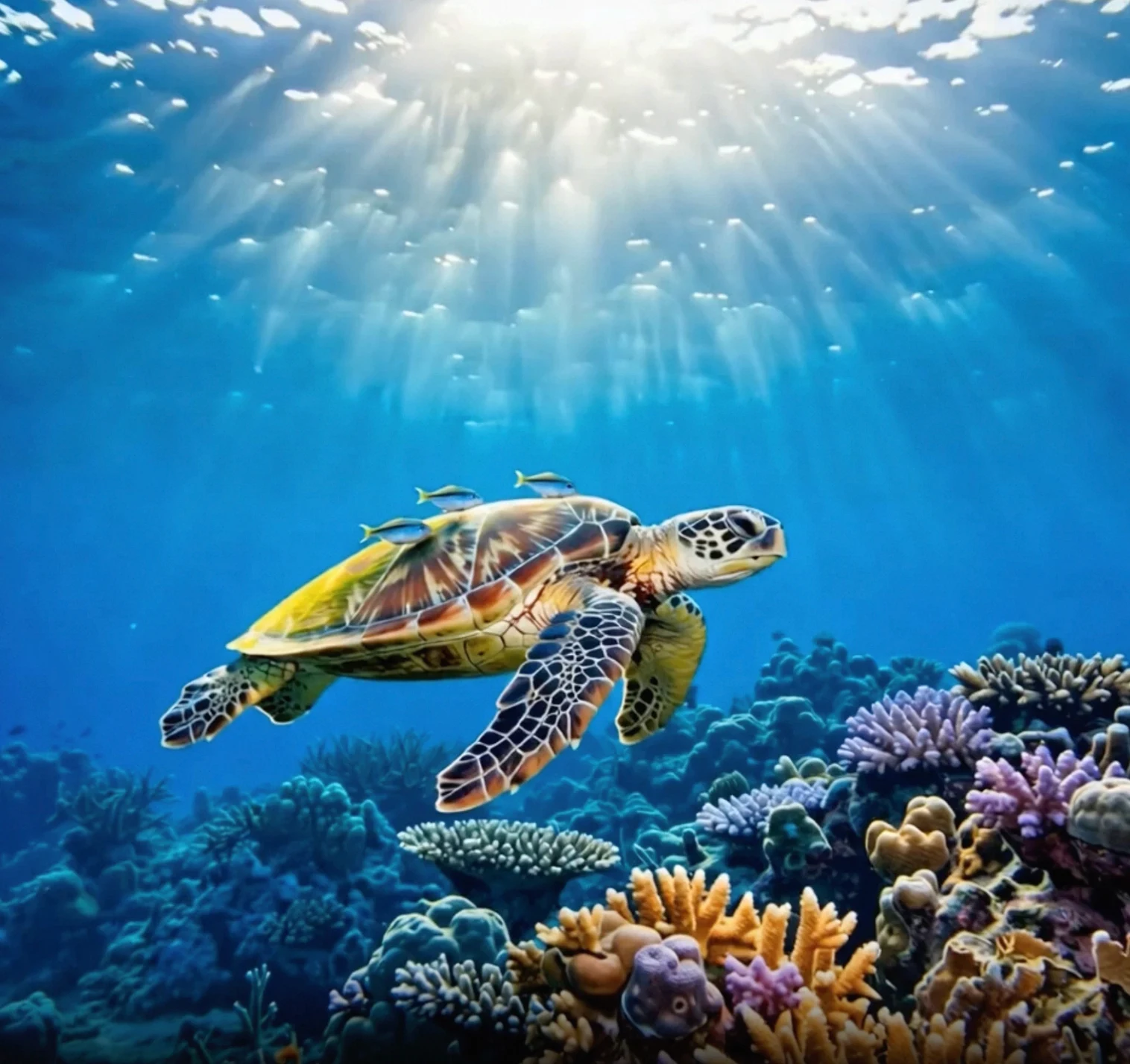
</td>
<td style={{verticalAlign: "top"}}>
<video style={{display: "block", width: "100%"}} src="https://help-static-aliyun-doc.aliyuncs.com/file-manage-files/en-US/20260121/oiiigs/wan-i2v-haigui-video.mp4" controls />
</td>
</tr> </table>
Antes de chamar a API, [obtenha uma chave de API] (/api-reference/preparation/api-key) e [defina a chave API como uma variável de ambiente] (/api-reference/preparation/export-api-key-env). Para usar um SDK, [instale o DashScope SDK] (/api-reference/preparation/install-sdk).
curl (wan2.7)
  Wan 2.7 usa um `media` Array para fornecer a imagem da primeira moldura.  Usa-se. `resolution` Em vez de dimensões de pixels, e descreve multi-shot diretamente no prompt.


```bash
# Step 1: Create a task to obtain the task ID
curl --location 'https://maas.qwencloudapi.com/api/v1/services/aigc/video-generation/video-synthesis' \
  -H 'X-DashScope-Async: enable' \
  -H "Authorization: Bearer $DASHSCOPE_API_KEY" \
  -H 'Content-Type: application/json' \
  -d '{
  "model": "wan2.7-i2v",
  "input": {
    "prompt": "The camera slowly moves up from below the sea turtle. The turtle swims leisurely, and the details of its belly are clearly visible.",
    "media": [
      {
        "type": "first_frame",
        "url": "https://help-static-aliyun-doc.aliyuncs.com/file-manage-files/zh-CN/20260121/zlpocv/wan-i2v-haigui.webp"
      }
    ]
  },
  "parameters": {
    "resolution": "1080P",
    "prompt_extend": true,
    "duration": 10
  }
}'

# Step 2: Retrieve the result using the task ID
# Replace {task_id} with the task_id value returned by the previous API call
curl -X GET https://maas.qwencloudapi.com/api/v1/tasks/{task_id} \
--header "Authorization: Bearer $DASHSCOPE_API_KEY"
```
curl (wan2.6)
```bash
# Step 1: Create a task to obtain the task ID
curl --location 'https://maas.qwencloudapi.com/api/v1/services/aigc/video-generation/video-synthesis' \
  -H 'X-DashScope-Async: enable' \
  -H "Authorization: Bearer $DASHSCOPE_API_KEY" \
  -H 'Content-Type: application/json' \
  -d '{
  "model": "wan2.6-i2v-flash",
  "input": {
    "prompt": "The camera slowly moves up from below the sea turtle. The turtle swims leisurely, and the details of its belly are clearly visible.",
    "img_url": "https://help-static-aliyun-doc.aliyuncs.com/file-manage-files/zh-CN/20260121/zlpocv/wan-i2v-haigui.webp"
  },
  "parameters": {
    "resolution": "720P",
    "prompt_extend": true,
    "watermark": true,
    "duration": 10,
    "shot_type":"multi"
  }
}'

# Step 2: Retrieve the result using the task ID
# Replace {task_id} with the task_id value returned by the previous API call
curl -X GET https://maas.qwencloudapi.com/api/v1/tasks/{task_id} \
--header "Authorization: Bearer $DASHSCOPE_API_KEY"
```
** Requisitos de versão SDK:
- DashScope Python SDK: **1.25.8 ou posterior
- DashScope Java SDK: **2.22.6 ou mais tarde
Se sua versão SDK é muito antiga, você pode encontrar erros como "erro de url, por favor, verifique url!"./api-reference/preparation/install-sdk).
Python and Java SDK examples (wan2.6)
```python Python SDK
import os
from http import HTTPStatus
from dashscope import VideoSynthesis
import dashscope

dashscope.base_http_api_url = 'https://maas.qwencloudapi.com/api/v1'
api_key = os.getenv("DASHSCOPE_API_KEY", "YOUR_API_KEY")

print('please wait...')
rsp = VideoSynthesis.call(api_key=api_key,
                          model='wan2.6-i2v-flash',
                          prompt='The camera slowly moves up from below the sea turtle. The turtle swims leisurely, and the details of its belly are clearly visible.',
                          img_url="https://help-static-aliyun-doc.aliyuncs.com/file-manage-files/zh-CN/20260121/zlpocv/wan-i2v-haigui.webp",
                          resolution="720P",
                          duration=10,
                          shot_type="multi",
                          prompt_extend=True,
                          watermark=True)
print(rsp)
if rsp.status_code == HTTPStatus.OK:
  print("video_url:", rsp.output.video_url)
else:
  print('Failed, status_code: %s, code: %s, message: %s' % (rsp.status_code, rsp.code, rsp.message))
```

```java Java SDK
import com.alibaba.dashscope.aigc.videosynthesis.VideoSynthesis;
import com.alibaba.dashscope.aigc.videosynthesis.VideoSynthesisParam;
import com.alibaba.dashscope.aigc.videosynthesis.VideoSynthesisResult;
import com.alibaba.dashscope.exception.ApiException;
import com.alibaba.dashscope.exception.InputRequiredException;
import com.alibaba.dashscope.exception.NoApiKeyException;
import com.alibaba.dashscope.utils.JsonUtils;
import com.alibaba.dashscope.utils.Constants;

public class Image2Video {

  static {
    Constants.baseHttpApiUrl = "https://maas.qwencloudapi.com/api/v1";
  }

  // If you have not configured the environment variable, replace the following line with your API key: apiKey="sk-xxx"
  static String apiKey = System.getenv("DASHSCOPE_API_KEY");

  public static void image2video() throws ApiException, NoApiKeyException, InputRequiredException {
    VideoSynthesis vs = new VideoSynthesis();
    VideoSynthesisParam param =
        VideoSynthesisParam.builder()
            .apiKey(apiKey)
            .model("wan2.6-i2v-flash")
            .prompt("The camera slowly moves up from below the sea turtle. The turtle swims leisurely, and the details of its belly are clearly visible.")
            .imgUrl("https://help-static-aliyun-doc.aliyuncs.com/file-manage-files/zh-CN/20260121/zlpocv/wan-i2v-haigui.webp")
            .duration(10)
            .resolution("720P")
            .shotType("multi")
            .promptExtend(true)
            .watermark(true)
            .build();
    System.out.println("please wait...");
    VideoSynthesisResult result = vs.call(param);
    System.out.println(JsonUtils.toJson(result));
  }

  public static void main(String[] args) {
    try {
      image2video();
    } catch (ApiException | NoApiKeyException | InputRequiredException e) {
      System.out.println(e.getMessage());
    }
    System.exit(0);
  }
}
```

```bash curl
# Step 1: Create a task to obtain the task ID
curl --location 'https://maas.qwencloudapi.com/api/v1/services/aigc/video-generation/video-synthesis' \
  -H 'X-DashScope-Async: enable' \
  -H "Authorization: Bearer $DASHSCOPE_API_KEY" \
  -H 'Content-Type: application/json' \
  -d '{
  "model": "wan2.6-i2v-flash",
  "input": {
    "prompt": "The camera slowly moves up from below the sea turtle. The turtle swims leisurely, and the details of its belly are clearly visible.",
    "img_url": "https://help-static-aliyun-doc.aliyuncs.com/file-manage-files/zh-CN/20260121/zlpocv/wan-i2v-haigui.webp"
  },
  "parameters": {
    "resolution": "720P",
    "prompt_extend": true,
    "watermark": true,
    "duration": 10,
    "shot_type":"multi"
  }
}'

# Step 2: Retrieve the result using the task ID
# Replace {task_id} with the task_id value returned by the previous API call
curl -X GET https://maas.qwencloudapi.com/api/v1/tasks/{task_id} \
--header "Authorization: Bearer $DASHSCOPE_API_KEY"
```
Características principais
Crie vídeos multi-shot
Modelos: wan2.7-i2v, wan2.7-i2v-2026-04-25, wan2.6-i2v-flash, wan2.6-i2v.
Introdução**: Muda automaticamente as fotos, como de um tiro largo para um close-up. Esta característica é adequada para criar MVs e outros cenários.
** Configurações de parâmetros**:
- **wan2.7Descreva as imagens diretamente no texto imediato (por exemplo,
Shot 1 [0-3 s]: ...). Não.shot_typeParâmetro necessário. - **wan2.6- Set.
shot_typepara"multi". prompt_extendDeve sertruepara permitir uma reescrita inteligente para descrições otimizadas de tiro.
<table style={{width: "100%", borderCollapse: "separate", borderSpacing: "8px 0", tableLayout: "fixed"}}> <tr> <th style={{textAlign: "left", width: "33%", paddingBottom: "8px"}}>? Prompt de entrada ?</th> <th style={{textAlign: "left", width: "33%", paddingBottom: "8px"}}>? Entrada primeiro quadro ?</th> <th style={{textAlign: "left", width: "33%", paddingBottom: "8px"}}>** Vídeo de saída (wan2.6, vídeo multi-fotografia ) **</th> </tr>
<tr> <td style={{verticalAlign: "top"}}> Uma cena de fantasia urbana. Um personagem dinâmico de arte de grafite. Um garoto feito de tinta spray ganha vida em uma parede de concreto. Ele faz um rap inglês em alta velocidade enquanto faz uma clássica pose de rapper energética. A cena é colocada à noite sob uma ponte ferroviária urbana. A iluminação vem de uma única lâmpada de rua, criando uma atmosfera cinematográfica cheia de alta energia e detalhes surpreendentes. O áudio do vídeo é inteiramente do rap, sem nenhum outro diálogo ou barulho. </td>
<td style={{verticalAlign: "top"}}>
  [rap] (https://help-static-aliyun-doc.aliyuncs.com/assets/img/en-US/1682878571/p1011609.webp) ** Áudio de entrada**: <audio style={{width: "100%"}} src="https://help-static-aliyun-doc.aliyuncs.com/file-manage-files/en-US/20250925/taxesr/rap.mp3" controls />
</td>

<td style={{verticalAlign: "top"}}>
  <video style={{display: "block", width: "100%"}} src="https://help-static-aliyun-doc.aliyuncs.com/file-manage-files/en-US/20251215/ofaaah/wan2.6.mp4" controls />
</td>
</tr> </table>
Certifique-se de que sua versão SDK DashScope esteja atualizada.
- Python SDK:
1.25.8Ou mais tarde - Java SDK:
2.22.6Ou mais tarde
[Instalar o SDK] (/api-reference/preparation/install-sdk).
import os
from http import HTTPStatus
from dashscope import VideoSynthesis
import dashscope

dashscope.base_http_api_url = 'https://maas.qwencloudapi.com/api/v1'

# If you have not configured the environment variable, replace the following line with your API key: api_key="sk-xxx"
api_key = os.getenv("DASHSCOPE_API_KEY")

def sample_async_call_i2v():
  # Asynchronous call, returns a task_id
  rsp = VideoSynthesis.async_call(api_key=api_key,
                  model='wan2.6-i2v-flash',
                  prompt='A scene of urban fantasy art. A dynamic graffiti art character. A boy made of spray paint comes to life on a concrete wall. He performs an English rap at high speed while striking a classic, energetic rapper pose. The scene is set at night under an urban railway bridge. The lighting comes from a single street lamp, creating a cinematic atmosphere full of high energy and amazing detail. The audio of the video consists entirely of the rap, with no other dialogue or noise.',
                  img_url="https://help-static-aliyun-doc.aliyuncs.com/file-manage-files/zh-CN/20250925/wpimhv/rap.png",
                  audio_url="https://help-static-aliyun-doc.aliyuncs.com/file-manage-files/zh-CN/20250925/ozwpvi/rap.mp3",
                  resolution="720P",
                  duration=10,
                  shot_type="multi", # Multi-shot
                  prompt_extend=True,
                  watermark=True,
                  negative_prompt="",
                  seed=12345)
  print(rsp)
  if rsp.status_code == HTTPStatus.OK:
    print("task_id: %s" % rsp.output.task_id)
  else:
    print('Failed, status_code: %s, code: %s, message: %s' % (rsp.status_code, rsp.code, rsp.message))

  # Wait for the asynchronous task to complete
  rsp = VideoSynthesis.wait(task=rsp, api_key=api_key)
  print(rsp)
  if rsp.status_code == HTTPStatus.OK:
    print(rsp.output.video_url)
  else:
    print('Failed, status_code: %s, code: %s, message: %s' % (rsp.status_code, rsp.code, rsp.message))

if __name__ == '__main__':
  sample_async_call_i2v()
import com.alibaba.dashscope.aigc.videosynthesis.VideoSynthesis;
import com.alibaba.dashscope.aigc.videosynthesis.VideoSynthesisParam;
import com.alibaba.dashscope.aigc.videosynthesis.VideoSynthesisResult;
import com.alibaba.dashscope.exception.ApiException;
import com.alibaba.dashscope.exception.InputRequiredException;
import com.alibaba.dashscope.exception.NoApiKeyException;
import com.alibaba.dashscope.utils.JsonUtils;
import com.alibaba.dashscope.utils.Constants;

public class Image2Video {
  static {
    Constants.baseHttpApiUrl = "https://maas.qwencloudapi.com/api/v1";
  }

  // If you have not configured the environment variable, replace the following line with your API key: apiKey="sk-xxx"
  static String apiKey = System.getenv("DASHSCOPE_API_KEY");

  //Set the input image URL
  static String imgUrl = "https://help-static-aliyun-doc.aliyuncs.com/file-manage-files/zh-CN/20250925/wpimhv/rap.png";
  // Set the audio URL
  static String audioUrl = "https://help-static-aliyun-doc.aliyuncs.com/file-manage-files/zh-CN/20250925/ozwpvi/rap.mp3";

  public static void image2video() throws ApiException, NoApiKeyException, InputRequiredException {
    VideoSynthesis vs = new VideoSynthesis();
    VideoSynthesisParam param =
        VideoSynthesisParam.builder()
            .apiKey(apiKey)
            .model("wan2.6-i2v-flash")
            .prompt("A scene of urban fantasy art. A dynamic graffiti art character. A boy made of spray paint comes to life on a concrete wall. He performs an English rap at high speed while striking a classic, energetic rapper pose. The scene is set at night under an urban railway bridge. The lighting comes from a single street lamp, creating a cinematic atmosphere full of high energy and amazing detail. The audio of the video consists entirely of the rap, with no other dialogue or noise.")
            .imgUrl(imgUrl)
            .audioUrl(audioUrl)
            .shotType("multi")
            .duration(10)
            .resolution("720P")
            .negativePrompt("")
            .promptExtend(true)
            .watermark(true)
            .seed(12345)
            .build();
    // Asynchronous call
    VideoSynthesisResult task = vs.asyncCall(param);
    System.out.println(JsonUtils.toJson(task));
    System.out.println("please wait...");

    //Get the result
    VideoSynthesisResult result = vs.wait(task, apiKey);
    System.out.println(JsonUtils.toJson(result));
  }

  public static void main(String[] args) {
    try {
      image2video();
    } catch (ApiException | NoApiKeyException | InputRequiredException e) {
      System.out.println(e.getMessage());
    }
    System.exit(0);
  }
}
# Step 1: Create a task to obtain the task ID
curl --location 'https://maas.qwencloudapi.com/api/v1/services/aigc/video-generation/video-synthesis' \
  -H 'X-DashScope-Async: enable' \
  -H "Authorization: Bearer $DASHSCOPE_API_KEY" \
  -H 'Content-Type: application/json' \
  -d '{
  "model": "wan2.6-i2v-flash",
  "input": {
    "prompt": "A scene of urban fantasy art. A dynamic graffiti art character. A boy made of spray paint comes to life from a concrete wall. He raps an English song at high speed while striking a classic, energetic rapper pose. The scene is set under an urban railway bridge at night. The lighting comes from a single street lamp, creating a cinematic atmosphere full of high energy and amazing detail. The audio of the video consists entirely of his rap, with no other dialogue or noise.",
    "img_url": "https://help-static-aliyun-doc.aliyuncs.com/file-manage-files/zh-CN/20250925/wpimhv/rap.png",
    "audio_url": "https://help-static-aliyun-doc.aliyuncs.com/file-manage-files/zh-CN/20250925/ozwpvi/rap.mp3"
  },
  "parameters": {
    "resolution": "720P",
    "prompt_extend": true,
    "duration": 10,
    "shot_type":"multi"
  }
}'

# Step 2: Retrieve the result using the task ID
# Replace {task_id} with the task_id value returned by the previous API call
curl -X GET https://maas.qwencloudapi.com/api/v1/tasks/{task_id} \
--header "Authorization: Bearer $DASHSCOPE_API_KEY"
Sincronização de áudio e vídeo
Modelos: wan2.7-i2v, wan2.7-i2v-2026-04-25, wan2.6-i2v-flash, wan2.6-i2v, wan2.5-i2v-preview.
**wan2.7Use o media Array com um driving_audio Tipo para dar áudio para a sincronização labial. Se omitido, o modelo gera efeitos sonoros. Veja o [wan2.7 Referência da API (/api-reference/video-generation/wan27-image-to-video/create-task) para detalhes.
Apresenta personagens animados em fotos para falar ou cantar, com movimentos labiais que combinam com o áudio. Para mais exemplos, veja [Geração sonora] (/developer-guides/accuracy-tuning/video-generation).
** Configurações do parâmetro:**
- Forneça um arquivo de áudio: passe o
audio_url. O modelo alinhará os movimentos labiais baseados no arquivo de áudio. - Não passem por uma
audio_url. O modelo produz um vídeo com áudio por padrão. Ele automaticamente gera efeitos sonoros de fundo, música, ou vocais baseados nos visuais.
<table style={{width: "100%", borderCollapse: "separate", borderSpacing: "8px 0", tableLayout: "fixed"}}> <tr> <th style={{textAlign: "left", width: "33%", paddingBottom: "8px"}}>? Prompt de entrada ?</th> <th style={{textAlign: "left", width: "33%", paddingBottom: "8px"}}>? Entrada primeiro quadro ?</th> <th style={{textAlign: "left", width: "33%", paddingBottom: "8px"}}> Vídeo de saída (com áudio)</th> </tr>
<tr> <td style={{verticalAlign: "top"}}> Uma cena de fantasia urbana. Um personagem dinâmico de arte de grafite. Um garoto feito de tinta spray ganha vida em uma parede de concreto. Ele faz um rap inglês em alta velocidade enquanto faz uma clássica pose de rapper energética. A cena é colocada à noite sob uma ponte ferroviária urbana. A iluminação vem de uma única lâmpada de rua, criando uma atmosfera cinematográfica cheia de alta energia e detalhes surpreendentes. O áudio do vídeo é inteiramente do rap, sem nenhum outro diálogo ou barulho. </td>
<td style={{verticalAlign: "top"}}>
  [rap] (https://help-static-aliyun-doc.aliyuncs.com/assets/img/en-US/1682878571/p1011609.webp) ** Áudio de entrada**: <audio style={{width: "100%"}} src="https://help-static-aliyun-doc.aliyuncs.com/file-manage-files/en-US/20250925/taxesr/rap.mp3" controls />
</td>

<td style={{verticalAlign: "top"}}>
  <video style={{display: "block", width: "100%"}} src="https://help-static-aliyun-doc.aliyuncs.com/file-manage-files/en-US/20250925/yfwbhx/%E8%8B%B1%E6%96%87rap+%281%29.mp4" controls />
</td>
</tr> </table>
Certifique-se de que sua versão SDK DashScope esteja atualizada.
- Python SDK:
1.25.8Ou mais tarde - Java SDK:
2.22.6Ou mais tarde
[Instalar o SDK] (/api-reference/preparation/install-sdk).
import os
from http import HTTPStatus
from dashscope import VideoSynthesis
import dashscope

dashscope.base_http_api_url = 'https://maas.qwencloudapi.com/api/v1'

# If you have not configured the environment variable, replace the following line with your API key: api_key="sk-xxx"
api_key = os.getenv("DASHSCOPE_API_KEY")

def sample_async_call_i2v():
  # Asynchronous call, returns a task_id
  rsp = VideoSynthesis.async_call(api_key=api_key,
                  model='wan2.6-i2v-flash',
                  prompt='A scene of urban fantasy art. A dynamic graffiti art character. A boy made of spray paint comes to life on a concrete wall. He performs an English rap at high speed while striking a classic, energetic rapper pose. The scene is set at night under an urban railway bridge. The lighting comes from a single street lamp, creating a cinematic atmosphere full of high energy and amazing detail. The audio of the video consists entirely of the rap, with no other dialogue or noise.',
                  img_url="https://help-static-aliyun-doc.aliyuncs.com/file-manage-files/zh-CN/20250925/wpimhv/rap.png",
                  audio_url="https://help-static-aliyun-doc.aliyuncs.com/file-manage-files/zh-CN/20250925/ozwpvi/rap.mp3",
                  resolution="720P",
                  duration=10,
                  prompt_extend=True,
                  watermark=True,
                  negative_prompt="",
                  seed=12345)
  print(rsp)
  if rsp.status_code == HTTPStatus.OK:
    print("task_id: %s" % rsp.output.task_id)
  else:
    print('Failed, status_code: %s, code: %s, message: %s' % (rsp.status_code, rsp.code, rsp.message))

  # Wait for the asynchronous task to complete
  rsp = VideoSynthesis.wait(task=rsp, api_key=api_key)
  print(rsp)
  if rsp.status_code == HTTPStatus.OK:
    print(rsp.output.video_url)
  else:
    print('Failed, status_code: %s, code: %s, message: %s' % (rsp.status_code, rsp.code, rsp.message))

if __name__ == '__main__':
  sample_async_call_i2v()
import com.alibaba.dashscope.aigc.videosynthesis.VideoSynthesis;
import com.alibaba.dashscope.aigc.videosynthesis.VideoSynthesisParam;
import com.alibaba.dashscope.aigc.videosynthesis.VideoSynthesisResult;
import com.alibaba.dashscope.exception.ApiException;
import com.alibaba.dashscope.exception.InputRequiredException;
import com.alibaba.dashscope.exception.NoApiKeyException;
import com.alibaba.dashscope.utils.JsonUtils;
import com.alibaba.dashscope.utils.Constants;

public class Image2Video {
  static {
    Constants.baseHttpApiUrl = "https://maas.qwencloudapi.com/api/v1";
  }

  // If you have not configured the environment variable, replace the following line with your API key: apiKey="sk-xxx"
  static String apiKey = System.getenv("DASHSCOPE_API_KEY");

  //Set the input image URL
  static String imgUrl = "https://help-static-aliyun-doc.aliyuncs.com/file-manage-files/zh-CN/20250925/wpimhv/rap.png";
  // Set the audio URL
  static String audioUrl = "https://help-static-aliyun-doc.aliyuncs.com/file-manage-files/zh-CN/20250925/ozwpvi/rap.mp3";

  public static void image2video() throws ApiException, NoApiKeyException, InputRequiredException {
    VideoSynthesis vs = new VideoSynthesis();
    VideoSynthesisParam param =
        VideoSynthesisParam.builder()
            .apiKey(apiKey)
            .model("wan2.6-i2v-flash")
            .prompt("A scene of urban fantasy art. A dynamic graffiti art character. A boy made of spray paint comes to life on a concrete wall. He performs an English rap at high speed while striking a classic, energetic rapper pose. The scene is set at night under an urban railway bridge. The lighting comes from a single street lamp, creating a cinematic atmosphere full of high energy and amazing detail. The audio of the video consists entirely of the rap, with no other dialogue or noise.")
            .imgUrl(imgUrl)
            .audioUrl(audioUrl)
            .duration(10)
            .resolution("720P")
            .negativePrompt("")
            .promptExtend(true)
            .watermark(true)
            .seed(12345)
            .build();
    // Asynchronous call
    VideoSynthesisResult task = vs.asyncCall(param);
    System.out.println(JsonUtils.toJson(task));
    System.out.println("please wait...");

    //Get the result
    VideoSynthesisResult result = vs.wait(task, apiKey);
    System.out.println(JsonUtils.toJson(result));
  }

  public static void main(String[] args) {
    try {
      image2video();
    } catch (ApiException | NoApiKeyException | InputRequiredException e) {
      System.out.println(e.getMessage());
    }
    System.exit(0);
  }
}
? ? ? ? ? ? ? ?
Passo 1: Criar uma tarefa para obter a identificação da tarefa
Provide an audio file
```bash
curl --location 'https://maas.qwencloudapi.com/api/v1/services/aigc/video-generation/video-synthesis' \
  -H 'X-DashScope-Async: enable' \
  -H "Authorization: Bearer $DASHSCOPE_API_KEY" \
  -H 'Content-Type: application/json' \
  -d '{
  "model": "wan2.5-i2v-preview",
  "input": {
    "prompt": "A scene of urban fantasy art. A dynamic graffiti art character. A boy made of spray paint comes to life from a concrete wall. He raps an English song at high speed while striking a classic, energetic rapper pose. The scene is set under an urban railway bridge at night. The lighting comes from a single street lamp, creating a cinematic atmosphere full of high energy and amazing detail. The audio of the video consists entirely of his rap, with no other dialogue or noise.",
    "img_url": "https://help-static-aliyun-doc.aliyuncs.com/file-manage-files/zh-CN/20250925/wpimhv/rap.png",
    "audio_url": "https://help-static-aliyun-doc.aliyuncs.com/file-manage-files/zh-CN/20250925/ozwpvi/rap.mp3"
  },
  "parameters": {
    "resolution": "480P",
    "prompt_extend": true,
    "duration": 10
  }
}'
```
Automatic dubbing
```bash
curl --location 'https://maas.qwencloudapi.com/api/v1/services/aigc/video-generation/video-synthesis' \
  -H 'X-DashScope-Async: enable' \
  -H "Authorization: Bearer $DASHSCOPE_API_KEY" \
  -H 'Content-Type: application/json' \
  -d '{
  "model": "wan2.5-i2v-preview",
  "input": {
    "prompt": "A scene of urban fantasy art. A dynamic graffiti art character. A boy made of spray paint comes to life from a concrete wall. He raps an English song at high speed while striking a classic, energetic rapper pose. The scene is set under an urban railway bridge at night. The lighting comes from a single street lamp, creating a cinematic atmosphere full of high energy and amazing detail. The audio of the video consists entirely of his rap, with no other dialogue or noise.",
    "img_url": "https://help-static-aliyun-doc.aliyuncs.com/file-manage-files/zh-CN/20250925/wpimhv/rap.png"
  },
  "parameters": {
    "resolution": "480P",
    "prompt_extend": true,
    "duration": 10
  }
}'
```
Passo 2: Recuperar o resultado usando a identificação da tarefa
Substituir {task_id} com o task_id O valor retornado pela chamada anterior da API.
curl -X GET https://maas.qwencloudapi.com/api/v1/tasks/{task_id} \
--header "Authorization: Bearer $DASHSCOPE_API_KEY"
Gere vídeos sem áudio.
Modelos: wan2.6-i2v-flash, wan2.2 and earlier models.
Introdução**: Adequado para cenários somente visuais que não requerem áudio, como cartazes dinâmicos e vídeos curtos silenciosos.
** Configurações de parâmetros**:
wan2.6-i2v-flashPor padrão, este modelo gera um vídeo com áudio. Para gerar um vídeo sem áudio, você deve definir explicitamenteaudio=false. Mesmo que você passe por umaudio_url, a saída é um vídeo silencioso, desde queaudio=false. Para detalhes de preços, veja [wan2.6-i2v-flash "Preços" (https://www.qwencloud.com/models/wan2.6-i2v-flash).wan2.2 and earlier modelsEsses modelos geram vídeos silenciosos por padrão, sem necessidade de configuração extra.
<table style={{width: "100%", borderCollapse: "separate", borderSpacing: "8px 0", tableLayout: "fixed"}}> <tr> <th style={{textAlign: "left", width: "33%", paddingBottom: "8px"}}>Prompt</th> <th style={{textAlign: "left", width: "33%", paddingBottom: "8px"}}>? Entrada primeiro quadro ?</th> <th style={{textAlign: "left", width: "33%", paddingBottom: "8px"}}> Vídeo de saída (sem áudio)</th> </tr>
<tr> <td style={{verticalAlign: "top"}}> Um gato correndo na grama </td>
<td style={{verticalAlign: "top"}}>
  [Imagem] (https://help-static-aliyun-doc.aliyuncs.com/assets/img/en-US/2102998671/p1007038.png)
</td>

<td style={{verticalAlign: "top"}}>
  <video style={{display: "block", width: "100%"}} src="https://help-static-aliyun-doc.aliyuncs.com/file-manage-files/en-US/20250418/oyxuch/29a2e615-6443-4647-bbe2-e26f345a3b26.mp4" controls />
</td>
</tr> </table>
Certifique-se de que sua versão SDK DashScope esteja atualizada.
- Python SDK:
1.25.8Ou mais tarde - Java SDK:
2.22.6Ou mais tarde
[Instalar o SDK] (/api-reference/preparation/install-sdk).
import os
from http import HTTPStatus
from dashscope import VideoSynthesis
import dashscope

dashscope.base_http_api_url = 'https://maas.qwencloudapi.com/api/v1'

# If you have not configured the environment variable, replace the following line with your API key: api_key="sk-xxx"
api_key = os.getenv("DASHSCOPE_API_KEY")

def sample_async_call_i2v():
  # Asynchronous call, returns a task_id
  rsp = VideoSynthesis.async_call(api_key=api_key,
                  model='wan2.6-i2v-flash',
                  prompt='A cat running on the grass',
                  img_url="https://cdn.translate.alibaba.com/r/wanx-demo-1.png",
                  audio=False,   # Must be explicitly set to False to output a video without audio
                  resolution="720P",
                  duration=5,
                  prompt_extend=True,
                  watermark=True,
                  negative_prompt="",
                  seed=12345)
  print(rsp)
  if rsp.status_code == HTTPStatus.OK:
    print("task_id: %s" % rsp.output.task_id)
  else:
    print('Failed, status_code: %s, code: %s, message: %s' % (rsp.status_code, rsp.code, rsp.message))

  # Wait for the asynchronous task to complete
  rsp = VideoSynthesis.wait(task=rsp, api_key=api_key)
  print(rsp)
  if rsp.status_code == HTTPStatus.OK:
    print(rsp.output.video_url)
  else:
    print('Failed, status_code: %s, code: %s, message: %s' % (rsp.status_code, rsp.code, rsp.message))

if __name__ == '__main__':
  sample_async_call_i2v()
import com.alibaba.dashscope.aigc.videosynthesis.VideoSynthesis;
import com.alibaba.dashscope.aigc.videosynthesis.VideoSynthesisParam;
import com.alibaba.dashscope.aigc.videosynthesis.VideoSynthesisResult;
import com.alibaba.dashscope.exception.ApiException;
import com.alibaba.dashscope.exception.InputRequiredException;
import com.alibaba.dashscope.exception.NoApiKeyException;
import com.alibaba.dashscope.utils.JsonUtils;
import com.alibaba.dashscope.utils.Constants;

public class Image2Video {
  static {
    Constants.baseHttpApiUrl = "https://maas.qwencloudapi.com/api/v1";
  }

  // If you have not configured the environment variable, replace the following line with your API key: apiKey="sk-xxx"
  static String apiKey = System.getenv("DASHSCOPE_API_KEY");

  public static void image2video() throws ApiException, NoApiKeyException, InputRequiredException {
    VideoSynthesis vs = new VideoSynthesis();
    VideoSynthesisParam param =
        VideoSynthesisParam.builder()
            .apiKey(apiKey)
            .model("wan2.6-i2v-flash")
            .prompt("A cat running on the grass")
            .imgUrl("https://cdn.translate.alibaba.com/r/wanx-demo-1.png")
            .audio(false)   /*Must be explicitly set to false to output a video without audio*/
            .duration(10)
            .resolution("720P")
            .negativePrompt("")
            .promptExtend(true)
            .watermark(true)
            .seed(12345)
            .build();
    // Asynchronous call
    VideoSynthesisResult task = vs.asyncCall(param);
    System.out.println(JsonUtils.toJson(task));
    System.out.println("please wait...");

    //Get the result
    VideoSynthesisResult result = vs.wait(task, apiKey);
    System.out.println(JsonUtils.toJson(result));
  }

  public static void main(String[] args) {
    try {
      image2video();
    } catch (ApiException | NoApiKeyException | InputRequiredException e) {
      System.out.println(e.getMessage());
    }
    System.exit(0);
  }
}
? ? ? ? ? ? ? ?
Passo 1: Criar uma tarefa para obter a identificação da tarefa
wan2.6-i2v-flash
```bash
curl --location 'https://maas.qwencloudapi.com/api/v1/services/aigc/video-generation/video-synthesis' \
  -H 'X-DashScope-Async: enable' \
  -H "Authorization: Bearer $DASHSCOPE_API_KEY" \
  -H 'Content-Type: application/json' \
  -d '{
  "model": "wan2.6-i2v-flash",
  "input": {
    "prompt": "A cat running on the grass",
    "img_url": "https://cdn.translate.alibaba.com/r/wanx-demo-1.png"
  },
  "parameters": {
    "audio": false,
    "resolution": "720P",
    "prompt_extend": true,
    "watermark": true,
    "duration": 5
  }
}'
```
wan2.2 and earlier models
```bash
curl --location 'https://maas.qwencloudapi.com/api/v1/services/aigc/video-generation/video-synthesis' \
  -H 'X-DashScope-Async: enable' \
  -H "Authorization: Bearer $DASHSCOPE_API_KEY" \
  -H 'Content-Type: application/json' \
  -d '{
  "model": "wan2.2-i2v-plus",
  "input": {
    "prompt": "A cat running on the grass",
    "img_url": "https://cdn.translate.alibaba.com/r/wanx-demo-1.png"
  },
  "parameters": {
    "resolution": "480P",
    "prompt_extend": true
  }
}'
```
Passo 2: Recuperar o resultado usando a identificação da tarefa
Substituir {task_id} com o task_id O valor retornado pela chamada anterior da API.
curl -X GET https://maas.qwencloudapi.com/api/v1/tasks/{task_id} \
--header "Authorization: Bearer $DASHSCOPE_API_KEY"
Como fornecer imagens e áudio
Imagem de entrada
- Número: 1.
- Métodos de entrada: URL de imagem pública, caminho de arquivo local, ou string codificada pela Base64.
Method 1: Public URL (HTTP interface, SDK) - Recommended
- Requisitos: Suporta o protocolo HTTP ou HTTPS. Certifique-se de que a URL da imagem seja diretamente acessível pela internet.
- Exemplo: "https://example.com/img.png](https://example.com/img.png)"
Method 2: Local file path (SDK only)
Os requisitos de caminho de arquivo diferem ligeiramente para Python e Java. No Windows: Python usa duas barras (file://), enquanto Java usa três (file:///). Siga as regras abaixo com cuidado.
Python SDK: suporta caminhos absolutos e relativos. As regras de caminho do arquivo são as seguintes:
| Sistema operacional. | Caminho do Arquivo de Entrada | Exemplo (caminho absoluto) | Exemplo (caminho relativo) |
|---|---|---|---|
| Linux / macOS | file://+ Caminho absoluto ou relativo |
file:///home/images/test.png |
file://./images/test.png |
| Janelas | file://+ Caminho absoluto ou relativo |
file://D:/images/test.png |
file://./images/test.png |
Apenas os caminhos absolutos. As regras de caminho do arquivo são as seguintes:
| Sistema operacional. | Caminho do arquivo de entrada | Exemplo (caminho absoluto) |
|---|---|---|
| Linux / macOS | file://+ Caminho absoluto |
file:///home/images/test.png |
| Janelas | file:///+ Caminho absoluto |
file:///D:/images/test.png |
Method 3: Base64-encoded string (HTTP interface, SDK)
- Exemplo:
data:image/png;base64,iVBORw0KGgoAAAANSUhEUgAABDg......(O exemplo é truncado apenas para fins de demonstração). -
- Exigência de formação:
data:<MIME_type>;base64,<base64_data>formato, onde: <base64_data>A string codificada pela Base64 do arquivo de imagem.<MIME_type>O tipo de mídia da imagem, que deve corresponder ao formato do arquivo.
- Exigência de formação:
| Formato da imagem | Tipo MIME |
|---|---|
| JPEG | Imagem/Jpeg |
| JPG | Imagem/Jpeg |
| PNG | Imagem/png |
| BMP | imagem/bmp |
| WEBP | imagem/webp |
Código de exemplo: três métodos de entrada.
import base64
import os
from http import HTTPStatus
from dashscope import VideoSynthesis
import mimetypes
import dashscope

dashscope.base_http_api_url = 'https://maas.qwencloudapi.com/api/v1'

# If you haven't configured the environment variable, replace the next line with your API key: api_key="sk-xxx"
api_key = os.getenv("DASHSCOPE_API_KEY")

# --- Helper function: For Base64 encoding ---
# Format: data:{MIME_type};base64,{base64_data}
def encode_file(file_path):
  mime_type, _ = mimetypes.guess_type(file_path)
  if not mime_type or not mime_type.startswith("image/"):
    raise ValueError("Unsupported or unrecognized image format")
  with open(file_path, "rb") as image_file:
    encoded_string = base64.b64encode(image_file.read()).decode('utf-8')
  return f"data:{mime_type};base64,{encoded_string}"

"""
Image input methods:
Choose one of the following three methods:

1. Use a public URL - Suitable for publicly accessible images
2. Use a local file - Suitable for local development and testing
3. Use Base64 encoding - Suitable for private images or scenarios requiring encrypted transmission
"""

# [Method 1] Use a publicly accessible image URL
# Example: Use a public image URL
img_url = "https://help-static-aliyun-doc.aliyuncs.com/file-manage-files/zh-CN/20250925/wpimhv/rap.png"

# [Method 2] Use a local file (supports absolute and relative paths)
# Format requirement: file:// + file path
# Example (absolute path):
# img_url = "file://" + "/path/to/your/img.png"    # Linux/macOS
# img_url = "file://" + "/C:/path/to/your/img.png"  # Windows
# Example (relative path):
# img_url = "file://" + "./img.png"                # Relative to the current executable file's path

# [Method 3] Use a Base64-encoded image
# img_url = encode_file("./img.png")

# Set audio URL
audio_url = "https://help-static-aliyun-doc.aliyuncs.com/file-manage-files/zh-CN/20250925/ozwpvi/rap.mp3"

def sample_call_i2v():
  # Synchronous call, returns result directly
  print('please wait...')
  rsp = VideoSynthesis.call(api_key=api_key,
                              model='wan2.6-i2v-flash',
                              prompt='A scene of urban fantasy art. A dynamic graffiti art character. A boy made of spray paint comes to life from a concrete wall. He raps an English song at high speed while striking a classic, energetic rapper pose. The scene is set under an urban railway bridge at night. The lighting comes from a single street lamp, creating a cinematic atmosphere full of high energy and amazing detail. The audio of the video consists entirely of his rap, with no other dialogue or noise.',
                              img_url=img_url,
                              audio_url=audio_url,
                              resolution="720P",
                              duration=10,
                              prompt_extend=True,
                              watermark=False,
                              negative_prompt="",
                              seed=12345)
  print(rsp)
  if rsp.status_code == HTTPStatus.OK:
    print("video_url:", rsp.output.video_url)
  else:
    print('Failed, status_code: %s, code: %s, message: %s' %
              (rsp.status_code, rsp.code, rsp.message))

if __name__ == '__main__':
  sample_call_i2v()
// Copyright (c) Alibaba, Inc. and its affiliates.

import com.alibaba.dashscope.aigc.videosynthesis.VideoSynthesis;
import com.alibaba.dashscope.aigc.videosynthesis.VideoSynthesisParam;
import com.alibaba.dashscope.aigc.videosynthesis.VideoSynthesisResult;
import com.alibaba.dashscope.exception.ApiException;
import com.alibaba.dashscope.exception.InputRequiredException;
import com.alibaba.dashscope.exception.NoApiKeyException;
import com.alibaba.dashscope.utils.JsonUtils;
import com.alibaba.dashscope.utils.Constants;

import java.io.IOException;
import java.nio.file.Files;
import java.nio.file.Path;
import java.nio.file.Paths;
import java.util.Base64;
import java.util.HashMap;
import java.util.Map;

public class Image2Video {

  static {
    Constants.baseHttpApiUrl = "https://maas.qwencloudapi.com/api/v1";
  }

  // If you haven't configured the environment variable, replace the next line with your API key: apiKey="sk-xxx"
  static String apiKey = System.getenv("DASHSCOPE_API_KEY");

  /**
     * Image input methods: Choose one of the following three
     *
     * 1. Use a public URL - Suitable for publicly accessible images
     * 2. Use a local file - Suitable for local development and testing
     * 3. Use Base64 encoding - Suitable for private images or scenarios requiring encrypted transmission
     */

  // [Method 1] Public URL
  static String imgUrl = "https://help-static-aliyun-doc.aliyuncs.com/file-manage-files/zh-CN/20250925/wpimhv/rap.png";

  // [Method 2] Local file path (file://+absolute path)
  // static String imgUrl = "file://" + "/your/path/to/img.png";    // Linux/macOS
  // static String imgUrl = "file://" + "/C:/your/path/to/img.png";  // Windows

  // [Method 3] Base64 encoding
  // static String imgUrl = Image2Video.encodeFile("/your/path/to/img.png");

  // Set audio URL
  static String audioUrl = "https://help-static-aliyun-doc.aliyuncs.com/file-manage-files/zh-CN/20250925/ozwpvi/rap.mp3";

  public static void image2video() throws ApiException, NoApiKeyException, InputRequiredException {
    // Set parameters
    Map<String, Object> parameters = new HashMap<>();
    parameters.put("prompt_extend", true);
    parameters.put("watermark", false);
    parameters.put("seed", 12345);

    VideoSynthesis vs = new VideoSynthesis();
    VideoSynthesisParam param =
        VideoSynthesisParam.builder()
            .apiKey(apiKey)
            .model("wan2.6-i2v-flash")
            .prompt("A scene of urban fantasy art. A dynamic graffiti art character. A boy made of spray paint comes to life from a concrete wall. He raps an English song at high speed while striking a classic, energetic rapper pose. The scene is set under an urban railway bridge at night. The lighting comes from a single street lamp, creating a cinematic atmosphere full of high energy and amazing detail. The audio of the video consists entirely of his rap, with no other dialogue or noise.")
            .imgUrl(imgUrl)
            .audioUrl(audioUrl)
            .duration(10)
            .parameters(parameters)
            .resolution("720P")
            .negativePrompt("")
            .build();
    System.out.println("please wait...");
    VideoSynthesisResult result = vs.call(param);
    System.out.println(JsonUtils.toJson(result));
  }

     /**
     * Encode a file into a Base64 string
     * @param filePath File path
     * @return Base64 string in the format: data:{MIME_type};base64,{base64_data}
     */
  public static String encodeFile(String filePath) {
    Path path = Paths.get(filePath);
    if (!Files.exists(path)) {
      throw new IllegalArgumentException("File does not exist: " + filePath);
    }
    // Detect MIME type
    String mimeType = null;
    try {
      mimeType = Files.probeContentType(path);
    } catch (IOException e) {
      throw new IllegalArgumentException("Cannot detect file type: " + filePath);
    }
    if (mimeType == null || !mimeType.startsWith("image/")) {
      throw new IllegalArgumentException("Unsupported or unrecognized image format");
    }
    // Read file content and encode
    byte[] fileBytes = null;
    try{
      fileBytes = Files.readAllBytes(path);
    } catch (IOException e) {
      throw new IllegalArgumentException("Cannot read file content: " + filePath);
    }

    String encodedString = Base64.getEncoder().encodeToString(fileBytes);
    return "data:" + mimeType + ";base64," + encodedString;
  }

  public static void main(String[] args) {
    try {
      image2video();
    } catch (ApiException | NoApiKeyException | InputRequiredException e) {
      System.out.println(e.getMessage());
    }
    System.exit(0);
  }
}
Áudio de entrada
- Número: 1.
- Método de entrada: Somente ** URLs acessíveis publicamente** (HTTP ou HTTPS) são suportadas - caminhos de arquivos locais e codificação Base64 não são suportadas.
- ** Restrições de arquivos de áudio**:
- Formato: wav, mp3
- Duração: 3-30 segundos
- Tamanho de arquivo: até 15 MB
- Se o áudio exceder a duração do vídeo, ele é truncado. Se o áudio for mais curto, o vídeo restante é silencioso.
Vídeo de saída
- Número: 1.
- Especificações de vídeo de saída: especificações de saída variam de acordo com o modelo, veja [Modelos de geração de vídeo]/developer-guides/getting-started/video-models#all-models).
- Validade da URL de vídeo de saída 24 horas.
- As dimensões são determinadas pela imagem de entrada e pela imagem de saída.
resolution- Preparando.- O modelo tenta manter a proporção de aspecto da imagem de entrada enquanto a escala para uma contagem total de pixels perto do valor alvo. Devido aos padrões de codificação, a largura e a altura devem ser divisíveis por 16, então o modelo automaticamente ajusta as dimensões ligeiramente.
- Por exemplo, se a imagem de entrada é de 750 x 1000 (taxa de incidência 3:4 = 0,75) e você define resolução = 720P (contagem de pixels alvo é de cerca de 920.000), a saída final pode ser de 816 x 1104 (taxa de incidência de aproximadamente 0,739, pixels totais aproximadamente 900.000), onde tanto a largura quanto a altura são múltiplos de 16.
-Limitações conhecidas.
Quando você usa wan2.6-i2v-flash para gerar uma animação de um objeto circular girando continuamente (como um anel, engrenagem, ou discagem), o vídeo pode gaguejar brevemente após cerca de 3 segundos (o quadro permanece parado por cerca de 1 segundo). Para gerar este tipo de rotação contínua, use [Wan 2.7 imagem para vídeo] (/api-reference/video-generation/wan27-image-to-video/create-task) em vez de evitar o problema.
Referência da API
- [Wan 2.7 referência API imagem-vídeo/api-reference/video-generation/wan27-image-to-video/create-task)
- [Wan 2.6 imagem para vídeo (primeiro quadro) referência API] (/api-reference/video-generation/wan-image-to-video-first-frame/create-task)
FAQ
Por que não posso definir diretamente a proporção de aspecto do vídeo (como 16:9)?
A API atual não suporta especificar diretamente a proporção de aspecto do vídeo. Você só pode definir a resolução do vídeo usando o resolution parâmetro.
O resolution O parâmetro controla o número total de pixels no vídeo, não uma relação fixa. O modelo prioriza preservar a proporção de aspecto original da imagem inicial e faz pequenos ajustes para atender aos requisitos de codificação de vídeo. Tanto a largura quanto a altura devem ser múltiplos de 16.
Erro SDK: "erro de url, por favor verifique url!"
Certifique-se disso:
- Sua versão do DashScope Python SDK é
1.25.8Ou mais tarde. - Sua versão do DashScope Java SDK é
2.22.6Ou mais tarde.
Se sua versão SDK é muito antiga, você pode encontrar o erro de "url, por favor verifique url!" erro. Para mais informações sobre a atualização do SDK, veja [Upgrade o SDK] (/api-reference/preparation/install-sdk).