 BRASIL
Analise imagens e vídeos
Gere conteúdo de entradas visuais.
Modelos de visão entendem imagens e vídeos para responder perguntas, extrair texto, resolver problemas e gerar descrições. Esses modelos multimodais combinam compreensão visual com capacidades de linguagem para tarefas que vão de OCR a escrita criativa.
Estrutura visual de entrada
Modelos de visão aceitam imagens e vídeos ao lado de mensagens de texto. Cada mensagem pode conter vários tipos de conteúdo:
- Sua pergunta ou instrução sobre o conteúdo visual
- URL de imagem, link direto para uma imagem online.
- Base64 imagem: Dados codificados de imagem para arquivos locais
- ** URL de vídeo**: Link direto para conteúdo de vídeo (selecionar modelos)
Faça sua primeira chamada de visão
? Pré-requisitos ?
- [Pegue uma chave API] (/api-reference/preparation/api-key) e [exportar como uma variável de ambiente] (/api-reference/preparation/install-sdk)
- Instale o [SDK] (/api-reference/preparation/install-sdk) se usando um (Python SDK 1.24.6+, Java SDK 2.21.10+)
Que API usar?
- Compatível com OpenAI, melhor para novas integrações e migração da OpenAI.
- Use se preferir o SDK nativo ou precisar de recursos específicos do DashScope.
OpenAI compatible
  ```python Python
  from openai import OpenAI
  import os

  client = OpenAI(
    api_key=os.getenv("DASHSCOPE_API_KEY"),
    base_url="https://maas.qwencloudapi.com/compatible-mode/v1"
  )

  completion = client.chat.completions.create(
    model="qwen3.8-max",
    messages=[
      {
        "role": "user",
        "content": [
          {
            "type": "image_url",
            "image_url": {
              "url": "https://help-static-aliyun-doc.aliyuncs.com/file-manage-files/zh-CN/20241022/emyrja/dog_and_girl.jpeg"
            },
          },
          {"type": "text", "text": "Describe what you see in this image"},
        ],
      },
    ],
  )
  print(completion.choices[0].message.content)
  ```

  ```javascript Node.js
  import OpenAI from "openai";

  const openai = new OpenAI({
    apiKey: process.env.DASHSCOPE_API_KEY,
    baseURL: "https://maas.qwencloudapi.com/compatible-mode/v1"
  });

  async function main() {
    const response = await openai.chat.completions.create({
      model: "qwen3.8-max",
      messages: [
        {
          role: "user",
          content: [{
              type: "image_url",
              image_url: {
                "url": "https://help-static-aliyun-doc.aliyuncs.com/file-manage-files/zh-CN/20241022/emyrja/dog_and_girl.jpeg"
              }
            },
            {
              type: "text",
              text: "Describe what you see in this image"
            }
          ]
        }
      ]
    });
    console.log(response.choices[0].message.content);
  }
  main()
  ```

  ```java Java
  import com.openai.client.OpenAIClient;
  import com.openai.client.okhttp.OpenAIOkHttpClient;
  import com.openai.core.http.StreamResponse;
  import com.openai.models.chat.completions.*;
  import java.util.List;

  public class Main {
    public static void main(String[] args) {
      // Create a client using the API key from the environment variable
      OpenAIClient client = OpenAIOkHttpClient.builder()
          .apiKey(System.getenv("DASHSCOPE_API_KEY"))
          .baseUrl("https://maas.qwencloudapi.com/compatible-mode/v1")
          .build();
      // Build the multimodal message content: image + text
      ChatCompletionContentPart imagePart = ChatCompletionContentPart.ofImageUrl(
          ChatCompletionContentPartImage.builder()
              .imageUrl(ChatCompletionContentPartImage.ImageUrl.builder()
                  .url("https://help-static-aliyun-doc.aliyuncs.com/file-manage-files/zh-CN/20241022/emyrja/dog_and_girl.jpeg")
                  .build())
              .build());
      ChatCompletionContentPart textPart = ChatCompletionContentPart.ofText(
          ChatCompletionContentPartText.builder()
              .text("Describe what you see in this image")
              .build());
      // Create a chat request
      ChatCompletionCreateParams chatParams = ChatCompletionCreateParams.builder()
          .model("qwen3.8-max")
          .addUserMessageOfArrayOfContentParts(List.of(imagePart, textPart))
          .build();
      StringBuilder fullResponse = new StringBuilder();
      // This example uses streaming output to clearly show the model output process.
      try (StreamResponse<ChatCompletionChunk> streamResponse = client.chat().completions().createStreaming(chatParams)) {
        streamResponse.stream().forEach(chunk -> {
          System.out.println(chunk);
          String content = chunk.choices().get(0).delta().content().orElse("");
          if (!content.isEmpty()) {
            fullResponse.append(content);
          }
        });
        System.out.println(fullResponse);
      } catch (Exception e) {
        System.err.println("Error message: " + e.getMessage());
      }
    }
  }
  ```

  ```bash curl
  curl --location 'https://maas.qwencloudapi.com/compatible-mode/v1/chat/completions' \
  --header "Authorization: Bearer $DASHSCOPE_API_KEY" \
  --header 'Content-Type: application/json' \
  --data '{
    "model": "qwen3.8-max",
    "messages": [
      {"role": "user",
        "content": [
        {"type": "image_url", "image_url": {"url": "https://help-static-aliyun-doc.aliyuncs.com/file-manage-files/zh-CN/20241022/emyrja/dog_and_girl.jpeg"}},
        {"type": "text", "text": "Describe what you see in this image"}
      ]
    }]
  }'
  ```


? Responder ?

```
This is a photo taken on a beach. In the photo, a person and a dog are sitting on the sand, with the sea and sky in the background. The person and dog appear to be interacting, with the dog's front paw resting on the person's hand. Sunlight is coming from the right side of the frame, adding a warm atmosphere to the scene.
```
Resposta completa do JSON
  ```json
  {
    "choices": [
      {
        "message": {
          "content": "This image depicts a heartwarming scene on a sandy beach...",
          "reasoning_content": "The user wants a description of the image.\n\n1. **Identify the main subjects:** A woman and a dog...",
          "role": "assistant"
        },
        "finish_reason": "stop",
        "index": 0,
        "logprobs": null
      }
    ],
    "object": "chat.completion",
    "usage": {
      "prompt_tokens": 2520,
      "completion_tokens": 777,
      "total_tokens": 3297,
      "completion_tokens_details": {
        "reasoning_tokens": 539,
        "text_tokens": 238
      },
      "prompt_tokens_details": {
        "image_tokens": 2503,
        "text_tokens": 17
      }
    },
    "created": 1774322504,
    "system_fingerprint": null,
    "model": "qwen3.8-max",
    "id": "chatcmpl-be9bf2d1-2e70-91c4-b8bc-c7f5bbd30320"
  }
  ```
DashScope
  ```python Python
  import os
  import dashscope

  dashscope.base_http_api_url = 'https://maas.qwencloudapi.com/api/v1'

  messages = [
  {
    "role": "user",
    "content": [
    {"image": "https://help-static-aliyun-doc.aliyuncs.com/file-manage-files/zh-CN/20241022/emyrja/dog_and_girl.jpeg"},
    {"text": "Describe what you see in this image"}]
  }]

  response = dashscope.MultiModalConversation.call(
    api_key=os.getenv('DASHSCOPE_API_KEY'),
    model='qwen3.8-max',
    messages=messages
  )

  print(response.output.choices[0].message.content[0]["text"])
  ```

  ```java Java
  import java.util.Arrays;
  import java.util.Collections;

  import com.alibaba.dashscope.aigc.multimodalconversation.MultiModalConversation;
  import com.alibaba.dashscope.aigc.multimodalconversation.MultiModalConversationParam;
  import com.alibaba.dashscope.aigc.multimodalconversation.MultiModalConversationResult;
  import com.alibaba.dashscope.common.MultiModalMessage;
  import com.alibaba.dashscope.common.Role;
  import com.alibaba.dashscope.exception.ApiException;
  import com.alibaba.dashscope.exception.NoApiKeyException;
  import com.alibaba.dashscope.exception.UploadFileException;
  import com.alibaba.dashscope.utils.Constants;

  public class Main {

    static {
      Constants.baseHttpApiUrl="https://maas.qwencloudapi.com/api/v1";
    }

    public static void simpleMultiModalConversationCall()
        throws ApiException, NoApiKeyException, UploadFileException {
      MultiModalConversation conv = new MultiModalConversation();
      MultiModalMessage userMessage = MultiModalMessage.builder().role(Role.USER.getValue())
          .content(Arrays.asList(
          Collections.singletonMap("image", "https://help-static-aliyun-doc.aliyuncs.com/file-manage-files/zh-CN/20241022/emyrja/dog_and_girl.jpeg"),
          Collections.singletonMap("text", "Describe what you see in this image"))).build();
      MultiModalConversationParam param = MultiModalConversationParam.builder()
          .apiKey(System.getenv("DASHSCOPE_API_KEY"))
          .model("qwen3.8-max")
          .messages(Arrays.asList(userMessage))
          .build();
      MultiModalConversationResult result = conv.call(param);
      System.out.println(result.getOutput().getChoices().get(0).getMessage().getContent().get(0).get("text"));
    }
    public static void main(String[] args) {
      try {
        simpleMultiModalConversationCall();
      } catch (ApiException | NoApiKeyException | UploadFileException e) {
        System.out.println(e.getMessage());
      }
      System.exit(0);
    }
  }
  ```

  ```bash curl
  curl -X POST https://maas.qwencloudapi.com/api/v1/services/aigc/multimodal-generation/generation \
  -H "Authorization: Bearer $DASHSCOPE_API_KEY" \
  -H 'Content-Type: application/json' \
  -d '{
    "model": "qwen3.8-max",
    "input":{
      "messages":[
        {
          "role": "user",
          "content": [
            {"image": "https://help-static-aliyun-doc.aliyuncs.com/file-manage-files/zh-CN/20241022/emyrja/dog_and_girl.jpeg"},
            {"text": "Describe what you see in this image"}
          ]
        }
      ]
    }
  }'
  ```


? Responder ?

```
This is a photo taken on a beach. In the photo, there is a woman and a dog. The woman is sitting on the sand, smiling and interacting with the dog. The dog is wearing a collar and appears to be shaking hands with the woman. The background is the sea and the sky, and the sunlight shining on them creates a warm atmosphere.
```
Resposta completa do JSON
  ```json
  {
    "output": {
      "choices": [
        {
          "finish_reason": "stop",
          "message": {
            "role": "assistant",
            "content": [
              {
                "text": "This is a photo taken on a beach. In the photo, there is a person in a plaid shirt and a dog with a collar. They are sitting on the sand, with the sea and sky in the background. Sunlight is coming from the right side of the frame, adding a warm atmosphere to the scene."
              }
            ]
          }
        }
      ]
    },
    "usage": {
      "output_tokens": 55,
      "input_tokens": 1271,
      "image_tokens": 1247
    },
    "request_id": "ccf845a3-dc33-9cda-b581-20fe7dc23f70"
  }
  ```
Compare o desempenho do modelo.
Responda perguntas sobre imagens.
Descreva o conteúdo de uma imagem ou classifique-a, como identificar pessoas, lugares, animais e plantas.
<table style={{width: "100%", borderCollapse: "collapse", tableLayout: "fixed"}}> <tr> <th style={{textAlign: "left", width: "50%", paddingRight: "12px", paddingBottom: "8px"}}> Entrada</th> <th style={{textAlign: "left", paddingLeft: "12px", paddingBottom: "8px"}}> Saída</th> </tr>
<tr>
<td style={{verticalAlign: "top", paddingRight: "12px"}}>
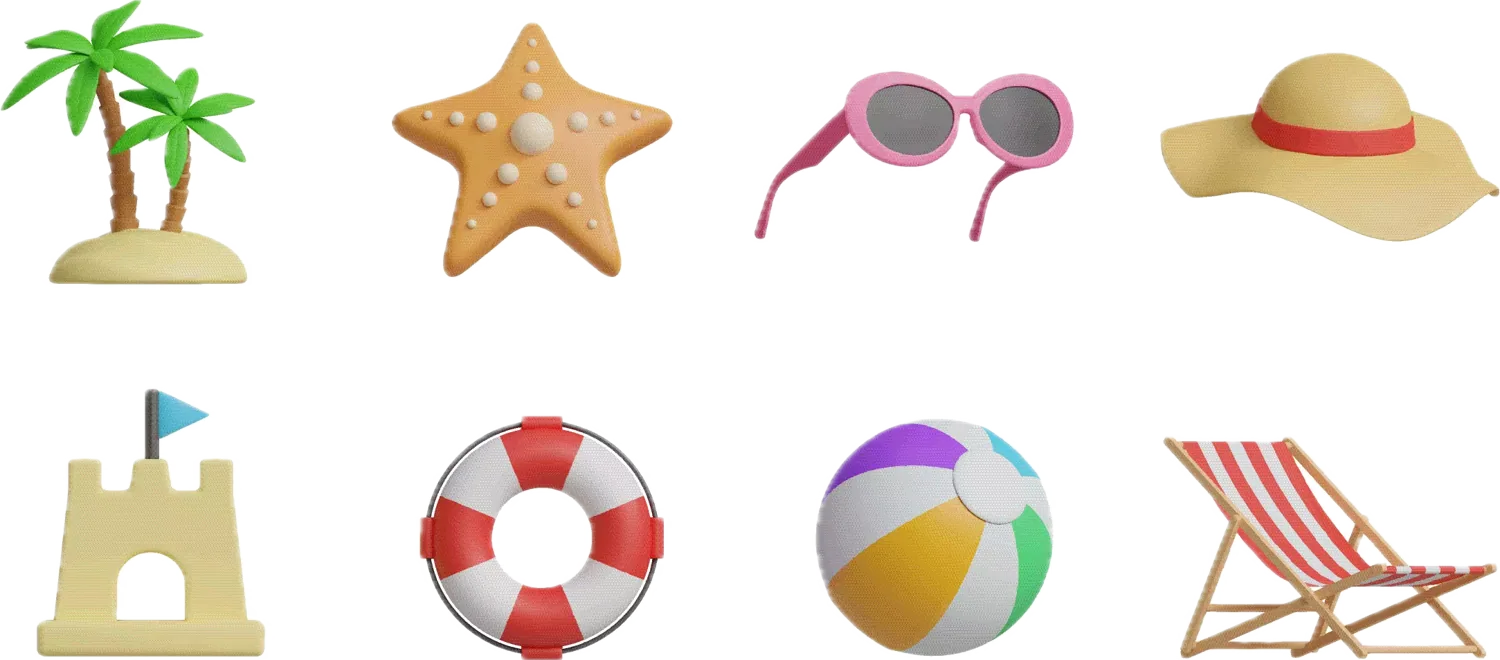
  Se o sol está brilhando, que item desta foto devo usar?
</td>

<td style={{verticalAlign: "top", paddingLeft: "12px"}}> Quando o sol está brilhando, você deve usar os óculos de sol rosa da foto.  Óculos de sol podem efetivamente bloquear a luz forte, reduzir os danos UV em seus olhos, e ajudar a proteger sua visão e melhorar o conforto visual em luz solar brilhante.</td>
</tr> </table>
Gerar conteúdo criativo de imagens
Gerar descrições vívidas de texto baseado em imagens ou conteúdo de vídeo. Isso é adequado para cenários criativos, como escrita de histórias, redação de textos e roteiros de vídeo curtos.
<table style={{width: "100%", borderCollapse: "collapse", tableLayout: "fixed"}}> <tr> <th style={{textAlign: "left", width: "50%", paddingRight: "12px", paddingBottom: "8px"}}> Entrada</th> <th style={{textAlign: "left", paddingLeft: "12px", paddingBottom: "8px"}}> Saída</th> </tr>
<tr>
<td style={{verticalAlign: "top", paddingRight: "12px"}}>
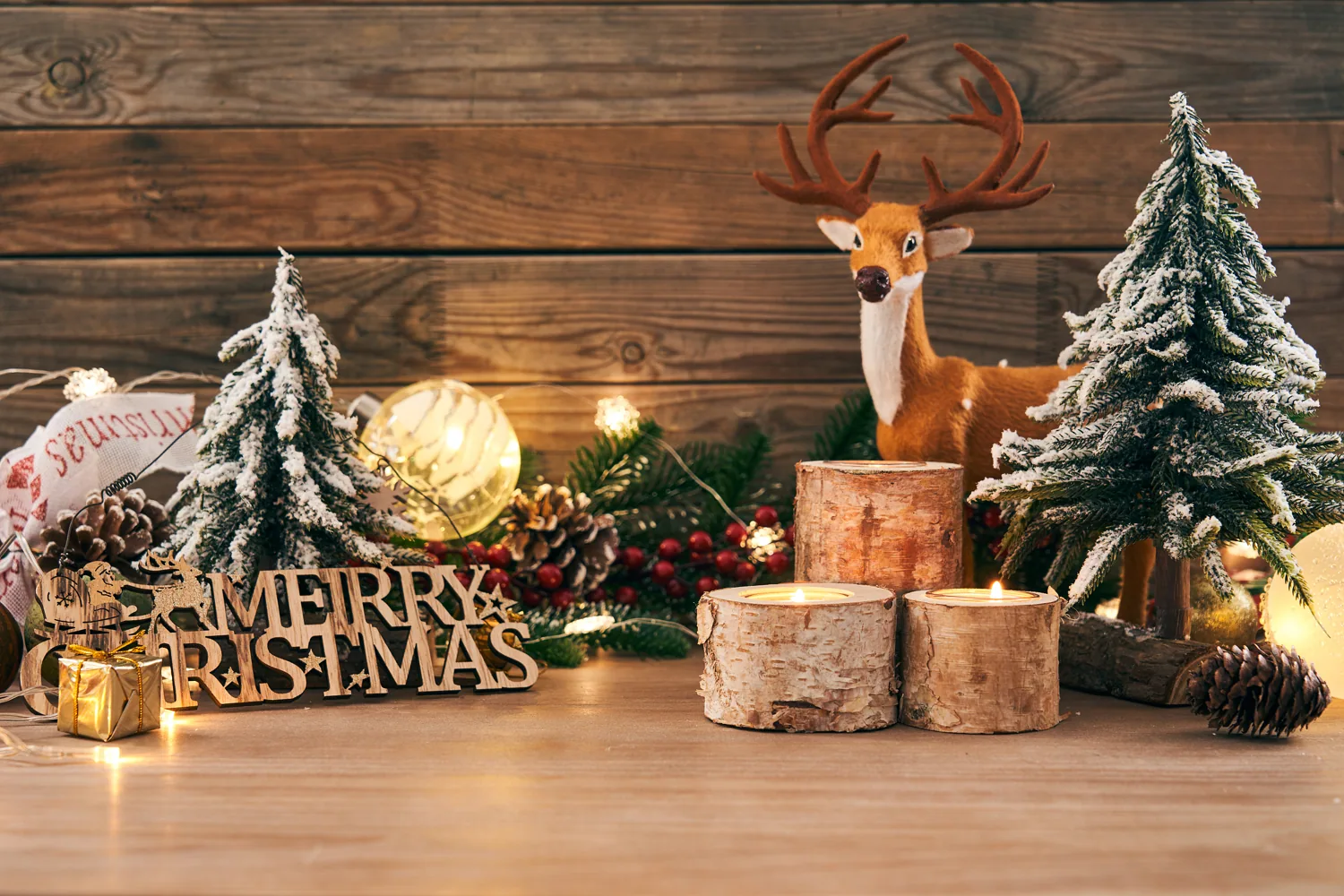
  Por favor, me ajude a escrever um post interessante baseado no conteúdo da foto.
</td>

<td style={{verticalAlign: "top", paddingLeft: "12px"}}> Feliz Natal do nosso pequeno país das maravilhas do inverno!  Estamos nos preparando para as férias com luzes quentes, pinhas e muito charme rústico.  Espero que sua temporada esteja cheia de tanto calor e alegria!</td>
</tr> </table>
Extrair texto e informação
Reconhecer texto e fórmulas em imagens ou extrair informações de recibos, certificados e formulários, com suporte para a saída de texto formatado. O Qwen3-VL Modelo expandiu seu suporte linguístico para 33 idiomas. Para uma lista de idiomas suportados, veja [Modelos de visão] (/developer-guides/getting-started/vision-models).
<table style={{width: "100%", borderCollapse: "collapse", tableLayout: "fixed"}}> <tr> <th style={{textAlign: "left", width: "50%", paddingRight: "12px", paddingBottom: "8px"}}> Entrada</th> <th style={{textAlign: "left", paddingLeft: "12px", paddingBottom: "8px"}}> Saída</th> </tr>
<tr>
<td style={{verticalAlign: "top", paddingRight: "12px"}}>
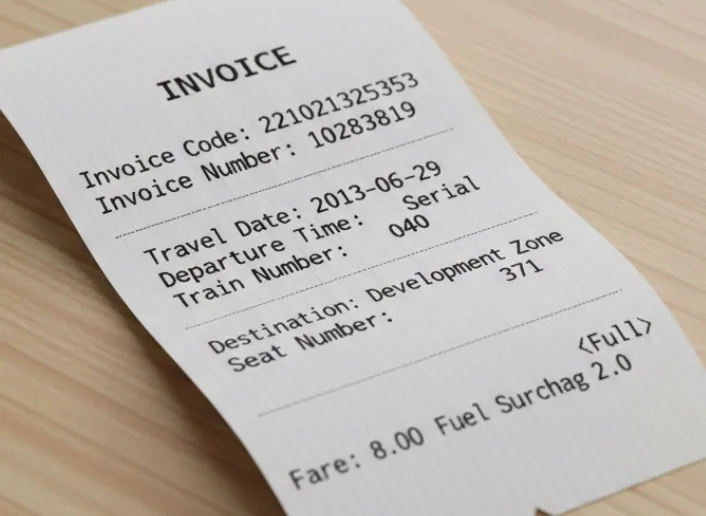
  Extraia o seguinte da imagem: \['Código de Fatura', 'Número de Fatura', 'Destino', 'Sobrecarga de combustível', 'Fare', 'Data de Viagem', 'Hora de Saída', 'Número de Trem', 'Número de Setor']. Por favor, saia em formato JSON.
</td>

<td style={{verticalAlign: "top", paddingLeft: "12px"}}>
  <code>
    {`{"Invoice Code": "221021325353", "Invoice Number": "10283819", "Destination": "Development Zone", "Fuel Surcharge": "2.0", "Fare": "8.00<Full>", "Travel Date": "2013-06-29", "Departure Time": "Serial", "Train Number": "040", "Seat Number": "371"}`}
  </code>
</td>
</tr> </table>
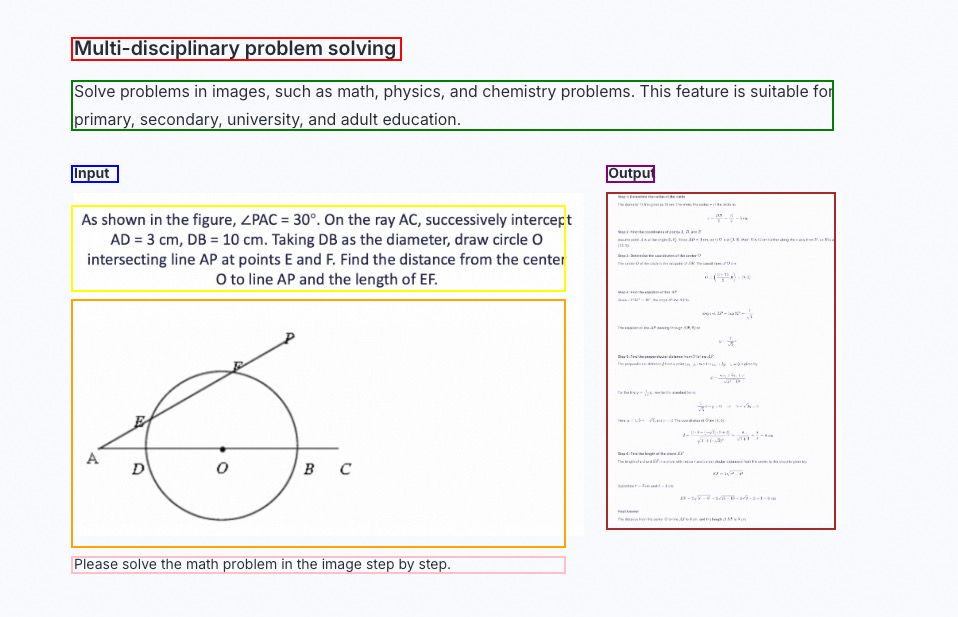
Resolva problemas visuais complexos.
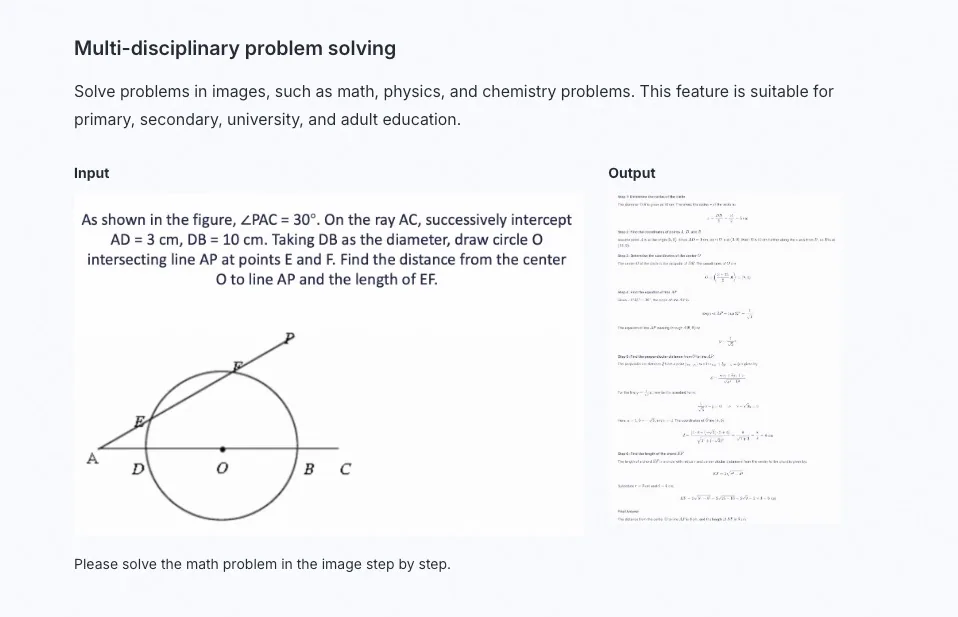
Resolver problemas em imagens, como matemática, física e química. Esta característica é adequada para educação primária, secundária, universitária e adulta.
<table style={{width: "100%", borderCollapse: "collapse", tableLayout: "fixed"}}> <tr> <th style={{textAlign: "left", width: "68%", paddingRight: "12px", paddingBottom: "8px"}}> Entrada</th> <th style={{textAlign: "left", width: "32%", paddingLeft: "12px", paddingBottom: "8px"}}> Saída</th> </tr>
<tr>
<td style={{verticalAlign: "top", paddingRight: "12px"}}>
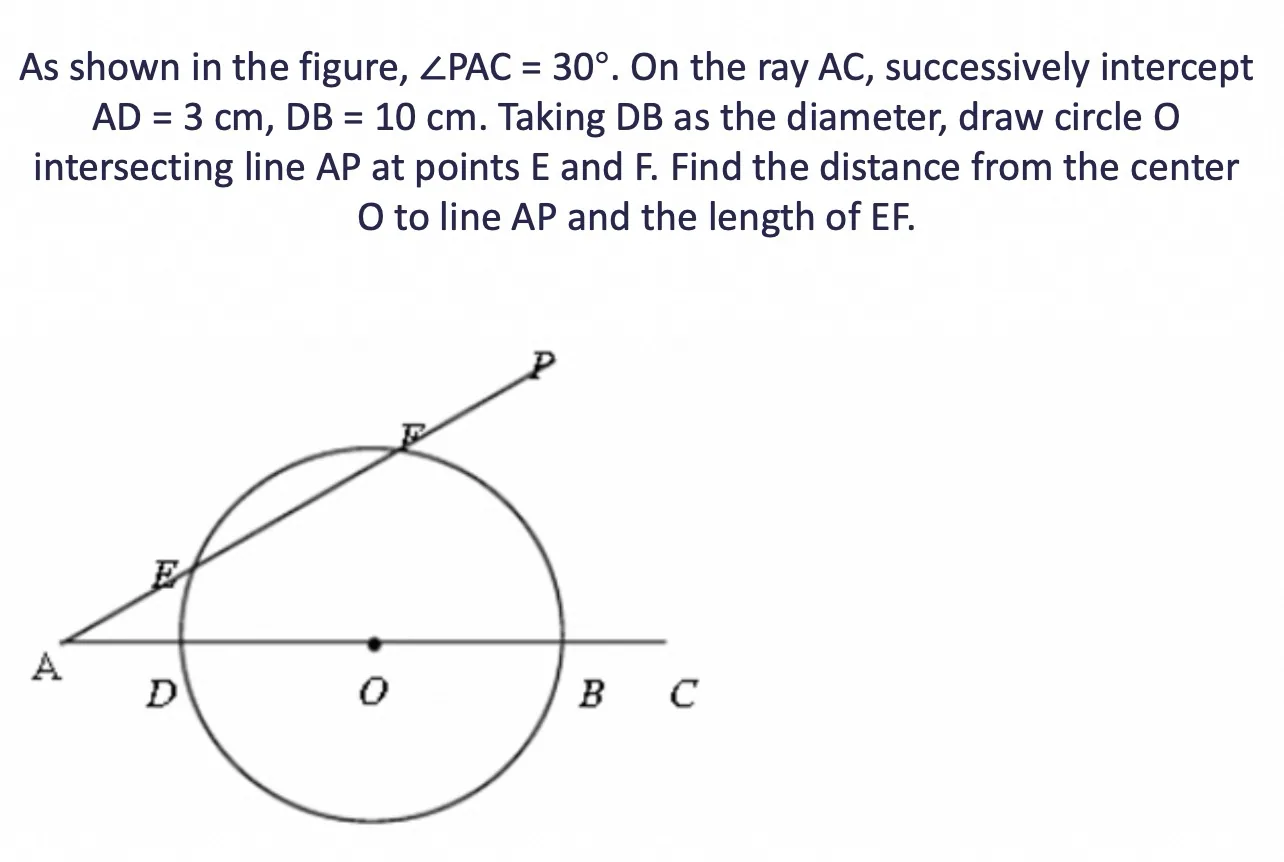
Por favor, resolva o problema de matemática na imagem passo a passo.
</td>
<td style={{verticalAlign: "top", paddingLeft: "12px"}}>
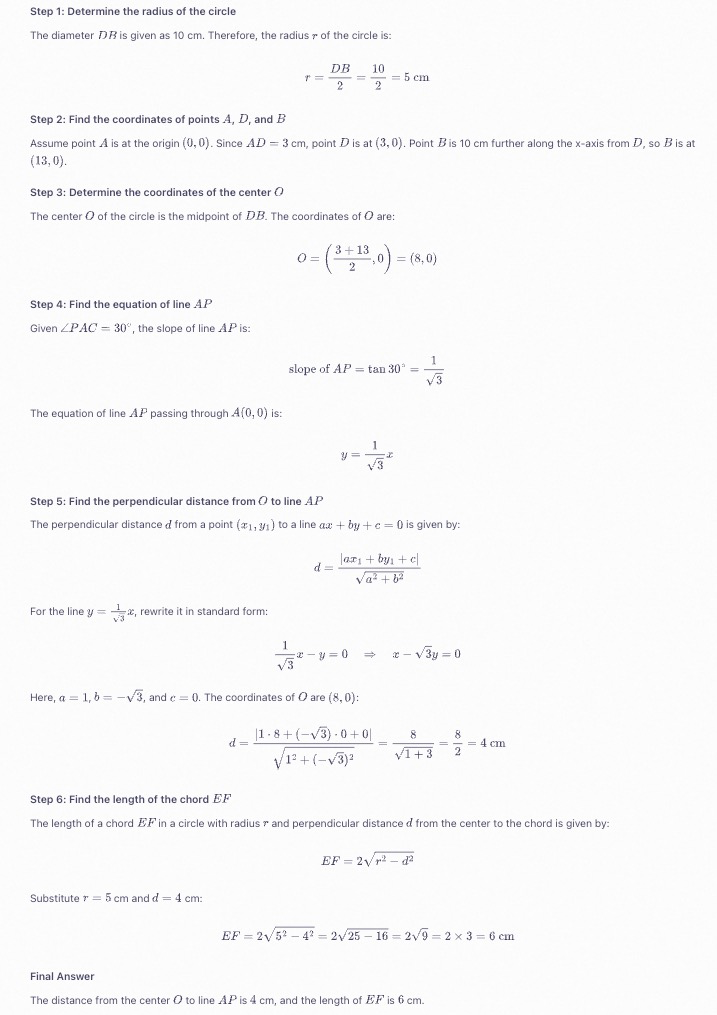
</td>
</tr> </table>
Gere código de projetos visuais.
Gere código de imagens ou vídeos. Isso pode ser usado para criar HTML, CSS e código JS a partir de rascunhos de design, screenshots de sites, e muito mais.
<table style={{width: "100%", borderCollapse: "collapse", tableLayout: "fixed"}}> <tr> <th style={{textAlign: "left", width: "44%", paddingRight: "12px", paddingBottom: "8px"}}> Entrada</th> <th style={{textAlign: "left", width: "56%", paddingLeft: "12px", paddingBottom: "8px"}}> Saída</th> </tr>
<tr>
<td style={{verticalAlign: "top", paddingRight: "12px"}}>
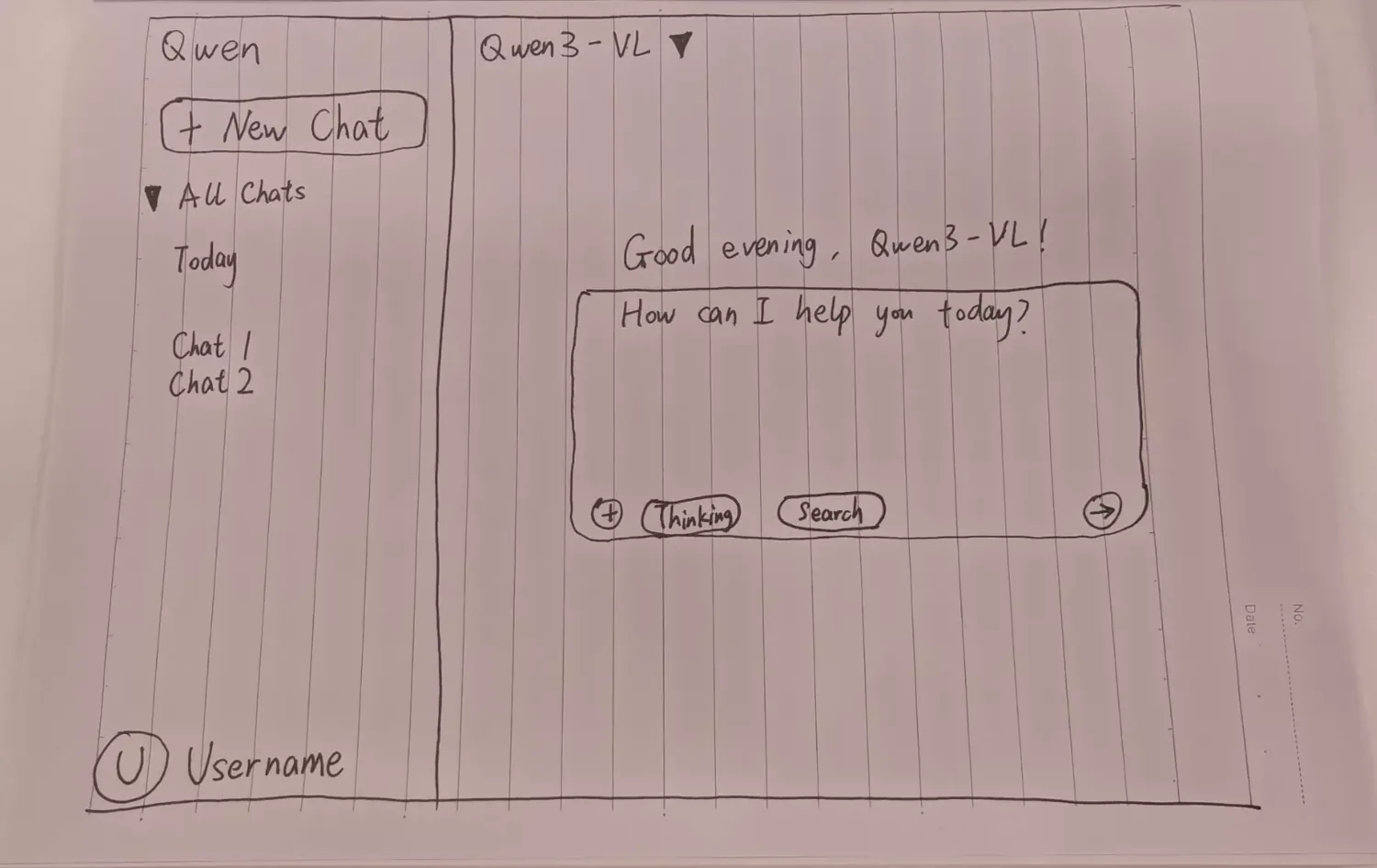
Projete uma página usando HTML e CSS baseado no meu esboço, com preto como a cor principal.
</td>
<td style={{verticalAlign: "top", paddingLeft: "12px"}}>
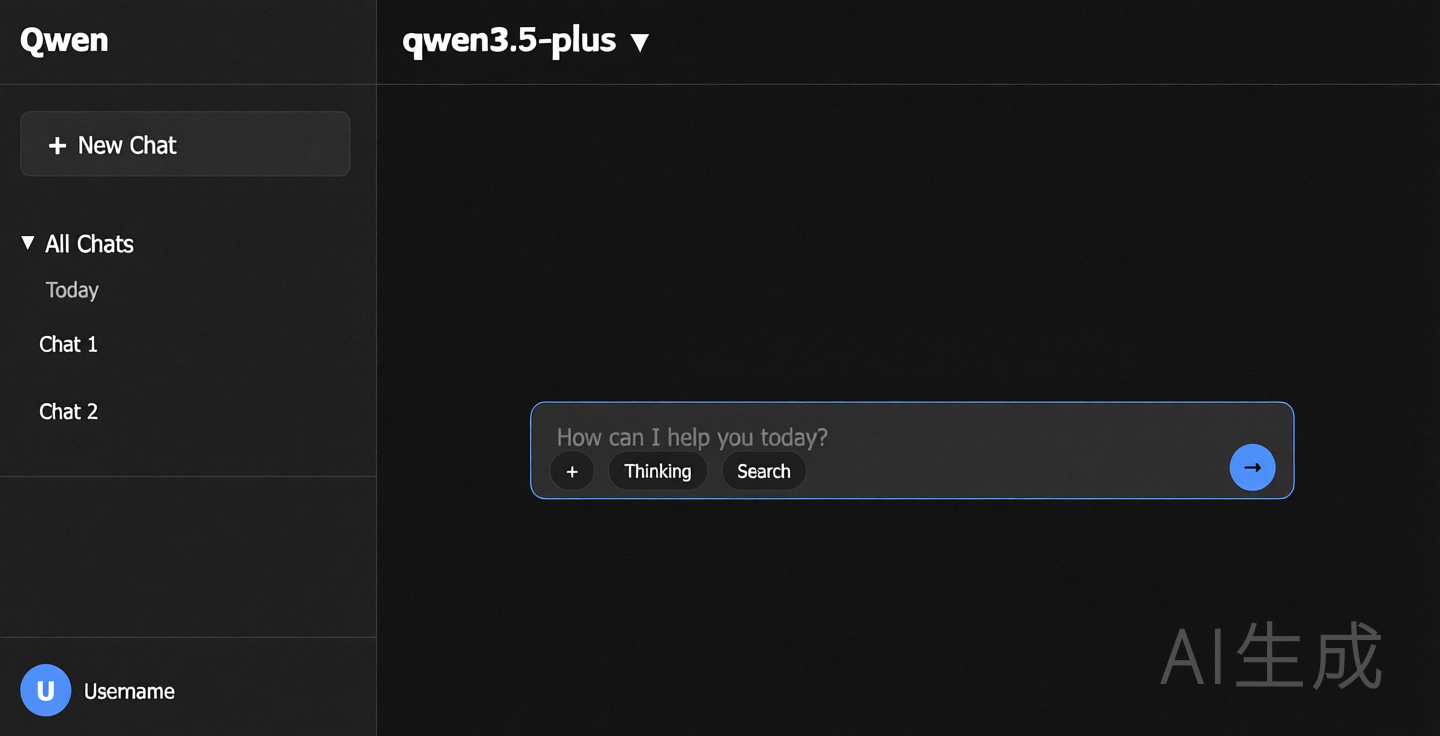
**Previsão da página web**
</td>
</tr> </table>
Localizar objetos em imagens
O modelo suporta localização 2D e 3D para determinar orientação de objeto, mudanças de perspectiva e relações de oclusão. Qwen3-VL Adiciona localização 3D.
Por Qwen2.5-VL, detecção de objetos é robusta dentro de 480x480 a 2560x2560 resolução. Fora desta faixa, a precisão pode diminuir com a ocasional deriva de caixa. Para desenhar os resultados de localização na imagem original, veja [FAQ] (#faq).
<table style={{width: "100%", borderCollapse: "collapse", tableLayout: "fixed"}}> <tr> <th style={{textAlign: "left", width: "50%", paddingRight: "12px", paddingBottom: "8px"}}> Entrada</th> <th style={{textAlign: "left", width: "50%", paddingLeft: "12px", paddingBottom: "8px"}}> Saída</th> </tr>
<tr> <td style={{verticalAlign: "top", paddingRight: "12px"}}> ** Localização 2D**
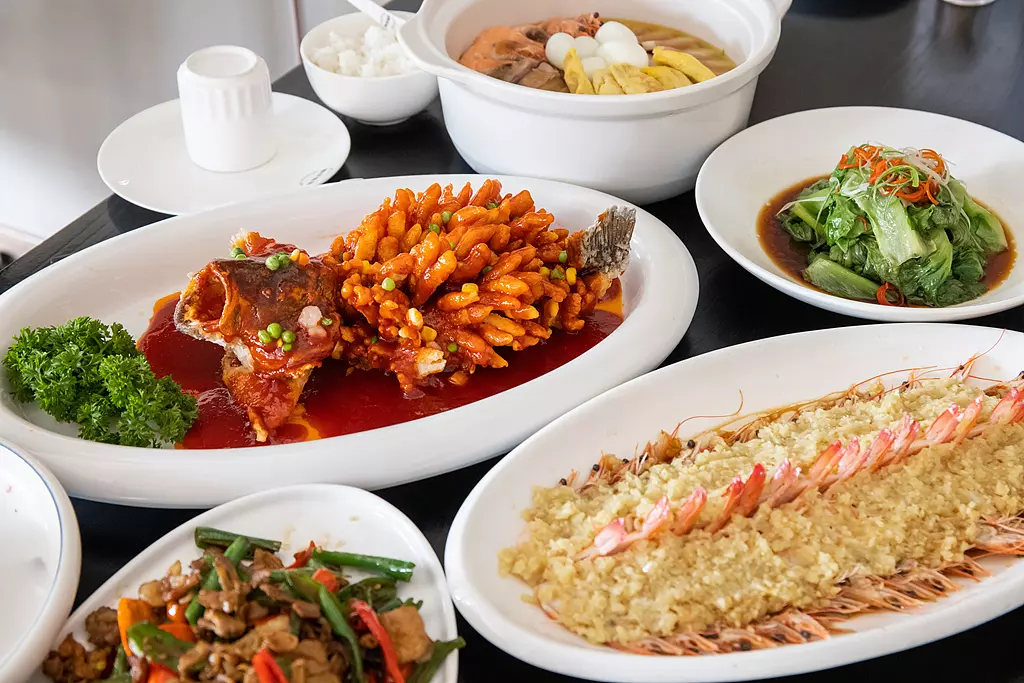
- Detecte todos os itens de comida na imagem e desempenhe as coordenadas de bbox no formato JSON.
-
Localize todos os itens da imagem como pontos e desempenhe suas coordenadas de ponto em formato XML. </td>
<td style={{verticalAlign: "top", paddingLeft: "12px"}}> Visualização dos resultados de localização 2D
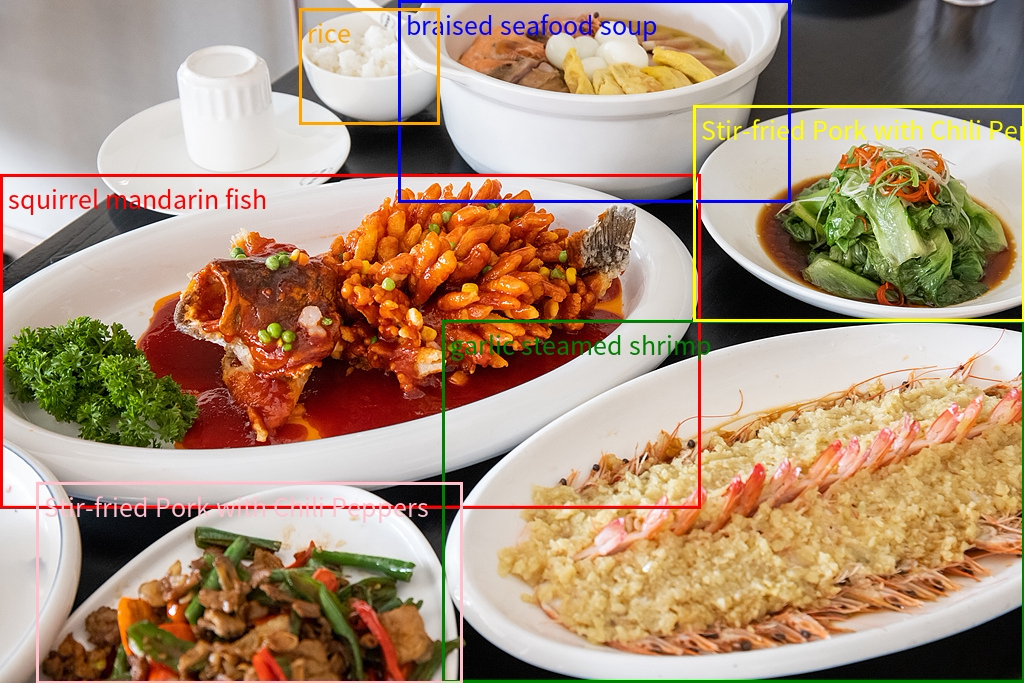</td> </tr> </table>
3D localization
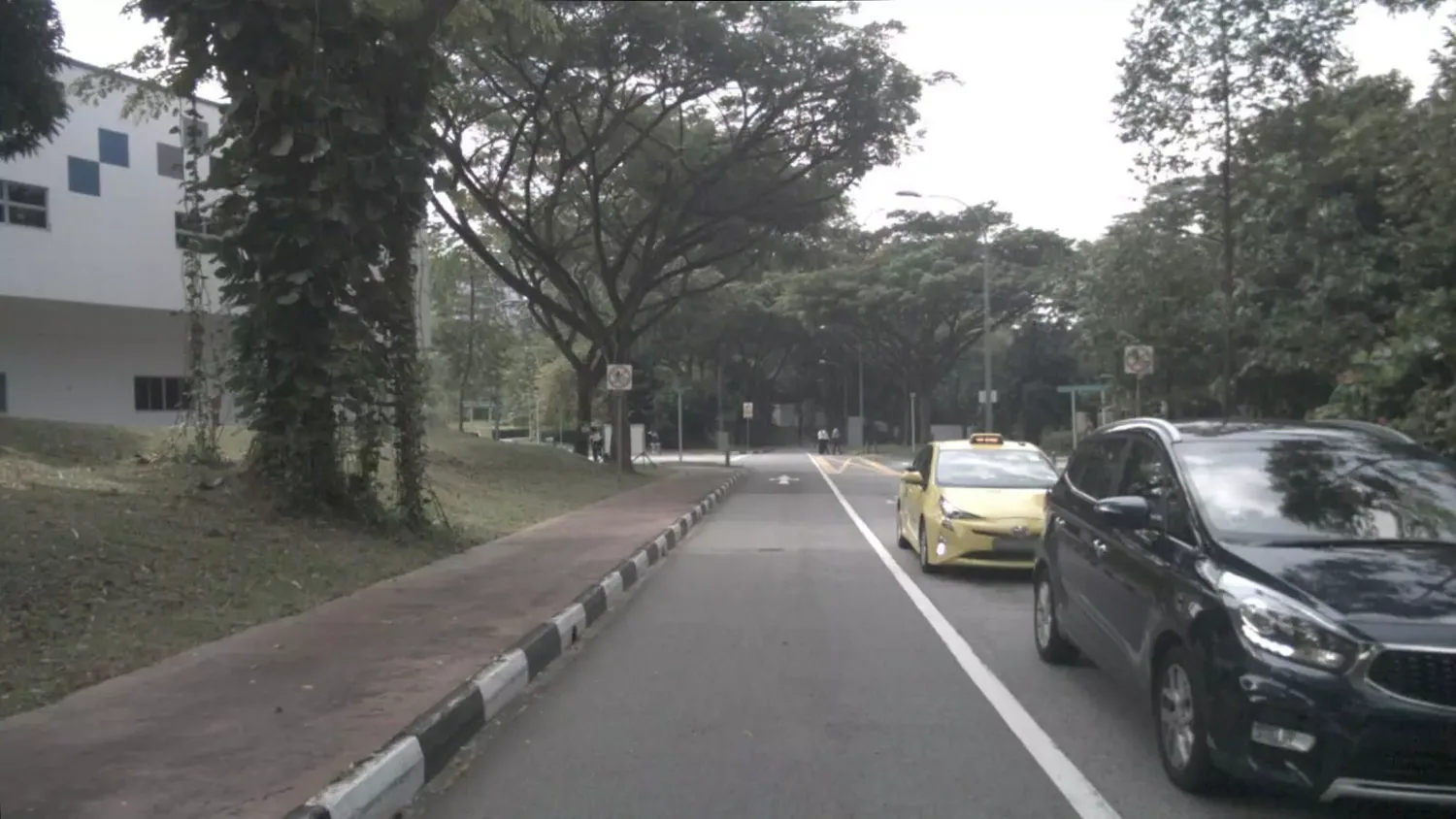
Detecte o carro na imagem e preveja sua posição 3D. Saída JSON: [{"bbox_3d": [x_center, y_center, z_center, x_size, y_size, z_size, roll, pitch, yaw], "label": "category"}].
Visualization of 3D localization results
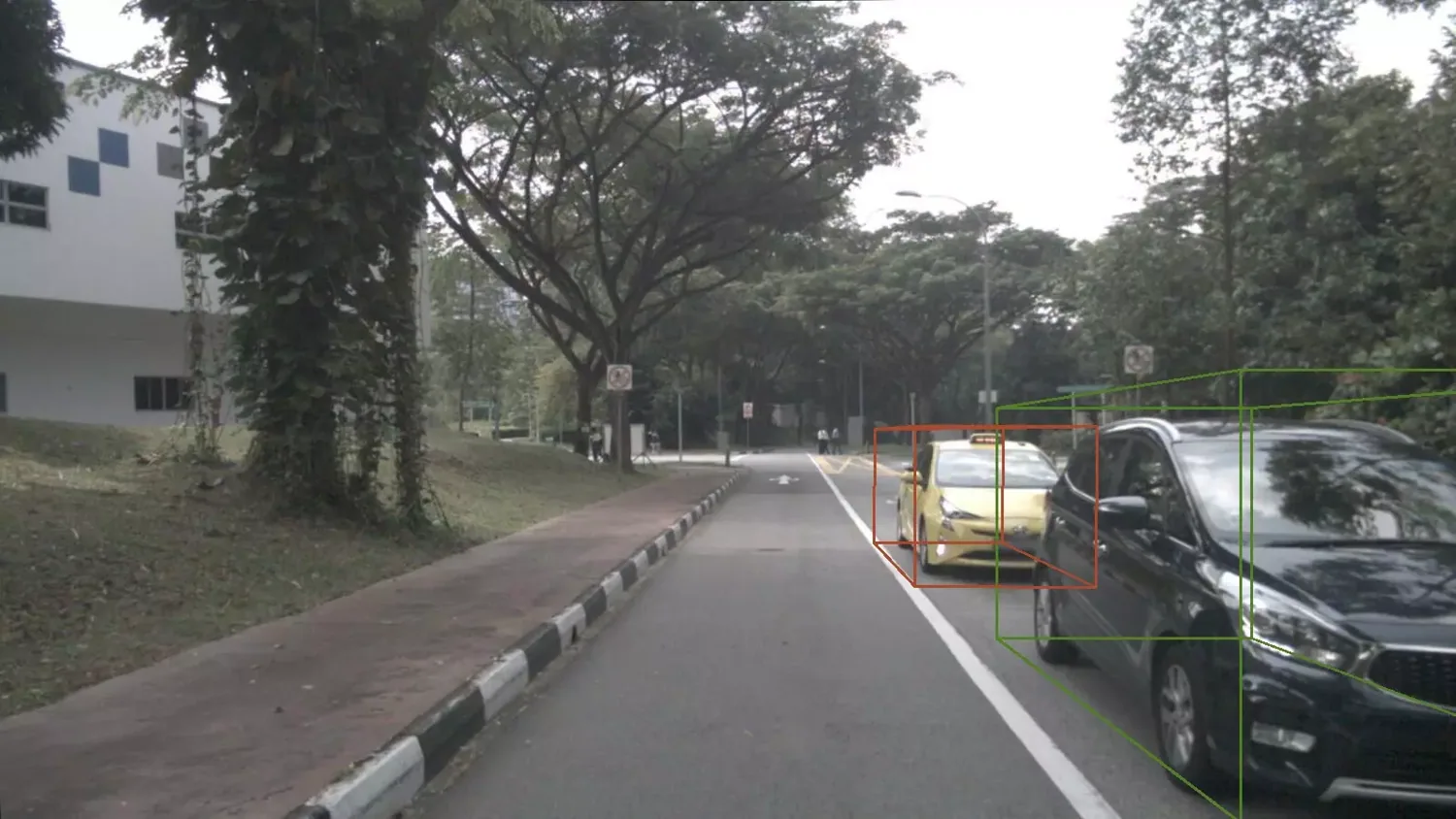
Processar documentos e PDFs
Processar documentos baseados em imagens, como digitalizações ou PDFs de imagens, em QwenVL HTML ou QwenVL Formato de marcação. Este formato não só reconhece com precisão o texto, mas também obtém a informação de posição de elementos como imagens e tabelas. O Qwen3-VL O modelo adiciona a habilidade de analisar documentos no formato Markdown.
As instruções recomendadas são: qwenvl html (para analisar em formato HTML) ou qwenvl markdown (para analisar no formato Markdown).
<table style={{width: "100%", borderCollapse: "collapse", tableLayout: "fixed"}}> <tr> <th style={{textAlign: "left", width: "48%", paddingRight: "12px", paddingBottom: "8px"}}> Entrada</th> <th style={{textAlign: "left", width: "52%", paddingLeft: "12px", paddingBottom: "8px"}}> Saída</th> </tr>
<tr>
<td style={{verticalAlign: "top", paddingRight: "12px"}}>
qwenvl -Marcando.
</td>
<td style={{verticalAlign: "top", paddingLeft: "12px"}}>
**Visualização dos resultados**
</td>
</tr> </table>
Analise o conteúdo do vídeo.
Analise conteúdo de vídeo, como localizar eventos específicos e obter datas, ou gerar resumos de períodos de tempo chave.
<table style={{width: "100%", borderCollapse: "collapse", tableLayout: "fixed"}}> <tr> <th style={{textAlign: "left", width: "50%", paddingRight: "12px", paddingBottom: "8px"}}> Entrada</th> <th style={{textAlign: "left", paddingLeft: "12px", paddingBottom: "8px"}}> Saída</th> </tr>
<tr> <td style={{verticalAlign: "top", paddingRight: "12px"}}> <video src="https://help-static-aliyun-doc.aliyuncs.com/file-manage-files/zh-CN/20250307/ozcoym/hailuo_1060827889_RF.hd.mp4" controls style={{display: "block", width: "100%", margin: "0 0 8px 0"}} />
  Por favor, descreva a série de ações da pessoa no vídeo.  Saída em formato JSON com início, fim e evento. Use o HH: mm:ss para timetamps.
</td>

<td style={{verticalAlign: "top", paddingLeft: "12px"}}>
  <code>
    {`{"events": [{"start_time": "00:00:00", "end_time": "00:00:05", "event": "The person walks towards the table holding a cardboard box and places it on the table."}, {"start_time": "00:00:05", "end_time": "00:00:15", "event": "The person picks up a scanner and scans the label on the cardboard box."}, {"start_time": "00:00:15", "end_time": "00:00:21", "event": "The person puts the scanner back in its place and then picks up a pen to write information in a notebook."}]}`}
  </code>
</td>
</tr> </table>
Trabalhe com conteúdo visual.
Modo de pensar
Para ativar/desativar, saída de streaming, e thinking_budget Veja, veja./developer-guides/text-generation/thinking).
Visão padrão: pensar é off** para qwen3-vl-plus e qwen3.6-flash, on para Qwen3.5 e séries posteriores. Modelos com um -thinking Sufixo sempre pensa.
Trabalhe com várias imagens.
Passe várias imagens em um único pedido para tarefas como comparação de produtos e processamento de documentos de várias páginas. Inclui vários objetos de imagem na user message's content Array.
Por pedido: até 256 imagens quando passadas como ** URL pública** ou ** caminho local de arquivos**, e até 250 imagens quando passadas como Base64-codificado imagens. Independentemente, os tokens totais para todas as imagens e texto devem ficar abaixo da entrada máxima do modelo (limite combinado de token de imagem e texto).
OpenAI compatible
Python
    ```python
    import os
    from openai import OpenAI

    client = OpenAI(
      api_key=os.getenv("DASHSCOPE_API_KEY"),
      base_url="https://maas.qwencloudapi.com/compatible-mode/v1",
    )

    completion = client.chat.completions.create(
      model="qwen3.8-max",
      messages=[
        {"role": "user","content": [
          {"type": "image_url","image_url": {"url": "https://help-static-aliyun-doc.aliyuncs.com/file-manage-files/zh-CN/20241022/emyrja/dog_and_girl.jpeg"},},
          {"type": "image_url","image_url": {"url": "https://dashscope.oss-cn-beijing.aliyuncs.com/images/tiger.png"},},
          {"type": "text", "text": "What do these images depict?"},
          ],
        }
      ],
    )

    print(completion.choices[0].message.content)
    ```

    ? Responder ?

    ```
    Image 1 shows a scene of a woman and a Labrador retriever interacting on a beach. The woman is wearing a plaid shirt and sitting on the sand, shaking hands with the dog. The background is ocean waves and the sky, and the whole picture is filled with a warm and pleasant atmosphere.

    Image 2 shows a scene of a tiger walking in a forest. The tiger's coat is orange with black stripes, and it is stepping forward. The surroundings are dense trees and vegetation, and the ground is covered with fallen leaves. The whole picture gives a feeling of wild nature.
    ```
Node.js
    ```javascript
    import OpenAI from "openai";

    const openai = new OpenAI(
      {
        apiKey: process.env.DASHSCOPE_API_KEY,
        baseURL: "https://maas.qwencloudapi.com/compatible-mode/v1"
      }
    );

    async function main() {
      const response = await openai.chat.completions.create({
        model: "qwen3.8-max",
        messages: [
              {role: "user",content: [
          {type: "image_url",image_url: {"url": "https://help-static-aliyun-doc.aliyuncs.com/file-manage-files/zh-CN/20241022/emyrja/dog_and_girl.jpeg"}},
          {type: "image_url",image_url: {"url": "https://dashscope.oss-cn-beijing.aliyuncs.com/images/tiger.png"}},
          {type: "text", text: "What do these images depict?" },
        ]}]
      });
      console.log(response.choices[0].message.content);
    }

    main()
    ```

    ? Responder ?

    ```
    In the first image, a person and a dog are interacting on a beach. The person is wearing a plaid shirt, and the dog is wearing a collar. They seem to be shaking hands or giving a high-five.

    In the second image, a tiger is walking in a forest. The tiger's coat is orange with black stripes, and the background is green trees and vegetation.
    ```
curl
    ```bash
    curl -X POST https://maas.qwencloudapi.com/compatible-mode/v1/chat/completions \
    -H "Authorization: Bearer $DASHSCOPE_API_KEY" \
    -H 'Content-Type: application/json' \
    -d '{
      "model": "qwen3.8-max",
      "messages": [
        {
          "role": "user",
          "content": [
            {
              "type": "image_url",
              "image_url": {
                "url": "https://help-static-aliyun-doc.aliyuncs.com/file-manage-files/zh-CN/20241022/emyrja/dog_and_girl.jpeg"
              }
            },
            {
              "type": "image_url",
              "image_url": {
                "url": "https://dashscope.oss-cn-beijing.aliyuncs.com/images/tiger.png"
              }
            },
            {
              "type": "text",
              "text": "What do these images depict?"
            }
          ]
        }
      ]
    }'
    ```

    ? Responder ?

    ```
    Image 1 shows a scene of a woman and a Labrador retriever interacting on a beach. The woman is wearing a plaid shirt and sitting on the sand, shaking hands with the dog. The background is ocean views and a sunset sky, and the whole picture looks very warm and harmonious.

    Image 2 shows a scene of a tiger walking in a forest. The tiger's coat is orange with black stripes, and it is stepping forward. The surroundings are dense trees and vegetation, and the ground is covered with fallen leaves. The whole picture is full of natural wildness and vitality.
    ```
Resposta completa do JSON
      ```json
      {
        "choices": [
          {
            "message": {
              "content": "Image 1 shows a scene of a woman and a Labrador retriever interacting on a beach. The woman is wearing a plaid shirt and sitting on the sand, shaking hands with the dog. The background is ocean views and a sunset sky, and the whole picture looks very warm and harmonious.\n\nImage 2 shows a scene of a tiger walking in a forest. The tiger's coat is orange with black stripes, and it is stepping forward. The surroundings are dense trees and vegetation, and the ground is covered with fallen leaves. The whole picture is full of natural wildness and vitality.",
              "role": "assistant"
            },
            "finish_reason": "stop",
            "index": 0,
            "logprobs": null
          }
        ],
        "object": "chat.completion",
        "usage": {
          "prompt_tokens": 2497,
          "completion_tokens": 109,
          "total_tokens": 2606
        },
        "created": 1725948561,
        "system_fingerprint": null,
        "model": "qwen3.8-max",
        "id": "chatcmpl-0fd66f46-b09e-9164-a84f-3ebbbedbac15"
      }
      ```
DashScope
Python
    ```python
    import os
    import dashscope

    dashscope.base_http_api_url = 'https://maas.qwencloudapi.com/api/v1'

    messages = [
      {
        "role": "user",
        "content": [
          {"image": "https://help-static-aliyun-doc.aliyuncs.com/file-manage-files/zh-CN/20241022/emyrja/dog_and_girl.jpeg"},
          {"image": "https://dashscope.oss-cn-beijing.aliyuncs.com/images/tiger.png"},
          {"text": "What do these images depict?"}
        ]
      }
    ]

    response = dashscope.MultiModalConversation.call(
      api_key=os.getenv('DASHSCOPE_API_KEY'),
      model='qwen3.8-max',
      messages=messages
    )

    print(response.output.choices[0].message.content[0]["text"])
    ```

    ? Responder ?

    ```
    These images show some animals and natural scenes. In the first image, a person and a dog are interacting on a beach. The second image is of a tiger walking in a forest.
    ```
Java
    ```java
    import java.util.Arrays;
    import java.util.Collections;
    import com.alibaba.dashscope.aigc.multimodalconversation.MultiModalConversation;
    import com.alibaba.dashscope.aigc.multimodalconversation.MultiModalConversationParam;
    import com.alibaba.dashscope.aigc.multimodalconversation.MultiModalConversationResult;
    import com.alibaba.dashscope.common.MultiModalMessage;
    import com.alibaba.dashscope.common.Role;
    import com.alibaba.dashscope.exception.ApiException;
    import com.alibaba.dashscope.exception.NoApiKeyException;
    import com.alibaba.dashscope.exception.UploadFileException;
    import com.alibaba.dashscope.utils.Constants;

    public class Main {
      static {
        Constants.baseHttpApiUrl="https://maas.qwencloudapi.com/api/v1";
      }
      public static void simpleMultiModalConversationCall()
          throws ApiException, NoApiKeyException, UploadFileException {
        MultiModalConversation conv = new MultiModalConversation();
        MultiModalMessage userMessage = MultiModalMessage.builder().role(Role.USER.getValue())
            .content(Arrays.asList(
            Collections.singletonMap("image", "https://help-static-aliyun-doc.aliyuncs.com/file-manage-files/zh-CN/20241022/emyrja/dog_and_girl.jpeg"),
            Collections.singletonMap("image", "https://dashscope.oss-cn-beijing.aliyuncs.com/images/tiger.png"),
            Collections.singletonMap("text", "What do these images depict?"))).build();
        MultiModalConversationParam param = MultiModalConversationParam.builder()
            .apiKey(System.getenv("DASHSCOPE_API_KEY"))
            .model("qwen3.8-max")
            .messages(Arrays.asList(userMessage))
            .build();
        MultiModalConversationResult result = conv.call(param);
        System.out.println(result.getOutput().getChoices().get(0).getMessage().getContent().get(0).get("text"));    }
      public static void main(String[] args) {
        try {
          simpleMultiModalConversationCall();
        } catch (ApiException | NoApiKeyException | UploadFileException e) {
          System.out.println(e.getMessage());
        }
        System.exit(0);
      }
    }
    ```

    ? Responder ?

    ```
    These images show some animals and natural scenes.

    1. First image: A woman and a dog are interacting on a beach. The woman is wearing a plaid shirt and sitting on the sand, and the dog is wearing a collar and extending its paw to shake hands with the woman.
    2. Second image: A tiger is walking in a forest. The tiger's coat is orange with black stripes, and the background is trees and leaves.
    ```
curl
    ```bash
    curl --location 'https://maas.qwencloudapi.com/api/v1/services/aigc/multimodal-generation/generation' \
    --header "Authorization: Bearer $DASHSCOPE_API_KEY" \
    --header 'Content-Type: application/json' \
    --data '{
      "model": "qwen3.8-max",
      "input":{
        "messages":[
          {
            "role": "user",
            "content": [
              {"image": "https://help-static-aliyun-doc.aliyuncs.com/file-manage-files/zh-CN/20241022/emyrja/dog_and_girl.jpeg"},
              {"image": "https://dashscope.oss-cn-beijing.aliyuncs.com/images/tiger.png"},
              {"text": "What do these images show?"}
            ]
          }
        ]
      }
    }'
    ```

    ? Responder ?

    ```
    These images show some animals and natural scenes. In the first image, a person and a dog are interacting on a beach. The second image is of a tiger walking in a forest.
    ```
Resposta completa do JSON
      ```json
      {
        "output": {
          "choices": [
            {
              "finish_reason": "stop",
              "message": {
                "role": "assistant",
                "content": [
                  {
                    "text": "These images show some animals and natural scenes. In the first image, a person and a dog are interacting on a beach. The second image is of a tiger walking in a forest."
                  }
                ]
              }
            }
          ]
        },
        "usage": {
          "output_tokens": 81,
          "input_tokens": 1277,
          "image_tokens": 2497
        },
        "request_id": "ccf845a3-dc33-9cda-b581-20fe7dc23f70"
      }
      ```
Analise o conteúdo do vídeo.
Modelos de compreensão visual suportam compreensão de conteúdo de vídeo. Você pode fornecer arquivos na forma de uma lista de imagens (quadros de vídeo) ou um arquivo de vídeo. O seguinte é um exemplo de código para entender uma lista de vídeo ou imagem online especificada por uma URL. Para mais informações sobre limites de vídeo ou o número de imagens que podem ser passadas em uma lista de imagens, veja o [Limites de vídeo] (#input-file-limits) seção.
Recomendamos usar a última ou recente versão do modelo para melhor desempenho em entender arquivos de vídeo.
Video file
 Modelos de compreensão visual analisam conteúdo extraindo uma sequência de quadros de um vídeo.  Você pode controlar a política de extração de quadros usando os seguintes dois parâmetros:

- Controla a frequência.  Uma moldura a cada um. `1/fps`  segundos. O intervalo de valor é \[0.1, 10] e o valor padrão é 2.0.
  - Cenas de movimento de alta velocidade, definir um valor FPS mais elevado para capturar mais detalhes.
  -  Estatic ou vídeos longos, defina um valor FPS menor para eficiência.
- O limite superior dos quadros extraídos.  Quando o número calculado com base em fps excede max\_frames, o sistema automaticamente e uniformemente amostras quadros para permanecer dentro do limite. ** Este parâmetro é ativo apenas para o DashScope SDK.**
OpenAI compatible
Quando você coloca diretamente um arquivo de vídeo em um modelo de compreensão visual usando o método OpenAI SDK ou HTTP, você deve definir o `"type"` parâmetro na mensagem do usuário para `"video_url"`.
Python
        ```python
        import os
        from openai import OpenAI

        client = OpenAI(
          api_key=os.getenv("DASHSCOPE_API_KEY"),
          base_url="https://maas.qwencloudapi.com/compatible-mode/v1",
        )
        completion = client.chat.completions.create(
          model="qwen3.8-max",
          messages=[
            {
              "role": "user",
              "content": [
                {
                  "type": "video_url",
                  "video_url": {
                    "url": "https://help-static-aliyun-doc.aliyuncs.com/file-manage-files/zh-CN/20241115/cqqkru/1.mp4"
                  },
                  "fps": 2
                },
                {
                  "type": "text",
                  "text": "Summarize what happens in this video"
                }
              ]
            }
          ]
        )

        print(completion.choices[0].message.content)
        ```
Node.js
        ```javascript
        import OpenAI from "openai";

        const openai = new OpenAI(
          {
            apiKey: process.env.DASHSCOPE_API_KEY,
            baseURL: "https://maas.qwencloudapi.com/compatible-mode/v1"
          }
        );

        async function main() {
          const response = await openai.chat.completions.create({
            model: "qwen3.8-max",
            messages: [
              {
                role: "user",
                content: [
                  {
                    type: "video_url",
                    video_url: {
                      "url": "https://help-static-aliyun-doc.aliyuncs.com/file-manage-files/zh-CN/20241115/cqqkru/1.mp4"
                    },
                    "fps": 2
                  },
                  {
                    type: "text",
                    text: "Summarize what happens in this video"
                  }
                ]
              }
            ]
          });

          console.log(response.choices[0].message.content);
        }

        main();
        ```
curl
        ```bash
        curl -X POST https://maas.qwencloudapi.com/compatible-mode/v1/chat/completions \
          -H "Authorization: Bearer $DASHSCOPE_API_KEY" \
          -H 'Content-Type: application/json' \
          -d '{
            "model": "qwen3.8-max",
            "messages": [
              {
                "role": "user",
                "content": [
                  {
                    "type": "video_url",
                    "video_url": {
                      "url": "https://help-static-aliyun-doc.aliyuncs.com/file-manage-files/zh-CN/20241115/cqqkru/1.mp4"
                    },
                    "fps":2
                  },
                  {
                    "type": "text",
                    "text": "Summarize what happens in this video"
                  }
                ]
              }
            ]
          }'
        ```
DashScope
Python
        ```python
        import dashscope
        import os

        dashscope.base_http_api_url = 'https://maas.qwencloudapi.com/api/v1'
        messages = [
          {"role": "user",
            "content": [
              {"video": "https://help-static-aliyun-doc.aliyuncs.com/file-manage-files/zh-CN/20241115/cqqkru/1.mp4","fps":2},
              {"text": "Summarize what happens in this video"}
            ]
          }
        ]

        response = dashscope.MultiModalConversation.call(
          api_key=os.getenv('DASHSCOPE_API_KEY'),
          model='qwen3.8-max',
          messages=messages
        )

        print(response.output.choices[0].message.content[0]["text"])
        ```
Java
        ```java
        import java.util.Arrays;
        import java.util.Collections;
        import java.util.HashMap;
        import java.util.Map;

        import com.alibaba.dashscope.aigc.multimodalconversation.MultiModalConversation;
        import com.alibaba.dashscope.aigc.multimodalconversation.MultiModalConversationParam;
        import com.alibaba.dashscope.aigc.multimodalconversation.MultiModalConversationResult;
        import com.alibaba.dashscope.common.MultiModalMessage;
        import com.alibaba.dashscope.common.Role;
        import com.alibaba.dashscope.exception.ApiException;
        import com.alibaba.dashscope.exception.NoApiKeyException;
        import com.alibaba.dashscope.exception.UploadFileException;
        import com.alibaba.dashscope.utils.Constants;

        public class Main {
          static {
            Constants.baseHttpApiUrl="https://maas.qwencloudapi.com/api/v1";
          }
          public static void simpleMultiModalConversationCall()
          throws ApiException, NoApiKeyException, UploadFileException {
            MultiModalConversation conv = new MultiModalConversation();
            Map<String, Object> params = new HashMap<>();
            params.put("video", "https://help-static-aliyun-doc.aliyuncs.com/file-manage-files/zh-CN/20241115/cqqkru/1.mp4");
            params.put("fps", 2);
            MultiModalMessage userMessage = MultiModalMessage.builder().role(Role.USER.getValue())
            .content(Arrays.asList(
            params,
            Collections.singletonMap("text", "Summarize what happens in this video"))).build();
            MultiModalConversationParam param = MultiModalConversationParam.builder()
            .apiKey(System.getenv("DASHSCOPE_API_KEY"))
            .model("qwen3.8-max")
            .messages(Arrays.asList(userMessage))
            .build();
            MultiModalConversationResult result = conv.call(param);
            System.out.println(result.getOutput().getChoices().get(0).getMessage().getContent().get(0).get("text"));
          }
          public static void main(String[] args) {
            try {
              simpleMultiModalConversationCall();
            } catch (ApiException | NoApiKeyException | UploadFileException e) {
              System.out.println(e.getMessage());
            }
            System.exit(0);
          }
        }
        ```
curl
        ```bash
        curl -X POST https://maas.qwencloudapi.com/api/v1/services/aigc/multimodal-generation/generation \
        -H "Authorization: Bearer $DASHSCOPE_API_KEY" \
        -H 'Content-Type: application/json' \
        -d '{
          "model": "qwen3.8-max",
          "input":{
            "messages":[
              {"role": "user","content": [{"video": "https://help-static-aliyun-doc.aliyuncs.com/file-manage-files/zh-CN/20241115/cqqkru/1.mp4","fps":2},
              {"text": "Summarize what happens in this video"}]}]}
        }'
        ```
Image list
Quando um vídeo é passado como uma lista de imagens (pré-extraídas quadros de vídeo), você pode usar o `fps` parâmetro para informar o modelo do intervalo de tempo entre os quadros de vídeo. Isso ajuda o modelo a entender melhor a sequência, duração e mudanças dinâmicas dos eventos. O modelo suporta especificar a taxa de quadros do vídeo original usando o `fps` parâmetro, que indica que os quadros de vídeo foram extraídos do vídeo original a cada `1/fps` segundos. Este parâmetro é suportado por **Qwen3.6**, **Qwen3-VL# E # #Qwen2.5-VL Modelos.
OpenAI compatible
Quando você introduz um vídeo como uma lista de imagens para um modelo de compreensão visual usando o OpenAI SDK ou um pedido HTTP, você deve definir o `"type"` parâmetro na mensagem do usuário para `"video"`.
Python
        ```python
        import os
        from openai import OpenAI

        client = OpenAI(
          api_key=os.getenv("DASHSCOPE_API_KEY"),
          base_url="https://maas.qwencloudapi.com/compatible-mode/v1",
        )

        completion = client.chat.completions.create(
          model="qwen3.8-max",
          messages=[{"role": "user","content": [
          {"type": "video","video": [
          "https://help-static-aliyun-doc.aliyuncs.com/file-manage-files/zh-CN/20241108/xzsgiz/football1.jpg",
          "https://help-static-aliyun-doc.aliyuncs.com/file-manage-files/zh-CN/20241108/tdescd/football2.jpg",
          "https://help-static-aliyun-doc.aliyuncs.com/file-manage-files/zh-CN/20241108/zefdja/football3.jpg",
          "https://help-static-aliyun-doc.aliyuncs.com/file-manage-files/zh-CN/20241108/aedbqh/football4.jpg"],
          "fps":2},
          {"type": "text","text": "Describe the specific process of this video"},
          ]}]
        )

        print(completion.choices[0].message.content)
        ```
Node.js
        ```javascript
        import OpenAI from "openai";

        const openai = new OpenAI({
          apiKey: process.env.DASHSCOPE_API_KEY,
          baseURL: "https://maas.qwencloudapi.com/compatible-mode/v1"
        });

        async function main() {
          const response = await openai.chat.completions.create({
            model: "qwen3.8-max",
            messages: [{
              role: "user",
              content: [
                {
                  type: "video",
                  video: [
                    "https://help-static-aliyun-doc.aliyuncs.com/file-manage-files/zh-CN/20241108/xzsgiz/football1.jpg",
                    "https://help-static-aliyun-doc.aliyuncs.com/file-manage-files/zh-CN/20241108/tdescd/football2.jpg",
                    "https://help-static-aliyun-doc.aliyuncs.com/file-manage-files/zh-CN/20241108/zefdja/football3.jpg",
                    "https://help-static-aliyun-doc.aliyuncs.com/file-manage-files/zh-CN/20241108/aedbqh/football4.jpg"],
                    "fps": 2
                },
                {
                  type: "text",
                  text: "Describe the specific process of this video"
                }
              ]
            }]
          });
          console.log(response.choices[0].message.content);
        }

        main();
        ```
curl
        ```bash
        curl -X POST https://maas.qwencloudapi.com/compatible-mode/v1/chat/completions \
        -H "Authorization: Bearer $DASHSCOPE_API_KEY" \
        -H 'Content-Type: application/json' \
        -d '{
          "model": "qwen3.8-max",
          "messages": [{"role": "user","content": [{"type": "video","video": [
          "https://help-static-aliyun-doc.aliyuncs.com/file-manage-files/zh-CN/20241108/xzsgiz/football1.jpg",
          "https://help-static-aliyun-doc.aliyuncs.com/file-manage-files/zh-CN/20241108/tdescd/football2.jpg",
          "https://help-static-aliyun-doc.aliyuncs.com/file-manage-files/zh-CN/20241108/zefdja/football3.jpg",
          "https://help-static-aliyun-doc.aliyuncs.com/file-manage-files/zh-CN/20241108/aedbqh/football4.jpg"],
          "fps":2},
          {"type": "text","text": "Describe the specific process of this video"}]}]
        }'
        ```
DashScope
Python
        ```python
        import os
        import dashscope

        dashscope.base_http_api_url = 'https://maas.qwencloudapi.com/api/v1'
        messages = [{"role": "user",
          "content": [
          {"video":["https://help-static-aliyun-doc.aliyuncs.com/file-manage-files/zh-CN/20241108/xzsgiz/football1.jpg",
          "https://help-static-aliyun-doc.aliyuncs.com/file-manage-files/zh-CN/20241108/tdescd/football2.jpg",
          "https://help-static-aliyun-doc.aliyuncs.com/file-manage-files/zh-CN/20241108/zefdja/football3.jpg",
          "https://help-static-aliyun-doc.aliyuncs.com/file-manage-files/zh-CN/20241108/aedbqh/football4.jpg"],
          "fps":2},
          {"text": "Describe the specific process of this video"}]}]
        response = dashscope.MultiModalConversation.call(
          api_key=os.getenv("DASHSCOPE_API_KEY"),
          model='qwen3.8-max',
          messages=messages
        )
        print(response.output.choices[0].message.content[0]["text"])
        ```
Java
        ```java
        // DashScope SDK version must be 2.21.10 or later
        import java.util.Arrays;
        import java.util.Collections;
        import java.util.HashMap;
        import java.util.Map;

        import com.alibaba.dashscope.aigc.multimodalconversation.MultiModalConversation;
        import com.alibaba.dashscope.aigc.multimodalconversation.MultiModalConversationParam;
        import com.alibaba.dashscope.aigc.multimodalconversation.MultiModalConversationResult;
        import com.alibaba.dashscope.common.MultiModalMessage;
        import com.alibaba.dashscope.common.Role;
        import com.alibaba.dashscope.exception.ApiException;
        import com.alibaba.dashscope.exception.NoApiKeyException;
        import com.alibaba.dashscope.exception.UploadFileException;
        import com.alibaba.dashscope.utils.Constants;

        public class Main {
          static {
            Constants.baseHttpApiUrl="https://maas.qwencloudapi.com/api/v1";
          }
          private static final String MODEL_NAME = "qwen3.8-max";
          public static void videoImageListSample() throws ApiException, NoApiKeyException, UploadFileException {
            MultiModalConversation conv = new MultiModalConversation();
            Map<String, Object> params = new HashMap<>();
            params.put("video", Arrays.asList("https://help-static-aliyun-doc.aliyuncs.com/file-manage-files/zh-CN/20241108/xzsgiz/football1.jpg",
                "https://help-static-aliyun-doc.aliyuncs.com/file-manage-files/zh-CN/20241108/tdescd/football2.jpg",
                "https://help-static-aliyun-doc.aliyuncs.com/file-manage-files/zh-CN/20241108/zefdja/football3.jpg",
                "https://help-static-aliyun-doc.aliyuncs.com/file-manage-files/zh-CN/20241108/aedbqh/football4.jpg"));
            params.put("fps", 2);
            MultiModalMessage userMessage = MultiModalMessage.builder()
                .role(Role.USER.getValue())
                .content(Arrays.asList(
                params,
                Collections.singletonMap("text", "Describe the specific process of this video")))
                .build();
            MultiModalConversationParam param = MultiModalConversationParam.builder()
                .apiKey(System.getenv("DASHSCOPE_API_KEY"))
                .model(MODEL_NAME)
                .messages(Arrays.asList(userMessage)).build();
            MultiModalConversationResult result = conv.call(param);
            System.out.print(result.getOutput().getChoices().get(0).getMessage().getContent().get(0).get("text"));
          }
          public static void main(String[] args) {
            try {
              videoImageListSample();
            } catch (ApiException | NoApiKeyException | UploadFileException e) {
              System.out.println(e.getMessage());
            }
            System.exit(0);
          }
        }
        ```
curl
        ```bash
        curl -X POST https://maas.qwencloudapi.com/api/v1/services/aigc/multimodal-generation/generation \
        -H "Authorization: Bearer $DASHSCOPE_API_KEY" \
        -H 'Content-Type: application/json' \
        -d '{
          "model": "qwen3.8-max",
          "input": {
            "messages": [
              {
                "role": "user",
                "content": [
                  {
                    "video": [
                      "https://help-static-aliyun-doc.aliyuncs.com/file-manage-files/zh-CN/20241108/xzsgiz/football1.jpg",
                      "https://help-static-aliyun-doc.aliyuncs.com/file-manage-files/zh-CN/20241108/tdescd/football2.jpg",
                      "https://help-static-aliyun-doc.aliyuncs.com/file-manage-files/zh-CN/20241108/zefdja/football3.jpg",
                      "https://help-static-aliyun-doc.aliyuncs.com/file-manage-files/zh-CN/20241108/aedbqh/football4.jpg"
                    ],
                    "fps":2
                  },
                  {
                    "text": "Describe the specific process of this video"
                  }
                ]
              }
            ]
          }
        }'
        ```
Usem os arquivos locais.
Modelos de compreensão visual fornecem duas maneiras de carregar arquivos locais: codificação Base64 e upload direto de arquivos. Escolha o método de upload baseado no tamanho do arquivo e tipo SDK. Para recomendações específicas, veja [Como escolher um método de upload de arquivos] (#faq). Ambos os métodos devem atender aos requisitos de arquivos descritos em [Limites de imagem] (#input-file-limits).
Base64 codificação upload
Converta o arquivo para uma string codificada Base64 e passe para o modelo. Este método é suportado pelos SDKs OpenAI e DashScope, e solicitações HTTP.
Steps to pass a Base64-encoded string (image example)
File encoding
Converta a imagem local para uma codificação Base64.
Código de exemplo para converter uma imagem para codificação Base64
        ```python
        #  Encoding function: Converts a local file to a Base64 encoded string
        import base64
        def encode_image(image_path):
          with open(image_path, "rb") as image_file:
            return base64.b64encode(image_file.read()).decode("utf-8")

        # Replace xxxx/eagle.png with the absolute path of your local image
        base64_image = encode_image("xxx/eagle.png")
        ```
Construct a Data URL
      O formato é o seguinte: `data:[MIME_type];base64,<base64_image>`.

      1.  Substituir `MIME_type` Com o tipo de mídia real.  Certifique-se de que combina com o `MIME type` valor nos formatos de imagem suportados (#input-file-limits) tabela, como `image/jpeg`  Ou `image/png`.
      2. `base64_image` é a string Base64 gerada na etapa anterior.
Chamar o modelo
Passe o `Data URL` através do `image` Ou `image_url` parâmetro e chame o modelo.
Arquivo caminho upload
 Passe o caminho do arquivo local diretamente para o modelo. Este método é suportado apenas pelos métodos DashScope Python e Java SDKs, não por métodos compatíveis com DashScope HTTP ou OpenAI.

 Consulte a tabela abaixo para especificar o caminho do arquivo baseado em sua linguagem de programação e sistema operacional.
Specify the file path (using an image as an example)
| Sistema | SDK | Caminho do arquivo de entrada | Exemplo |
|---|---|---|---|
| Linux ou MacOS | Python SDK | file://<absolute path of the file> |
file:///home/images/test.png |
| Linux ou MacOS | Java SDK | file://<absolute path of the file> |
file:///home/images/test.png |
| Janelas | Python SDK | file://<absolute path of the file> |
file://D:/images/test.png |
| Janelas | Java SDK | file:///<absolute path of the file> |
file:///D:/images/test.png |
Os exemplos de código abaixo mostram como passar imagens locais, vídeos e listas de imagens usando métodos de codificação Base64 e caminho de arquivos. Devido ao grande número de exemplos, eles são organizados por tipo de arquivo.
Image - Pass by file path (DashScope only)
Python
  ```python
  import os
  import dashscope

  dashscope.base_http_api_url = 'https://maas.qwencloudapi.com/api/v1'

  # Replace xxx/eagle.png with the absolute path of your local image
  local_path = "xxx/eagle.png"
  image_path = f"file://{local_path}"
  messages = [
    {'role':'user',
    'content': [{'image': image_path},
    {'text': 'Describe what you see in this image'}]}]
  response = dashscope.MultiModalConversation.call(
    api_key=os.getenv('DASHSCOPE_API_KEY'),
    model='qwen3.8-max',
    messages=messages)
  print(response.output.choices[0].message.content[0]["text"])
  ```
Java
  ```java
  import java.util.Arrays;
  import java.util.Collections;
  import java.util.HashMap;
  import com.alibaba.dashscope.aigc.multimodalconversation.MultiModalConversation;
  import com.alibaba.dashscope.aigc.multimodalconversation.MultiModalConversationParam;
  import com.alibaba.dashscope.aigc.multimodalconversation.MultiModalConversationResult;
  import com.alibaba.dashscope.common.MultiModalMessage;
  import com.alibaba.dashscope.common.Role;
  import com.alibaba.dashscope.exception.ApiException;
  import com.alibaba.dashscope.exception.NoApiKeyException;
  import com.alibaba.dashscope.exception.UploadFileException;
  import com.alibaba.dashscope.utils.Constants;

  public class Main {

    static {
      Constants.baseHttpApiUrl="https://maas.qwencloudapi.com/api/v1";
    }

    public static void callWithLocalFile(String localPath)
        throws ApiException, NoApiKeyException, UploadFileException {
      String filePath = "file://"+localPath;
      MultiModalConversation conv = new MultiModalConversation();
      MultiModalMessage userMessage = MultiModalMessage.builder().role(Role.USER.getValue())
          .content(Arrays.asList(new HashMap<String, Object>(){{put("image", filePath);}},
          new HashMap<String, Object>(){{put("text", "Describe what you see in this image");}})).build();
      MultiModalConversationParam param = MultiModalConversationParam.builder()
          .apiKey(System.getenv("DASHSCOPE_API_KEY"))
          .model("qwen3.8-max")
          .messages(Arrays.asList(userMessage))
          .build();
      MultiModalConversationResult result = conv.call(param);
      System.out.println(result.getOutput().getChoices().get(0).getMessage().getContent().get(0).get("text"));}

    public static void main(String[] args) {
      try {
        // Replace xxx/eagle.png with the absolute path of your local image
        callWithLocalFile("xxx/eagle.png");
      } catch (ApiException | NoApiKeyException | UploadFileException e) {
        System.out.println(e.getMessage());
      }
      System.exit(0);
    }
  }
  ```
Image - Pass in Base64 encoding
OpenAI compatible
Python
      ```python
      from openai import OpenAI
      import os
      import base64

      def encode_image(image_path):
        with open(image_path, "rb") as image_file:
          return base64.b64encode(image_file.read()).decode("utf-8")

      base64_image = encode_image("xxx/eagle.png")
      client = OpenAI(
        api_key=os.getenv('DASHSCOPE_API_KEY'),
        base_url="https://maas.qwencloudapi.com/compatible-mode/v1",
      )
      completion = client.chat.completions.create(
        model="qwen3.8-max",
        messages=[
          {
            "role": "user",
            "content": [
              {
                "type": "image_url",
                "image_url": {"url": f"data:image/png;base64,{base64_image}"},
              },
              {"type": "text", "text": "Describe what you see in this image"},
            ],
          }
        ],
      )
      print(completion.choices[0].message.content)
      ```
Node.js
      ```javascript
      import OpenAI from "openai";
      import { readFileSync } from 'fs';

      const openai = new OpenAI(
          {
          apiKey: process.env.DASHSCOPE_API_KEY,
          baseURL: "https://maas.qwencloudapi.com/compatible-mode/v1"
          }
      );

      const encodeImage = (imagePath) => {
          const imageFile = readFileSync(imagePath);
          return imageFile.toString('base64');
        };
      const base64Image = encodeImage("xxx/eagle.png")
      async function main() {
          const completion = await openai.chat.completions.create({
          model: "qwen3.8-max",
          messages: [
          {"role": "user",
          "content": [{"type": "image_url",
          "image_url": {"url": `data:image/png;base64,${base64Image}`},},
          {"type": "text", "text": "Describe what you see in this image"}]}]
          });
          console.log(completion.choices[0].message.content);
      }

      main();
      ```
curl
      - Para fins de exibição, a string codificada Base64 no código é truncada.  Você deve passar a corda codificada completa.

      ```bash
      curl --location 'https://maas.qwencloudapi.com/compatible-mode/v1/chat/completions' \
      --header "Authorization: Bearer $DASHSCOPE_API_KEY" \
      --header 'Content-Type: application/json' \
      --data '{
        "model": "qwen3.8-max",
        "messages": [
        {
          "role": "user",
          "content": [
            {"type": "image_url", "image_url": {"url": "data:image/jpeg;base64,/9j/4AAQSkZJRgABAQAAAQABAAD/2wBDAA"}},
            {"type": "text", "text": "Describe what you see in this image"}
          ]
        }]
      }'
      ```
DashScope
Python
      ```python
      import base64
      import os
      import dashscope

      dashscope.base_http_api_url = 'https://maas.qwencloudapi.com/api/v1'

      def encode_image(image_path):
        with open(image_path, "rb") as image_file:
          return base64.b64encode(image_file.read()).decode("utf-8")

      base64_image = encode_image("xxxx/eagle.png")

      messages = [
        {
          "role": "user",
          "content": [
            {"image": f"data:image/png;base64,{base64_image}"},
            {"text": "Describe what you see in this image"},
          ],
        },
      ]

      response = dashscope.MultiModalConversation.call(
        api_key=os.getenv("DASHSCOPE_API_KEY"),
        model="qwen3.8-max",
        messages=messages,
      )
      print(response.output.choices[0].message.content[0]["text"])
      ```
Java
      ```java
      import java.io.IOException;
      import java.util.Arrays;
      import java.util.Collections;
      import java.util.HashMap;
      import java.util.Base64;
      import java.nio.file.Files;
      import java.nio.file.Path;
      import java.nio.file.Paths;

      import com.alibaba.dashscope.aigc.multimodalconversation.*;
      import com.alibaba.dashscope.common.MultiModalMessage;
      import com.alibaba.dashscope.common.Role;
      import com.alibaba.dashscope.exception.ApiException;
      import com.alibaba.dashscope.exception.NoApiKeyException;
      import com.alibaba.dashscope.exception.UploadFileException;
      import com.alibaba.dashscope.utils.Constants;

      public class Main {

        static {
          Constants.baseHttpApiUrl="https://maas.qwencloudapi.com/api/v1";
        }

        private static String encodeImageToBase64(String imagePath) throws IOException {
          Path path = Paths.get(imagePath);
          byte[] imageBytes = Files.readAllBytes(path);
          return Base64.getEncoder().encodeToString(imageBytes);
        }

        public static void callWithLocalFile(String localPath) throws ApiException, NoApiKeyException, UploadFileException, IOException {

          String base64Image = encodeImageToBase64(localPath);

          MultiModalConversation conv = new MultiModalConversation();
          MultiModalMessage userMessage = MultiModalMessage.builder().role(Role.USER.getValue())
              .content(Arrays.asList(
              new HashMap<String, Object>() {{ put("image", "data:image/png;base64," + base64Image); }},
              new HashMap<String, Object>() {{ put("text", "Describe what you see in this image"); }}
              )).build();

          MultiModalConversationParam param = MultiModalConversationParam.builder()
              .apiKey(System.getenv("DASHSCOPE_API_KEY"))
              .model("qwen3.8-max")
              .messages(Arrays.asList(userMessage))
              .build();

          MultiModalConversationResult result = conv.call(param);
          System.out.println(result.getOutput().getChoices().get(0).getMessage().getContent().get(0).get("text"));
        }

        public static void main(String[] args) {
          try {
            callWithLocalFile("xxx/eagle.png");
          } catch (ApiException | NoApiKeyException | UploadFileException | IOException e) {
            System.out.println(e.getMessage());
          }
          System.exit(0);
        }
      }
      ```
curl
      - Para fins de exibição, a string codificada Base64 no código é truncada.  Você deve passar a corda codificada completa.

      ```bash
      curl -X POST https://maas.qwencloudapi.com/api/v1/services/aigc/multimodal-generation/generation \
      -H "Authorization: Bearer $DASHSCOPE_API_KEY" \
      -H 'Content-Type: application/json' \
      -d '{
        "model": "qwen3.8-max",
        "input":{
          "messages":[
            {
              "role": "user",
              "content": [
              {"image": "data:image/jpeg;base64,/9j/4AAQSkZJRgABAQAAAQABAAD/2wBDAA..."},
              {"text": "Describe what you see in this image"}
              ]
            }
          ]
        }
      }'
      ```
Video file - Pass by file path (DashScope only)
Este exemplo usa um local salvo [test.mp4] (https://help-static-aliyun-doc.aliyuncs.com/file-manage-files/en-US/20250415/nvwkcj/test.mp4) arquivo.
Python
  ```python
  import os
  import dashscope

  dashscope.base_http_api_url = 'https://maas.qwencloudapi.com/api/v1'

  local_path = "xxx/test.mp4"
  video_path = f"file://{local_path}"
  messages = [
    {'role':'user',
    'content': [{'video': video_path,"fps":2},
    {'text': 'What scene does this video depict?'}]}]
  response = dashscope.MultiModalConversation.call(
    api_key=os.getenv('DASHSCOPE_API_KEY'),
    model='qwen3.8-max',
    messages=messages)
  print(response.output.choices[0].message.content[0]["text"])
  ```
Java
  ```java
  import java.util.Arrays;
  import java.util.Collections;
  import java.util.HashMap;
  import com.alibaba.dashscope.aigc.multimodalconversation.MultiModalConversation;
  import com.alibaba.dashscope.aigc.multimodalconversation.MultiModalConversationParam;
  import com.alibaba.dashscope.aigc.multimodalconversation.MultiModalConversationResult;
  import com.alibaba.dashscope.common.MultiModalMessage;
  import com.alibaba.dashscope.common.Role;
  import com.alibaba.dashscope.exception.ApiException;
  import com.alibaba.dashscope.exception.NoApiKeyException;
  import com.alibaba.dashscope.exception.UploadFileException;
  import com.alibaba.dashscope.utils.Constants;

  public class Main {

    static {
      Constants.baseHttpApiUrl="https://maas.qwencloudapi.com/api/v1";
    }

    public static void callWithLocalFile(String localPath)
        throws ApiException, NoApiKeyException, UploadFileException {
      String filePath = "file://"+localPath;
      MultiModalConversation conv = new MultiModalConversation();
      MultiModalMessage userMessage = MultiModalMessage.builder().role(Role.USER.getValue())
          .content(Arrays.asList(new HashMap<String, Object>()
          {{
          put("video", filePath);
          put("fps", 2);
          }},
          new HashMap<String, Object>(){{put("text", "What scene does this video depict?");}})).build();
      MultiModalConversationParam param = MultiModalConversationParam.builder()
          .apiKey(System.getenv("DASHSCOPE_API_KEY"))
          .model("qwen3.8-max")
          .messages(Arrays.asList(userMessage))
          .build();
      MultiModalConversationResult result = conv.call(param);
      System.out.println(result.getOutput().getChoices().get(0).getMessage().getContent().get(0).get("text"));}

    public static void main(String[] args) {
      try {
        callWithLocalFile("xxx/test.mp4");
      } catch (ApiException | NoApiKeyException | UploadFileException e) {
        System.out.println(e.getMessage());
      }
      System.exit(0);
    }
  }
  ```
Video file - Base64-encoded input
OpenAI compatible
Python
      ```python
      from openai import OpenAI
      import os
      import base64

      def encode_video(video_path):
        with open(video_path, "rb") as video_file:
          return base64.b64encode(video_file.read()).decode("utf-8")

      base64_video = encode_video("xxx/test.mp4")
      client = OpenAI(
        api_key=os.getenv('DASHSCOPE_API_KEY'),
        base_url="https://maas.qwencloudapi.com/compatible-mode/v1",
      )
      completion = client.chat.completions.create(
        model="qwen3.8-max",
        messages=[
          {
            "role": "user",
            "content": [
              {
                "type": "video_url",
                "video_url": {"url": f"data:video/mp4;base64,{base64_video}"},
                "fps":2
              },
              {"type": "text", "text": "What scene does this video depict?"},
            ],
          }
        ],
      )
      print(completion.choices[0].message.content)
      ```
Node.js
      ```javascript
      import OpenAI from "openai";
      import { readFileSync } from 'fs';

      const openai = new OpenAI(
          {
          apiKey: process.env.DASHSCOPE_API_KEY,
          baseURL: "https://maas.qwencloudapi.com/compatible-mode/v1"
          }
      );

      const encodeVideo = (videoPath) => {
          const videoFile = readFileSync(videoPath);
          return videoFile.toString('base64');
        };
      const base64Video = encodeVideo("xxx/test.mp4")
      async function main() {
          const completion = await openai.chat.completions.create({
          model: "qwen3.8-max",
          messages: [
          {"role": "user",
          "content": [{
          "type": "video_url",
          "video_url": {"url": `data:video/mp4;base64,${base64Video}`},
          "fps":2},
          {"type": "text", "text": "What scene does this video depict?"}]}]
          });
          console.log(completion.choices[0].message.content);
      }

      main();
      ```
curl
      - Para fins de exibição, a string codificada Base64 no código é truncada.  Você deve passar a corda codificada completa.

      ```bash
      curl --location 'https://maas.qwencloudapi.com/compatible-mode/v1/chat/completions' \
      --header "Authorization: Bearer $DASHSCOPE_API_KEY" \
      --header 'Content-Type: application/json' \
      --data '{
        "model": "qwen3.8-max",
        "messages": [
        {
          "role": "user",
          "content": [
            {"type": "video_url", "video_url": {"url": "data:video/mp4;base64,/9j/4AAQSkZJRgABAQAAAQABAAD/2wBDAA..."},"fps":2},
            {"type": "text", "text": "What scene is depicted in the image?"}
          ]
        }]
      }'
      ```
DashScope
Python
      ```python
      import base64
      import os
      import dashscope

      dashscope.base_http_api_url = 'https://maas.qwencloudapi.com/api/v1'

      def encode_video(video_path):
        with open(video_path, "rb") as video_file:
          return base64.b64encode(video_file.read()).decode("utf-8")

      base64_video = encode_video("xxxx/test.mp4")

      messages = [{'role':'user',
          'content': [{'video': f"data:video/mp4;base64,{base64_video}","fps":2},
          {'text': 'What scene does this video depict?'}]}]
      response = dashscope.MultiModalConversation.call(
        api_key=os.getenv('DASHSCOPE_API_KEY'),
        model='qwen3.8-max',
        messages=messages)

      print(response.output.choices[0].message.content[0]["text"])
      ```
Java
      ```java
      import java.io.IOException;
      import java.util.*;
      import java.nio.file.Files;
      import java.nio.file.Path;
      import java.nio.file.Paths;

      import com.alibaba.dashscope.aigc.multimodalconversation.*;
      import com.alibaba.dashscope.common.MultiModalMessage;
      import com.alibaba.dashscope.common.Role;
      import com.alibaba.dashscope.exception.ApiException;
      import com.alibaba.dashscope.exception.NoApiKeyException;
      import com.alibaba.dashscope.exception.UploadFileException;
      import com.alibaba.dashscope.utils.Constants;

      public class Main {

        static {
          Constants.baseHttpApiUrl="https://maas.qwencloudapi.com/api/v1";
        }

        private static String encodeVideoToBase64(String videoPath) throws IOException {
          Path path = Paths.get(videoPath);
          byte[] videoBytes = Files.readAllBytes(path);
          return Base64.getEncoder().encodeToString(videoBytes);
        }

        public static void callWithLocalFile(String localPath)
            throws ApiException, NoApiKeyException, UploadFileException, IOException {

          String base64Video = encodeVideoToBase64(localPath);

          MultiModalConversation conv = new MultiModalConversation();
          MultiModalMessage userMessage = MultiModalMessage.builder().role(Role.USER.getValue())
              .content(Arrays.asList(new HashMap<String, Object>()
              {{
              put("video", "data:video/mp4;base64," + base64Video);
              put("fps", 2);
              }},
              new HashMap<String, Object>(){{put("text", "What scene does this video depict?");}})).build();

          MultiModalConversationParam param = MultiModalConversationParam.builder()
              .apiKey(System.getenv("DASHSCOPE_API_KEY"))
              .model("qwen3.8-max")
              .messages(Arrays.asList(userMessage))
              .build();

          MultiModalConversationResult result = conv.call(param);
          System.out.println(result.getOutput().getChoices().get(0).getMessage().getContent().get(0).get("text"));
        }

        public static void main(String[] args) {
          try {
            callWithLocalFile("xxx/test.mp4");
          } catch (ApiException | NoApiKeyException | UploadFileException | IOException e) {
            System.out.println(e.getMessage());
          }
          System.exit(0);
        }
      }
      ```
curl
      - Para fins de exibição, a string codificada Base64 no código é truncada.  Você deve passar a corda codificada completa.

      ```bash
      curl -X POST https://maas.qwencloudapi.com/api/v1/services/aigc/multimodal-generation/generation \
      -H "Authorization: Bearer $DASHSCOPE_API_KEY" \
      -H 'Content-Type: application/json' \
      -d '{
        "model": "qwen3.8-max",
        "input":{
          "messages":[
            {
              "role": "user",
              "content": [
              {"video": "data:video/mp4;base64,/9j/4AAQSkZJRgABAQAAAQABAAD/2wBDAA..."},
              {"text": "What scene does this video depict? "}
              ]
            }
          ]
        }
      }'
      ```
Image list - Pass by file path (DashScope only)
Este exemplo usa arquivos salvos localmente: [football1.jpg] (https://help-static-aliyun-doc.aliyuncs.com/file-manage-files/en-US/20250415/spqrrx/football1.jpg), [football2.jpg] (https://help-static-aliyun-doc.aliyuncs.com/file-manage-files/en-US/20250415/vtnhyr/football2.jpg), [football3.jpg] (https://help-static-aliyun-doc.aliyuncs.com/file-manage-files/en-US/20250415/ykaoih/football3.jpg), e [football4.jpg] (https://help-static-aliyun-doc.aliyuncs.com/file-manage-files/en-US/20250415/vkuupi/football4.jpg).
Python
  ```python
  import os
  import dashscope

  dashscope.base_http_api_url = 'https://maas.qwencloudapi.com/api/v1'

  local_path1 = "football1.jpg"
  local_path2 = "football2.jpg"
  local_path3 = "football3.jpg"
  local_path4 = "football4.jpg"

  image_path1 = f"file://{local_path1}"
  image_path2 = f"file://{local_path2}"
  image_path3 = f"file://{local_path3}"
  image_path4 = f"file://{local_path4}"

  messages = [{'role':'user',
    'content': [{'video': [image_path1,image_path2,image_path3,image_path4],"fps":2},
    {'text': 'What scene does this video depict?'}]}]
  response = dashscope.MultiModalConversation.call(
    api_key=os.getenv('DASHSCOPE_API_KEY'),
    model='qwen3.8-max',
    messages=messages)

  print(response.output.choices[0].message.content[0]["text"])
  ```
Java
  ```java
  // DashScope SDK version must be 2.21.10 or later
  import java.util.Arrays;
  import java.util.Map;
  import java.util.Collections;
  import java.util.HashMap;
  import com.alibaba.dashscope.aigc.multimodalconversation.MultiModalConversation;
  import com.alibaba.dashscope.aigc.multimodalconversation.MultiModalConversationParam;
  import com.alibaba.dashscope.aigc.multimodalconversation.MultiModalConversationResult;
  import com.alibaba.dashscope.common.MultiModalMessage;
  import com.alibaba.dashscope.common.Role;
  import com.alibaba.dashscope.exception.ApiException;
  import com.alibaba.dashscope.exception.NoApiKeyException;
  import com.alibaba.dashscope.exception.UploadFileException;
  import com.alibaba.dashscope.utils.Constants;

  public class Main {

    static {
      Constants.baseHttpApiUrl="https://maas.qwencloudapi.com/api/v1";
    }

    private static final String MODEL_NAME = "qwen3.8-max";
    public static void videoImageListSample(String localPath1, String localPath2, String localPath3, String localPath4)
        throws ApiException, NoApiKeyException, UploadFileException {
      MultiModalConversation conv = new MultiModalConversation();
      String filePath1 = "file://" + localPath1;
      String filePath2 = "file://" + localPath2;
      String filePath3 = "file://" + localPath3;
      String filePath4 = "file://" + localPath4;
      Map<String, Object> params = new HashMap<>();
      params.put("video", Arrays.asList(filePath1,filePath2,filePath3,filePath4));
      params.put("fps", 2);
      MultiModalMessage userMessage = MultiModalMessage.builder()
          .role(Role.USER.getValue())
          .content(Arrays.asList(params,
              Collections.singletonMap("text", "Describe the specific process of this video")))
          .build();
      MultiModalConversationParam param = MultiModalConversationParam.builder()
          .apiKey(System.getenv("DASHSCOPE_API_KEY"))
          .model(MODEL_NAME)
          .messages(Arrays.asList(userMessage)).build();
      MultiModalConversationResult result = conv.call(param);
      System.out.print(result.getOutput().getChoices().get(0).getMessage().getContent().get(0).get("text"));
    }
    public static void main(String[] args) {
      try {
        videoImageListSample(
            "xxx/football1.jpg",
            "xxx/football2.jpg",
            "xxx/football3.jpg",
            "xxx/football4.jpg");
      } catch (ApiException | NoApiKeyException | UploadFileException e) {
        System.out.println(e.getMessage());
      }
      System.exit(0);
    }
  }
  ```
Image list - Base64-encoded input
OpenAI compatible
Python
      ```python
      import os
      from openai import OpenAI
      import base64

      def encode_image(image_path):
        with open(image_path, "rb") as image_file:
          return base64.b64encode(image_file.read()).decode("utf-8")

      base64_image1 = encode_image("football1.jpg")
      base64_image2 = encode_image("football2.jpg")
      base64_image3 = encode_image("football3.jpg")
      base64_image4 = encode_image("football4.jpg")
      client = OpenAI(
        api_key=os.getenv("DASHSCOPE_API_KEY"),
        base_url="https://maas.qwencloudapi.com/compatible-mode/v1",
      )
      completion = client.chat.completions.create(
        model="qwen3.8-max",
        messages=[
        {"role": "user","content": [
          {"type": "video","video": [
            f"data:image/jpeg;base64,{base64_image1}",
            f"data:image/jpeg;base64,{base64_image2}",
            f"data:image/jpeg;base64,{base64_image3}",
            f"data:image/jpeg;base64,{base64_image4}",]},
          {"type": "text","text": "Describe the specific process of this video"},
        ]}]
      )
      print(completion.choices[0].message.content)
      ```
Node.js
      ```javascript
      import OpenAI from "openai";
      import { readFileSync } from 'fs';

      const openai = new OpenAI(
          {
          apiKey: process.env.DASHSCOPE_API_KEY,
          baseURL: "https://maas.qwencloudapi.com/compatible-mode/v1"
          }
      );

      const encodeImage = (imagePath) => {
          const imageFile = readFileSync(imagePath);
          return imageFile.toString('base64');
        };

      const base64Image1 = encodeImage("football1.jpg")
      const base64Image2 = encodeImage("football2.jpg")
      const base64Image3 = encodeImage("football3.jpg")
      const base64Image4 = encodeImage("football4.jpg")
      async function main() {
          const completion = await openai.chat.completions.create({
          model: "qwen3.8-max",
          messages: [
          {"role": "user",
          "content": [{"type": "video",
          "video": [
          `data:image/jpeg;base64,${base64Image1}`,
          `data:image/jpeg;base64,${base64Image2}`,
          `data:image/jpeg;base64,${base64Image3}`,
          `data:image/jpeg;base64,${base64Image4}`]},
          {"type": "text", "text": "What scene does this video depict?"}]}]
          });
          console.log(completion.choices[0].message.content);
      }

      main();
      ```
curl
      - Para fins de exibição, as cordas codificadas no código Base64 são truncadas.  Você deve passar as cordas codificadas completas.

      ```bash
      curl -X POST https://maas.qwencloudapi.com/compatible-mode/v1/chat/completions \
      -H "Authorization: Bearer $DASHSCOPE_API_KEY" \
      -H 'Content-Type: application/json' \
      -d '{
        "model": "qwen3.8-max",
        "messages": [{"role": "user",
        "content": [{"type": "video",
        "video": [
        "data:image/jpeg;base64,/9j/4AAQSkZJRgABAQAAAQABAAD/2wBDAA...",
        "data:image/jpeg;base64,nEpp6jpnP57MoWSyOWwrkXMJhHRCWYeFYb...",
        "data:image/jpeg;base64,JHWQnJPc40GwQ7zERAtRMK6iIhnWw4080s...",
        "data:image/jpeg;base64,adB6QOU5HP7dAYBBOg/Fb7KIptlbyEOu58..."
        ]},
        {"type": "text",
        "text": "Describe the specific process of this video"}]}]
      }'
      ```
DashScope
Python
      ```python
      import base64
      import os
      import dashscope

      dashscope.base_http_api_url = 'https://maas.qwencloudapi.com/api/v1'

      def encode_image(image_path):
        with open(image_path, "rb") as image_file:
          return base64.b64encode(image_file.read()).decode("utf-8")

      base64_image1 = encode_image("football1.jpg")
      base64_image2 = encode_image("football2.jpg")
      base64_image3 = encode_image("football3.jpg")
      base64_image4 = encode_image("football4.jpg")

      messages = [{'role':'user',
            'content': [
            {'video':
            [f"data:image/jpeg;base64,{base64_image1}",
            f"data:image/jpeg;base64,{base64_image2}",
            f"data:image/jpeg;base64,{base64_image3}",
            f"data:image/jpeg;base64,{base64_image4}"],
            "fps":2},
            {'text': 'Describe the specific process of this video'}]}]

      response = dashscope.MultiModalConversation.call(
        api_key=os.getenv('DASHSCOPE_API_KEY'),
        model='qwen3.8-max',
        messages=messages)

      print(response.output.choices[0].message.content[0]["text"])
      ```
Java
      ```java
      // DashScope SDK version must be 2.21.10 or later
      import java.util.*;
      import java.io.IOException;
      import java.nio.file.Files;
      import java.nio.file.Path;
      import java.nio.file.Paths;

      import com.alibaba.dashscope.aigc.multimodalconversation.*;
      import com.alibaba.dashscope.common.MultiModalMessage;
      import com.alibaba.dashscope.common.Role;
      import com.alibaba.dashscope.exception.ApiException;
      import com.alibaba.dashscope.exception.NoApiKeyException;
      import com.alibaba.dashscope.exception.UploadFileException;
      import com.alibaba.dashscope.utils.Constants;

      public class Main {
        static {
          Constants.baseHttpApiUrl="https://maas.qwencloudapi.com/api/v1";
        }

        private static String encodeImageToBase64(String imagePath) throws IOException {
          Path path = Paths.get(imagePath);
          byte[] imageBytes = Files.readAllBytes(path);
          return Base64.getEncoder().encodeToString(imageBytes);
        }

        public static void simpleMultiModalConversationCall()
            throws ApiException, NoApiKeyException, UploadFileException, IOException {
          String base64Image1 = encodeImageToBase64("football1.jpg");
          String base64Image2 = encodeImageToBase64("football2.jpg");
          String base64Image3 = encodeImageToBase64("football3.jpg");
          String base64Image4 = encodeImageToBase64("football4.jpg");

          MultiModalConversation conv = new MultiModalConversation();
          Map<String, Object> params = new HashMap<>();
          params.put("video", Arrays.asList(
            "data:image/jpeg;base64," + base64Image1,
            "data:image/jpeg;base64," + base64Image2,
            "data:image/jpeg;base64," + base64Image3,
            "data:image/jpeg;base64," + base64Image4));
          params.put("fps", 2);
          MultiModalMessage userMessage = MultiModalMessage.builder()
              .role(Role.USER.getValue())
              .content(Arrays.asList(params,
              Collections.singletonMap("text", "Describe the specific process of this video")))
              .build();
          MultiModalConversationParam param = MultiModalConversationParam.builder()
              .apiKey(System.getenv("DASHSCOPE_API_KEY"))
              .model("qwen3.8-max")
              .messages(Arrays.asList(userMessage)).build();
          MultiModalConversationResult result = conv.call(param);
          System.out.print(result.getOutput().getChoices().get(0).getMessage().getContent().get(0).get("text"));
        }
        public static void main(String[] args) {
          try {
            simpleMultiModalConversationCall();
          } catch (ApiException | NoApiKeyException | UploadFileException | IOException e) {
            System.out.println(e.getMessage());
          }
          System.exit(0);
        }
      }
      ```
curl
      - Para fins de exibição, a string codificada Base64 no código é truncada.  Você deve passar a corda codificada completa.

      ```bash
      curl -X POST https://maas.qwencloudapi.com/api/v1/services/aigc/multimodal-generation/generation \
      -H "Authorization: Bearer $DASHSCOPE_API_KEY" \
      -H 'Content-Type: application/json' \
      -d '{
        "model": "qwen3.8-max",
        "input":{
          "messages":[
            {
              "role": "user",
              "content": [
              {"video": ["data:image/jpeg;base64,/9j/4AAQSkZJRgABAQAAAQABAAD/2wBDAA...",
              "data:image/jpeg;base64,nEpp6jpnP57MoWSyOWwrkXMJhHRCWYeFYb...",
              "data:image/jpeg;base64,JHWQnJPc40GwQ7zERAtRMK6iIhnWw4080s...",
              "data:image/jpeg;base64,adB6QOU5HP7dAYBBOg/Fb7KIptlbyEOu58..."],
              "fps":2},
              {"text": "What scene does this video depict?"}
              ]
            }
          ]
        }
      }'
      ```
Lidar com imagens de alta resolução
O modelo visual de compreensão API tem um limite no número de fichas visuais para uma única imagem após codificação. Com configurações padrão, imagens de alta resolução são comprimidas, o que pode resultar em perda de detalhes e afetar a precisão de compreensão. Activar vl_high_resolution_images Ou ajustar max_pixels para aumentar o número de fichas visuais, que preservam mais detalhes de imagem e melhora a compreensão.
Veja os pixels por ficha visual, limite de token e limite de pixels para cada modelo.
Se uma imagem de entrada tem mais pixels do que o limite de pixels do modelo, a imagem é reduzida para caber dentro do limite.
| Modelo | Pixels por token | Imagens de alta resolução | max_pixels | Limite de token | Limite de pixels |
|---|---|---|---|---|---|
Qwen3.8,Qwen3.7,Qwen3.6,Qwen3.5eQwen3-VL Modelos de série |
32*32 |
true |
max_pixelsé inválido. |
16384 tokens |
16777216(que é16384*32*32) |
Qwen3.8,Qwen3.7,Qwen3.6,Qwen3.5eQwen3-VL Modelos de série |
32*32 |
false(padrão) |
Personalizável. O padrão é2621440E o máximo é16777216. |
Determinado pormax_pixels, que émax_pixels/32/32. |
max_pixels |
QVQe outrosQwen2.5-VL Modelos |
28*28 |
Não apoiado. | Personalizável. O padrão é1003520E o máximo é12845056. |
Determinado pormax_pixels, que émax_pixels/28/28. |
max_pixels |
- Quando
vl_high_resolution_images=trueA API usa uma política de resolução fixa e ignora omax_pixels- Preparando. Isto é adequado para reconhecer texto fino, pequenos objetos, ou detalhes ricos em imagens. - Quando
vl_high_resolution_images=falseO limite final de pixels depende do valor domax_pixelsparâmetro. - Para cenários sensíveis aos custos, onde você want Para reduzir o consumo visual de fichas, use o valor padrão de
max_pixelsou colocá-lo em um valor menor. - Se você want para focar em certos detalhes e pode aceitar uma menor velocidade de processamento, aumentar o valor de
max_pixelsComo necessário.
OpenAI compatible
Python
    ```python
    import os
    import time
    from openai import OpenAI

    client = OpenAI(
      api_key=os.getenv("DASHSCOPE_API_KEY"),
      base_url="https://maas.qwencloudapi.com/compatible-mode/v1",
    )

    completion = client.chat.completions.create(
      model="qwen3.8-max",
      messages=[
        {"role": "user","content": [
          {"type": "image_url","image_url": {"url": "https://help-static-aliyun-doc.aliyuncs.com/file-manage-files/zh-CN/20250212/earbrt/vcg_VCG211286867973_RF.jpg"},
          # max_pixels represents the maximum pixel threshold for the input image. It is invalid when vl_high_resolution_images=True, but customizable when vl_high_resolution_images=False. The maximum value varies by model.
          # "max_pixels": 16384 * 32 * 32
          },
          {"type": "text", "text": "What festival atmosphere does this picture show?"},
          ],
        }
      ],
      extra_body={"vl_high_resolution_images":True}

    )
    print(f"Model output: {completion.choices[0].message.content}")
    print(f"Total input tokens: {completion.usage.prompt_tokens}")
    ```
Node.js
    ```javascript
    import OpenAI from "openai";

    const openai = new OpenAI(
      {
        apiKey: process.env.DASHSCOPE_API_KEY,
        baseURL: "https://maas.qwencloudapi.com/compatible-mode/v1"
      }
    );

    const response = await openai.chat.completions.create({
        model: "qwen3.8-max",
        messages: [
        {role: "user",content: [
          {type: "image_url",
          image_url: {"url": "https://help-static-aliyun-doc.aliyuncs.com/file-manage-files/zh-CN/20250212/earbrt/vcg_VCG211286867973_RF.jpg"},
          // max_pixels represents the maximum pixel threshold for the input image. It is not effective when vl_high_resolution_images=True, but customizable when vl_high_resolution_images=False. The maximum value varies by model.
          // "max_pixels": 2560 * 32 * 32
          },
          {type: "text", text: "What festival atmosphere does this picture show?" },
        ]}],
        vl_high_resolution_images:true
      })

    console.log("Model output:",response.choices[0].message.content);
    console.log("Total input tokens",response.usage.prompt_tokens);
    ```
curl
    ```bash
    curl -X POST https://maas.qwencloudapi.com/compatible-mode/v1/chat/completions \
    -H "Authorization: Bearer $DASHSCOPE_API_KEY" \
    -H 'Content-Type: application/json' \
    -d '{
      "model": "qwen3.8-max",
      "messages": [
        {
          "role": "user",
          "content": [
            {
              "type": "image_url",
              "image_url": {
                "url": "https://help-static-aliyun-doc.aliyuncs.com/file-manage-files/zh-CN/20250212/earbrt/vcg_VCG211286867973_RF.jpg"
              }
            },
            {
              "type": "text",
              "text": "What festival atmosphere does this picture show?"
            }
          ]
        }
      ],
      "vl_high_resolution_images":true
    }'
    ```
DashScope
Python
    ```python
    import os
    import time

    import dashscope

    dashscope.base_http_api_url = 'https://maas.qwencloudapi.com/api/v1'

    messages = [
      {
        "role": "user",
        "content": [
          {"image": "https://help-static-aliyun-doc.aliyuncs.com/file-manage-files/zh-CN/20250212/earbrt/vcg_VCG211286867973_RF.jpg",
          # max_pixels represents the maximum pixel threshold for the input image. It is invalid when vl_high_resolution_images=True, but customizable when vl_high_resolution_images=False. The maximum value varies by model.
          # "max_pixels": 16384 * 32 * 32
          },
          {"text": "What festival atmosphere does this picture show?"}
        ]
      }
    ]

    response = dashscope.MultiModalConversation.call(
        api_key=os.getenv('DASHSCOPE_API_KEY'),
        model='qwen3.8-max',
        messages=messages,
        vl_high_resolution_images=True
      )

    print("Model output",response.output.choices[0].message.content[0]["text"])
    print("Total input tokens:",response.usage.input_tokens)
    ```
Java
    ```java
    import java.util.Arrays;
    import java.util.Collections;
    import java.util.Map;
    import java.util.HashMap;
    import com.alibaba.dashscope.aigc.multimodalconversation.MultiModalConversation;
    import com.alibaba.dashscope.aigc.multimodalconversation.MultiModalConversationParam;
    import com.alibaba.dashscope.aigc.multimodalconversation.MultiModalConversationResult;
    import com.alibaba.dashscope.common.MultiModalMessage;
    import com.alibaba.dashscope.common.Role;
    import com.alibaba.dashscope.exception.ApiException;
    import com.alibaba.dashscope.exception.NoApiKeyException;
    import com.alibaba.dashscope.exception.UploadFileException;
    import com.alibaba.dashscope.utils.Constants;

    public class Main {

      static {
        Constants.baseHttpApiUrl="https://maas.qwencloudapi.com/api/v1";
      }

      public static void simpleMultiModalConversationCall()
          throws ApiException, NoApiKeyException, UploadFileException {
        MultiModalConversation conv = new MultiModalConversation();
        Map<String, Object> map = new HashMap<>();
        map.put("image", "https://help-static-aliyun-doc.aliyuncs.com/file-manage-files/zh-CN/20250212/earbrt/vcg_VCG211286867973_RF.jpg");
        // max_pixels represents the maximum pixel threshold for the input image. It is invalid when vl_high_resolution_images=True, but customizable when vl_high_resolution_images=False. The maximum value varies by model.
        // map.put("max_pixels", 2621440);
        MultiModalMessage userMessage = MultiModalMessage.builder().role(Role.USER.getValue())
            .content(Arrays.asList(
            map,
            Collections.singletonMap("text", "What festival atmosphere does this picture show?"))).build();
        MultiModalConversationParam param = MultiModalConversationParam.builder()
            .apiKey(System.getenv("DASHSCOPE_API_KEY"))
            .model("qwen3.8-max")
            .message(userMessage)
            .vlHighResolutionImages(true)
            .build();
        MultiModalConversationResult result = conv.call(param);
        System.out.println(result.getOutput().getChoices().get(0).getMessage().getContent().get(0).get("text"));
        System.out.println(result.getUsage().getInputTokens());
      }

      public static void main(String[] args) {
        try {
          simpleMultiModalConversationCall();
        } catch (ApiException | NoApiKeyException | UploadFileException e) {
          System.out.println(e.getMessage());
        }
        System.exit(0);
      }
    }
    ```
curl
    ```bash
    curl -X POST https://maas.qwencloudapi.com/api/v1/services/aigc/multimodal-generation/generation \
    -H "Authorization: Bearer $DASHSCOPE_API_KEY" \
    -H 'Content-Type: application/json' \
    -d '{
      "model": "qwen3.8-max",
      "input":{
        "messages":[
          {
            "role": "user",
            "content": [
            {"image": "https://help-static-aliyun-doc.aliyuncs.com/file-manage-files/zh-CN/20250212/earbrt/vcg_VCG211286867973_RF.jpg"},
            {"text": "What festival atmosphere does this picture show?"}
            ]
          }
        ]
      },
      "parameters": {
        "vl_high_resolution_images": true
      }
    }'
    ```
Recursos avançados
- [Conversa de turnos múltiplos] (/developer-guides/run-and-scale/multi-turn)
- [Streaming saída] (/developer-guides/run-and-scale/streaming)
Limites
Limites de arquivos de entrada
Image limits
- ** Resolução de imagens:**
  -  Tamanho mínimo: a largura e altura da imagem devem ser maiores que `10` Pixels.
  - A relação entre o lado longo e o lado curto da imagem não pode exceder `200:1`.
  -  Limite de pixels:
    -  Recomendamos manter a resolução da imagem dentro `8K (7680x4320)`.  Imagens que excedem essa resolução podem causar tempo de chamada da API por causa de grandes tamanhos de arquivos e longos tempos de transmissão de rede.
    - O modelo pode ajustar o tamanho da imagem usando `max_pixels` e `min_pixels`.  Portanto, fornecer imagens de ultra-alta resolução não melhora a precisão de reconhecimento, mas aumenta o risco de falhas de chamadas.  Recomendamos escalar a imagem para um tamanho razoável no cliente com antecedência.
- ** Formatos de imagem suportados **
  - Para as resoluções abaixo `4K (3840x2160)` Os formatos de imagem suportados são os seguintes:
| Formato da imagem | Extensões comuns | Tipo MIME |
|---|---|---|
| BMP | .bmp | imagem/bmp |
| JPEG | JPE, JPEG, JPG | Imagem/Jpeg |
| PNG | .png | Imagem/png |
| TIFF | .tif, .tiff | imagem/tiff |
| WEBP | .webp | imagem/webp |
| HEIC | .heic | Imagem/eique |
  - Para resoluções entre `4K (3840x2160)` e `8K (7680x4320)` Apenas os formatos JPEG, JPG e PNG são suportados.
- ** Tamanho da imagem:**
  O corpo de pedido total para todas as interfaces não deve exceder `64 MB` Ao passarem várias imagens, eles compartilham essa quota de corpo de pedido.

  -  Quando passado como um URL público, uma única imagem não pode exceder `20 MB` para Qwen3.8, Qwen3.7, Qwen3.6, e Qwen3.5 e Qwen3-VL  Modelos de série. Para outros modelos, uma única imagem não pode exceder `10 MB`.
  -  Quando passado como um caminho local, uma única imagem não pode exceder `10 MB`.
  -  Quando passou como base64 codificação: Qwen3.8, Qwen3.7, Qwen3.6, Qwen3.5 e Qwen3-VL  Modelos de série, o arquivo original de imagem antes da codificação não pode exceder `20 MB`. Para outros modelos, não pode exceder `10 MB`. A sequência de dados URI não pode exceder `20 MB` na API compatível com OpenAI e DashScope, ou `32 MB` na API compatível com Antrópicos.

   Esses limites dependem do modelo que você usa.  Não podem ser criados comprando um plano de nível superior ou atualizando a versão modelo.
-  Número de imagens suportadas:
  -  Quando passado como URLs públicas ou caminhos locais:
    - Qwen3.8-Max, Qwen3.8-Flash, Qwen3.7-Plus  até 2.048 imagens
    - Qwen3.7-Flash, Qwen3.6-Plus, Qwen3.6-Flash, Qwen3.5-Plus, Qwen3.5-Flash, Qwen3-VL, Qwen-VL Até 256 imagens.
  -  Quando passou como cordas codificadas pela Base64, até 250 imagens.
Video limits
-  Quando passado como uma lista de imagens, o número de imagens na lista é limitado da seguinte forma:
  - `qwen3.5` Um mínimo de 4 imagens e um máximo de 8 mil imagens.
  - `qwen3-vl-plus`  Série e `qwen3.6-flash`Um mínimo de 4 imagens e um máximo de 2.000 imagens.
  -  Outro `Qwen3-VL`  código aberto, `Qwen2.5-VL` (incluindo versões comerciais e de código aberto), e `QVQ`  Modelos de série: um mínimo de 4 imagens e um máximo de 512 imagens.
  -  Outros modelos: um mínimo de 4 imagens e um máximo de 80 imagens.
-  Quando passado como um arquivo de vídeo:
  -  Tamanho do vídeo:

    -  Quando passado como um URL público:
      - `qwen3.5`  Série e `Qwen3-VL`  Não pode exceder 2 GB.
      - `Qwen2.5-VL`  Série de código aberto e `QVQ`  Modelos de série: não podem exceder 1 GB.
      -  Outros modelos não podem exceder 150 MB.
    -  Quando passado como uma string codificada pela Base64, a string codificada deve ser menor que 10 MB.
    -  Quando passado como um caminho de arquivo local, o arquivo de vídeo não pode exceder 100 MB.

    Para mais informações sobre como comprimir o tamanho do arquivo, veja [Como comprimir uma imagem ou vídeo para o tamanho necessário] (#faq).
  - * Duração do vídeo: *
    - `qwen3.5`  Série: 2 segundos para 2 horas.
    - `qwen3-vl-plus`  Série e `qwen3.6-flash`2 segundos para 1 hora.
    -  Outro `Qwen3-VL`  Série de código aberto: 2 segundos a 20 minutos.
    - `Qwen2.5-VL`  Série de código aberto e `QVQ`  Modelos de série: 2 segundos a 10 minutos.
    -  Outros modelos: 2 segundos a 40 segundos.
  -  Formato de vídeo:** MP4, AVI, MKV, MOV, FLV, WMV, e muito mais.
  - ** Dimensões de vídeo:** Sem limite específico. O modelo pode ajustar automaticamente as dimensões do vídeo usando `max_pixels` e `min_pixels`.  Arquivos de vídeo maiores não resultam em melhor compreensão.
  -  Número de vídeos:** Independentemente de usar uma URL pública**, **Base64 codificado** string, ou **local file path**, você pode passar no máximo **64** vídeos por solicitação.  Além deste limite de contagem, os símbolos totais de todos os vídeos e texto de todos devem ser menores que o comprimento máximo de entrada do modelo.
  - **Compreensão de áudio:**O modelo não suporta entender o áudio de arquivos de vídeo.
Métodos de entrada de arquivos
-
URL pública**: Fornecer um endereço de arquivo acessível publicamente que suporte o protocolo HTTP ou HTTPS. Para uma estabilidade e desempenho ótimos, envie o arquivo para a OSS para obter uma URL pública. QwenCloud Não pode acessar os terminais internos da OSS, cujos endereços contêm
-internal, comohttps://<bucket>.oss-cn-hangzhou-internal.aliyuncs.com/image.jpg. Se você passar um endereço interno, o download do arquivo falha eInvalidParameteré devolvido com a mensagemFailed to download multimodal content. Use um ponto de encontro público da OSS, comohttps://<bucket>.oss-cn-hangzhou.aliyuncs.com/image.jpgOu uma URL OSS assinada.Para garantir que o modelo possa baixar com sucesso o arquivo, o cabeçalho de solicitação da URL pública **deve incluir Conteúdo-Comprimento (tamanho do arquivo) e Conteúdo-Tipo (tipo de mídia, como imagem/jpeg). Se algum campo está faltando ou incorreto, o download do arquivo falha.
-
Passar como uma string codificada pela Base64: Converter o arquivo para uma string codificada pela Base64 e depois passá-lo.
-
Passar como um caminho de arquivo local (apenas SDK DashScope): Passar o caminho do arquivo local.
Para recomendações sobre métodos de entrada de arquivos, veja como escolher um método de upload de arquivos?#faq)
Preparar para a produção
-
Modelos de compreensão visual têm limites de tamanho para arquivos de entrada. Para mais informações sobre como comprimir arquivos, veja [Métodos de compressão de imagem ou vídeo] (#faq).
-
**Arquivos de texto de processo:**Modelos de compreensão visual suportam o processamento de arquivos apenas em formato de imagem e não podem processar diretamente arquivos de texto. Converta o arquivo de texto para um formato de imagem. Recomendamos usar uma biblioteca de processamento de imagens, como
Python'spdf2image, para converter a página de arquivo por página em várias imagens de alta qualidade. Então passe-os para o modelo usando a [inserção de imagem múltipla] (#work-with-multiple-images) método. -
Tolerância e estabilidade por falhas
-
Em chamadas não transmitidas, se o modelo não terminar de sair em 300 segundos, um erro de tempo é geralmente acionado. Para melhorar a experiência do usuário, o corpo de resposta retorna qualquer conteúdo já gerado após um tempo. Se o cabeçalho de resposta contém
x-dashscope-partialresponse:trueA resposta desencadeou um intervalo. Você pode usar o [modo parcial] (/developer-guides/text-generation/partial-mode) recurso (suportado por alguns modelos) para adicionar o conteúdo gerado para o array de mensagens e enviar o pedido novamente. Isso permite que o grande modelo continue gerando conteúdo. Para mais informações, veja [Continue escrevendo baseado em saída incompleta] (/developer-guides/text-generation/partial-mode). -
Configuração de tempo-out do cliente: o tempo-out anterior é um tempo-out do servidor que ocorre quando o modelo não termina gerando saída dentro do limite. É diferente do tempo padrão de cliente-de-desliga do SDK. Quando você processa imagens grandes, como uma imagem de 4000 x 4000 pixels, um pedido pode demorar mais do que o tempo padrão de cliente-side fora do SDK e ser interrompido com um
APITimeoutErrorMesmo que o limite do servidor não seja alcançado. Para evitar isso, usewith_optionsNo OpenAI Python SDK para estender o tempo de espera do cliente:
client = client.with_options(timeout=1800.0) response = client.chat.completions.create( model="qwen3-vl-plus", messages=[...] )- Saída de transmissão:
stream=Truepara que o modelo retorne o conteúdo incrementalmente em vez de esperar por uma única resposta completa. Isso evita que os clientes tenham tempo de espera devido a chamadas não transmitidas quando processam imagens grandes.
stream = client.chat.completions.create( model="qwen3-vl-plus", messages=[...], stream=True ) for chunk in stream: print(chunk.choices[0].delta.content)- Desenhe uma lógica de repetição de chamadas de API razoável, como retrocesso exponencial, para lidar com flutuações de rede ou indisponibilidade de serviço temporário.
-
Regras de faturamento
- **O custo total é baseado no número total de fichas de entrada e saída. Para os preços de entrada e de produção, veja o [Modelo Marketplace] (https://www.qwencloud.com/models).
- **Toque de composição:**Toques de entrada consistem em fichas de texto e fichas convertidas de imagens ou vídeos. Tokens de saída são o texto que o modelo gera. No modo de pensar, o processo de pensamento do modelo também conta para os sinais de saída. Se o processo de pensamento não é uma saída no modo de pensar, o preço para o modo não pensar se aplica.
- Calcular símbolos de imagem e vídeo: Use o seguinte código para estimar o consumo de símbolos para uma imagem ou vídeo. A estimativa é apenas para referência. O uso real é baseado na resposta da API.
Calculate image and video tokens
Image
   Fórmula: `Image Token = h_bar * w_bar / token_pixels + 2`

  - `h_bar, w_bar`A altura e largura da imagem em escala.  Antes de processar uma imagem, o modelo pré-processa-a, escalando-a para um limite de pixel específico. O limite de pixel depende dos valores do `max_pixels` e `vl_high_resolution_images`  Parâmetros. Para mais informações, veja [Process de imagens de alta resolução]#handle-high-resolution-images).
  - `token_pixels`O valor de pixel que corresponde a cada visual. `token`. Este valor varia de acordo com o modelo:
    - `Qwen3.8`, `Qwen3.7`, `Qwen3.6`, `Qwen3.5`, `Qwen3-VL` Cada um `token`  corresponde a `32x32` Pixels.
    - `QVQ` e outros `Qwen2.5-VL`  Cada token corresponde a `28x28` Pixels.

  O seguinte código mostra a lógica aproximada de escala de imagem dentro do modelo. Use-o para estimar a contagem de fichas para uma imagem. A cobrança é baseada na resposta da API.

  ```python
  import math
  # Use the following command to install the Pillow library: pip install Pillow
  from PIL import Image

  def token_calculate(image_path, max_pixels, vl_high_resolution_images):
    # Open the specified image file.
    image = Image.open(image_path)

    # Get the original dimensions of the image.
    height = image.height
    width = image.width

    # Adjust the width and height to be multiples of 32 or 28, depending on the model.
    h_bar = round(height / 32) * 32
    w_bar = round(width / 32) * 32

    # Lower limit for image tokens: 4 tokens.
    min_pixels = 4 * 32 * 32
    # If vl_high_resolution_images is set to True, the upper limit for input image tokens is 16,386, and the corresponding maximum pixel value is 16384 * 32 * 32 or 16384 * 28 * 28. Otherwise, it is the value set for max_pixels.
    if vl_high_resolution_images:
      max_pixels = 16384 * 32 * 32
    else:
      max_pixels = max_pixels

    # Scale the image so that the total number of pixels is within the range of [min_pixels, max_pixels].
    if h_bar * w_bar > max_pixels:
      beta = math.sqrt((height * width) / max_pixels)
      h_bar = math.floor(height / beta / 32) * 32
      w_bar = math.floor(width / beta / 32) * 32
    elif h_bar * w_bar < min_pixels:
      beta = math.sqrt(min_pixels / (height * width))
      h_bar = math.ceil(height * beta / 32) * 32
      w_bar = math.ceil(width * beta / 32) * 32
    return h_bar, w_bar

  if __name__ == "__main__":
    # Replace xxx/test.jpg with the path to your local image.
    h_bar, w_bar =  token_calculate("xxx/test.jpg", max_pixels=16384*32*32, vl_high_resolution_images=False)
    print(f"Scaled image dimensions: height {h_bar}, width {w_bar}")
    # The system automatically adds the <vision_bos> and <vision_eos> visual markers (1 token each).
    token = int((h_bar * w_bar) / (32 * 32))+2
    print(f"Number of tokens for the image: {token}")
  ```
Video
  -  Arquivo de vídeo:

   Quando o modelo processa um arquivo de vídeo, ele primeiro extrai os quadros de vídeo e então calcula o número total de fichas para todos os quadros.  Você pode usar o seguinte código para estimar o número total de fichas que um vídeo consome fornecendo o caminho do vídeo:

  ```python
  # Before use, install: pip install opencv-python
  import math
  import os
  import logging
  import cv2

  logger = logging.getLogger(__name__)

  FRAME_FACTOR = 2
  IMAGE_FACTOR = 32
  MAX_RATIO = 200
  VIDEO_MIN_PIXELS = 4 * 32 * 32
  VIDEO_MAX_PIXELS = 640 * 32 * 32
  FPS = 2.0
  FPS_MIN_FRAMES = 4
  FPS_MAX_FRAMES = 2000
  VIDEO_TOTAL_PIXELS = int(float(os.environ.get('VIDEO_TOTAL_PIXELS', 131072 * 32 * 32)))

  def round_by_factor(number: int, factor: int) -> int:
    return round(number / factor) * factor

  def ceil_by_factor(number: int, factor: int) -> int:
    return math.ceil(number / factor) * factor

  def floor_by_factor(number: int, factor: int) -> int:
    return math.floor(number / factor) * factor

  def extract_vision_info(conversations):
    vision_infos = []
    if isinstance(conversations[0], dict):
      conversations = [conversations]
    for conversation in conversations:
      for message in conversation:
        if isinstance(message["content"], list):
          for ele in message["content"]:
            if (
              "image" in ele
              or "image_url" in ele
              or "video" in ele
              or ele.get("type","") in ("image", "image_url", "video")
            ):
              vision_infos.append(ele)
    return vision_infos

  def smart_nframes(ele,total_frames,video_fps):
    assert not ("fps" in ele and "nframes" in ele), "Only accept either `fps` or `nframes`"
    fps = ele.get("fps", FPS)
    min_frames = ceil_by_factor(ele.get("min_frames", FPS_MIN_FRAMES), FRAME_FACTOR)
    max_frames = floor_by_factor(ele.get("max_frames", min(FPS_MAX_FRAMES, total_frames)), FRAME_FACTOR)
    duration = total_frames / video_fps if video_fps != 0 else 0
    if duration-int(duration)>(1/fps):
      total_frames = math.ceil(duration * video_fps)
    else:
      total_frames = math.ceil(int(duration)*video_fps)
    nframes = total_frames / video_fps * fps
    if nframes > total_frames:
      logger.warning(f"smart_nframes: nframes[{nframes}] > total_frames[{total_frames}]")
    nframes = int(min(min(max(nframes, min_frames), max_frames), total_frames))
    if not (FRAME_FACTOR <= nframes and nframes <= total_frames):
      raise ValueError(f"nframes should in interval [{FRAME_FACTOR}, {total_frames}], but got {nframes}.")
    return nframes

  def get_video(video_path):
    cap = cv2.VideoCapture(video_path)
    frame_width = int(cap.get(cv2.CAP_PROP_FRAME_WIDTH))
    frame_height = int(cap.get(cv2.CAP_PROP_FRAME_HEIGHT))
    total_frames = int(cap.get(cv2.CAP_PROP_FRAME_COUNT))
    video_fps = cap.get(cv2.CAP_PROP_FPS)
    return frame_height, frame_width, total_frames, video_fps

  def smart_resize(ele, path, factor=IMAGE_FACTOR):
    height, width, total_frames, video_fps = get_video(path)
    min_pixels = VIDEO_MIN_PIXELS
    total_pixels = VIDEO_TOTAL_PIXELS
    nframes = smart_nframes(ele, total_frames, video_fps)
    max_pixels = max(min(VIDEO_MAX_PIXELS, total_pixels / nframes * FRAME_FACTOR),int(min_pixels * 1.05))

    if max(height, width) / min(height, width) > MAX_RATIO:
      raise ValueError(
        f"absolute aspect ratio must be smaller than {MAX_RATIO}, got {max(height, width) / min(height, width)}"
      )

    h_bar = max(factor, round_by_factor(height, factor))
    w_bar = max(factor, round_by_factor(width, factor))
    if h_bar * w_bar > max_pixels:
      beta = math.sqrt((height * width) / max_pixels)
      h_bar = floor_by_factor(height / beta, factor)
      w_bar = floor_by_factor(width / beta, factor)
    elif h_bar * w_bar < min_pixels:
      beta = math.sqrt(min_pixels / (height * width))
      h_bar = ceil_by_factor(height * beta, factor)
      w_bar = ceil_by_factor(width * beta, factor)
    return h_bar, w_bar

  def token_calculate(video_path, fps):
    messages = [{"content": [{"video": video_path, "fps": fps}]}]
    vision_infos = extract_vision_info(messages)[0]
    resized_height, resized_width = smart_resize(vision_infos, video_path)
    height, width, total_frames, video_fps = get_video(video_path)
    num_frames = smart_nframes(vision_infos, total_frames, video_fps)
    print(f"Original video dimensions: {height}*{width}, Dimensions for model input: {resized_height}*{resized_width}, Total video frames: {total_frames}, Total frames extracted when fps is {fps}: {num_frames}", end=", ")
    video_token = int(math.ceil(num_frames / 2) * resized_height / 32 * resized_width / 32)
    video_token += 2
    return video_token

  video_token = token_calculate("xxx/test.mp4", 1)
  print("Video tokens:", video_token)
  ```

  -  Lista de imagens:

  Se você fornecer o vídeo como uma lista de imagens, use o seguinte código para calcular o número de fichas consumidas:

  ```python
  # Install before use: pip install Pillow
  import math
  import os
  import logging
  from typing import Tuple
  from PIL import Image

  logger = logging.getLogger(__name__)

  FRAME_FACTOR = 2
  IMAGE_FACTOR = 32
  TOKEN_DIVISOR = 32
  VISION_SPECIAL_TOKENS = 2
  MAX_RATIO = 200
  VIDEO_MIN_PIXELS = 4 * 32 * 32
  VIDEO_MAX_PIXELS = 640 * 32 * 32
  VIDEO_TOTAL_PIXELS = int(float(os.environ.get('VIDEO_TOTAL_PIXELS', 131072 * 32 * 32)))

  def round_by_factor(number: int, factor: int) -> int:
    return round(number / factor) * factor

  def ceil_by_factor(number: int, factor: int) -> int:
    return math.ceil(number / factor) * factor

  def floor_by_factor(number: int, factor: int) -> int:
    return math.floor(number / factor) * factor

  def get_image_size(image_path: str) -> Tuple[int, int]:
    if not os.path.exists(image_path):
      raise FileNotFoundError(f"Image file not found: {image_path}")
    try:
      image = Image.open(image_path)
      height = image.height
      width = image.width
      image.close()
      return height, width
    except Exception as e:
      raise ValueError(f"Cannot read the image file {image_path}: {str(e)}")

  def smart_resize(height: int, width: int, nframes: int, factor: int = IMAGE_FACTOR) -> Tuple[int, int]:
    min_pixels = VIDEO_MIN_PIXELS
    total_pixels = VIDEO_TOTAL_PIXELS
    max_pixels = max(min(VIDEO_MAX_PIXELS, total_pixels / nframes * FRAME_FACTOR), int(min_pixels * 1.05))

    aspect_ratio = max(height, width) / min(height, width)
    if aspect_ratio > MAX_RATIO:
      raise ValueError(
        f"The aspect ratio of the image must be less than {MAX_RATIO}:1. The current ratio is {aspect_ratio:.2f}:1."
      )

    h_bar = max(factor, round_by_factor(height, factor))
    w_bar = max(factor, round_by_factor(width, factor))
    if h_bar * w_bar > max_pixels:
      beta = math.sqrt((height * width) / max_pixels)
      h_bar = floor_by_factor(height / beta, factor)
      w_bar = floor_by_factor(width / beta, factor)
    elif h_bar * w_bar < min_pixels:
      beta = math.sqrt(min_pixels / (height * width))
      h_bar = ceil_by_factor(height * beta, factor)
      w_bar = ceil_by_factor(width * beta, factor)
    return h_bar, w_bar

  def calculate_video_tokens(image_path: str, nframes: int = 1, factor: int = IMAGE_FACTOR, verbose: bool = True) -> int:
    height, width = get_image_size(image_path)
    resized_height, resized_width = smart_resize(height, width, nframes, factor)
    video_token = int(
      math.ceil(nframes / 2) *
      (resized_height / TOKEN_DIVISOR) *
      (resized_width / TOKEN_DIVISOR)
    )
    video_token += VISION_SPECIAL_TOKENS
    if verbose:
      print(f"Original video frame dimensions: {height}x{width}, dimensions input to the model: {resized_height}x{resized_width}, ", end="")
    return video_token

  if __name__ == "__main__":
    try:
      video_token = calculate_video_tokens("xxx/test.jpg", nframes=30)
      print(f"Video tokens: {video_token}\n")
    except Exception as e:
      print(f"Error: {str(e)}\n")
  ```
- Veja as suas notas na seção de contashttps://home.qwencloud.com/billing/overview).
Referência
Para os parâmetros de entrada e saída de modelos de compreensão visual, veja [A API Chat] (/api-reference/chat/openai-chat).
FAQ
How do I choose a file upload method?
Escolha o método de upload mais adequado baseado no tipo SDK, tamanho de arquivo e estabilidade de rede.
| Tipo | Especificações | DashScope SDK (Python, Java) | Compatível com OpenAI / DashScope HTTP |
|---|---|---|---|
| Imagem | Mais de 7 MB e menos de 10 MB | Passe pelo caminho local. | Só URLs públicas são suportadas. Recomendamos usar o serviço de armazenamento de objetos. |
| Imagem | Menos de 7 MB | Passe pelo caminho local. | Base64 codificando. |
| Vídeo | Mais de 100 MB | Só URLs públicas são suportadas. Recomendamos usar o serviço de armazenamento de objetos. | Só URLs públicas são suportadas. Recomendamos usar o serviço de armazenamento de objetos. |
| Vídeo | Mais de 7 MB e menos de 100 MB | Passe pelo caminho local. | Só URLs públicas são suportadas. Recomendamos usar o serviço de armazenamento de objetos. |
| Vídeo | Menos de 7 MB | Passe pelo caminho local. | Base64 codificando. |
A codificação Base64 aumenta o tamanho dos dados, então o arquivo original deve estar abaixo de 7 MB. Usar Base64 ou um caminho local evita que o servidor baixe os intervalos e melhora a estabilidade.
How do I compress an image or video to the required size?
Modelos de compreensão visual têm limites de tamanho para arquivos de entrada. Comprima arquivos usando os seguintes métodos.
Métodos de compressão de imagens
- Ferramentas online: use ferramentas online como [CompressJPEG] (https://compressjpeg.com/) ou [TinyPng] (https://free.tinypng.site/).
- Software local: use software como Photoshop para ajustar a qualidade durante a exportação.
- Aplicação de código:
# pip install pillow

from PIL import Image
def compress_image(input_path, output_path, quality=85):
  with Image.open(input_path) as img:
    img.save(output_path, "JPEG", optimize=True, quality=quality)

# Pass a local image
compress_image("/xxx/before-large.jpeg","/xxx/after-min.jpeg")

# Batch compress the images in a directory
import glob
import os
def batch_compress(input_dir, output_dir, quality=85):
  files = (
    glob.glob(os.path.join(input_dir, "*.jpg"))
    + glob.glob(os.path.join(input_dir, "*.jpeg"))
    + glob.glob(os.path.join(input_dir, "*.png"))
  )
  for i, f in enumerate(files, 1):
    try:
      compress_image(f, os.path.join(output_dir, os.path.basename(f)), quality)
      print(f"[{i}/{len(files)}] {os.path.basename(f)} done")
    except Exception as e:
      print(f"[{i}/{len(files)}] {os.path.basename(f)} error: {e}")
batch_compress("/xxx/input_dir", "/xxx/output_dir")
** Métodos de compressão de vídeo**
- Ferramentas online: use ferramentas online como [FreeConvert] (https://www.freeconvert.com).
- Software local: use software como [HandBrake] (https://handbrake.fr/).
- Use a ferramenta FFmpeg. Para mais informações, veja o site oficial da FFmpeg (https://ffmpeg.org/download.html).
# Basic conversion command
# -i: input file path
# -vcodec: video encoder (libx264 recommended)
# -crf: controls video quality. Value range: [18-28]. Smaller values = higher quality.
# --preset: controls encoding speed vs compression. Common values: slow, fast, faster.
# -y: overwrite existing file.

ffmpeg -i input.mp4 -vcodec libx264 -crf 28 -preset slow output.mp4
Depois que o modelo sair, como desenharei as caixas na imagem original?
Após o modelo de compreensão visual sair, use o seguinte código para desenhar as caixas delimitadoras e suas etiquetas na imagem original.
- Qwen2.5-VL Retorna coordenadas como valores absolutos em pixels. Estas coordenadas são relativas ao canto superior esquerdo da imagem em escala. Para desenhar as caixas delimitadoras, veja o código em [qwen2(\5\\\2d.py] (https://help-static-aliyun-doc.aliyuncs.com/file-manage-files/en-US/20251103/bgyust/qwen2_5-vl-2d.py).
- Qwen3-VL Retorna coordenadas relativas que são normalizadas para o alcance
[0, 999]. Para desenhar as caixas delimitadoras, veja o código em [qwen3(\vl\2d.py) (https://help-static-aliyun-doc.aliyuncs.com/file-manage-files/en-US/20251103/wpucdo/qwen3-vl-2d.py(para localização 2D) ou [qwen3(_vl\3d.zip] (https://help-static-aliyun-doc.aliyuncs.com/file-manage-files/en-US/20251103/mjjrka/qwen3_vl_3d.zip(para localização 3D).
Códigos de erro.
Se uma ligação falhar, veja [Mensagens de erro] (/api-reference/preparation/error-messages).