 BRASIL
Tradução de apoio para consulta. Código e identificadores técnicos preservados. Consultar referência original ↗
Configure sua chave API
Evite segredos de codificação
Pré-requisitos
Crie uma chave de API primeiro.
Etapas
Linux
### Variável de ambiente permanente

Defina uma variável de ambiente permanente para o usuário atual:
Add the environment variable
    Adicione a variável a `~/.bashrc`:

    ```bash
    # Replace YOUR_DASHSCOPE_API_KEY with your API key.
    echo "export DASHSCOPE_API_KEY='YOUR_DASHSCOPE_API_KEY'" >> ~/.bashrc
    ```
Edit manually
      Abrir `~/.bashrc`:

      ```bash
      nano ~/.bashrc
      ```

      Adicione o seguinte conteúdo ao arquivo:

      ```bash
      # Replace YOUR_DASHSCOPE_API_KEY with your API key.
      export DASHSCOPE_API_KEY="YOUR_DASHSCOPE_API_KEY"
      ```

      No editor nano, pressione Ctrl+X e depois Y. Pressione Enter para salvar e fechar o arquivo.
Apply the changes
    Aplicar alterações:

    ```bash
    source ~/.bashrc
    ```
Verify
    Verifique em uma nova sessão:

    ```bash
    echo $DASHSCOPE_API_KEY
    ```


### Variável de ambiente temporária

Defina uma variável temporária (somente sessão atual):
Set the variable
    ```bash
    # Replace YOUR_DASHSCOPE_API_KEY with your API key.
    export DASHSCOPE_API_KEY="YOUR_DASHSCOPE_API_KEY"
    ```
Verify
    ```bash
    echo $DASHSCOPE_API_KEY
    ```
macOS
### Variável de ambiente permanente

Defina uma variável de ambiente permanente para o usuário atual:
Verifique seu tipo de shell padrão
    ```bash
    echo $SHELL
    ```
Add the environment variable
Zsh
        Adicione a variável a `~/.zshrc`:

        ```zsh
        # Replace YOUR_DASHSCOPE_API_KEY with your API key.
        echo "export DASHSCOPE_API_KEY='YOUR_DASHSCOPE_API_KEY'" >> ~/.zshrc
        ```
Edit manually
          Abrir `~/.zshrc`:

          ```zsh
          nano ~/.zshrc
          ```

          Adicione o seguinte conteúdo ao arquivo:

          ```bash
          # Replace YOUR_DASHSCOPE_API_KEY with your API key.
          export DASHSCOPE_API_KEY="YOUR_DASHSCOPE_API_KEY"
          ```

          No editor nano, pressione Ctrl+X e depois Y. Pressione Enter para salvar e fechar o arquivo.
Bash
        Adicione a variável a `~/.bash_profile`:

        ```bash
        # Replace YOUR_DASHSCOPE_API_KEY with your API key.
        echo "export DASHSCOPE_API_KEY='YOUR_DASHSCOPE_API_KEY'" >> ~/.bash_profile
        ```
Edit manually
          Abrir `~/.bash_profile`:

          ```bash
          nano ~/.bash_profile
          ```

          Adicione o seguinte conteúdo ao arquivo:

          ```bash
          # Replace YOUR_DASHSCOPE_API_KEY with your API key.
          export DASHSCOPE_API_KEY="YOUR_DASHSCOPE_API_KEY"
          ```

          No editor nano, pressione Ctrl+X e depois Y. Pressione Enter para salvar e fechar o arquivo.
Apply the changes
Zsh
        ```zsh
        source ~/.zshrc
        ```
Bash
        ```bash
        source ~/.bash_profile
        ```
Verify
    Verifique em uma nova sessão:

    ```zsh
    echo $DASHSCOPE_API_KEY
    ```


### Variável de ambiente temporária

Defina uma variável temporária (somente sessão atual):
Set the variable
    ```bash
    # Replace YOUR_DASHSCOPE_API_KEY with your API key.
    export DASHSCOPE_API_KEY="YOUR_DASHSCOPE_API_KEY"
    ```
Verify
    ```bash
    echo $DASHSCOPE_API_KEY
    ```
Windows
Defina variáveis de ambiente por meio de Propriedades do Sistema, CMD ou PowerShell.
System Properties
      - Variável de ambiente permanente (requer permissões de administrador)
      - Entra em vigor apenas em novas sessões – reinicie terminais, IDEs e aplicativos
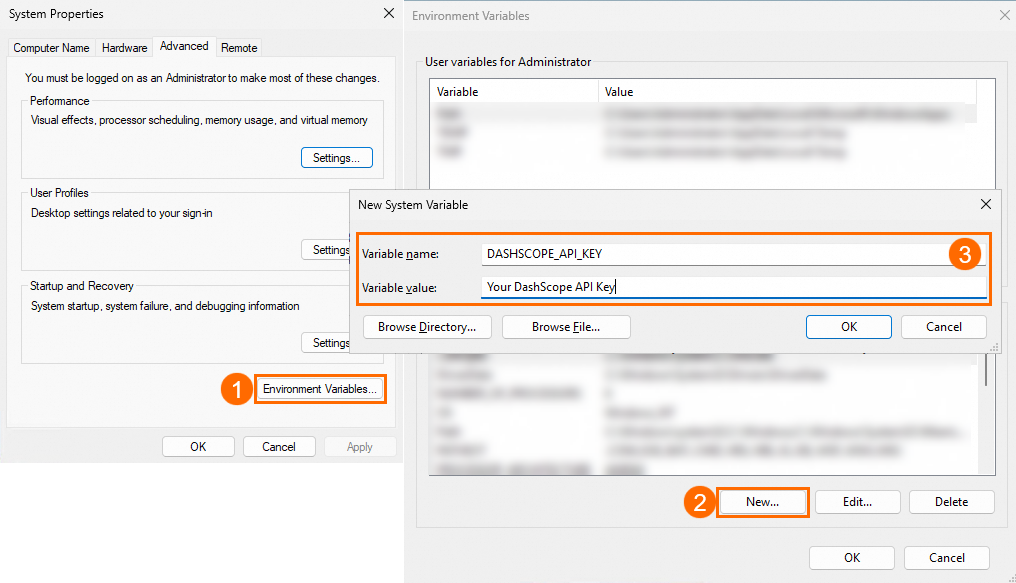
Open System Properties
Pressione `Win+Q`, pesquise "**Editar as variáveis de ambiente do sistema**" e abra **Propriedades do sistema**.
Add the environment variable
Clique em **Variáveis de ambiente** > **Variáveis de sistema** > **Novo**. Definir nome para `DASHSCOPE_API_KEY` e valor para sua chave de API.
Confirm
Clique em **OK** em todas as três caixas de diálogo.
Verify
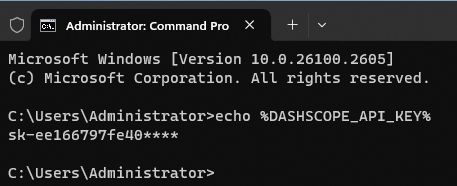
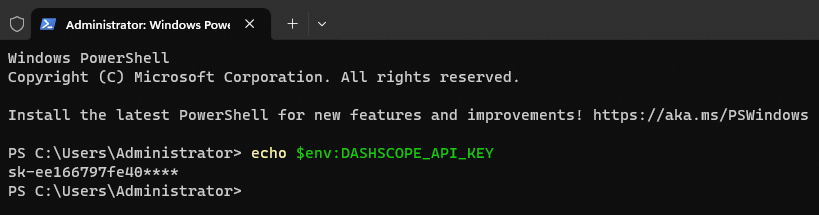
Verifique no CMD ou PowerShell:
- DMC:
```powershell
echo %DASHSCOPE_API_KEY%
```
- Windows PowerShell:
```powershell
echo $env:DASHSCOPE_API_KEY
```
CMD
#### Variável de ambiente permanente
Set the variable
        ```batch
        # Replace YOUR_DASHSCOPE_API_KEY with your API key.
        setx DASHSCOPE_API_KEY "YOUR_DASHSCOPE_API_KEY"
        ```
Open a new session
Abra uma nova sessão CMD.
Verify
```batch
echo %DASHSCOPE_API_KEY%
```

#### Variável de ambiente temporária
Execute o seguinte comando
        ```batch
        # Replace YOUR_DASHSCOPE_API_KEY with your API key.
        set DASHSCOPE_API_KEY="YOUR_DASHSCOPE_API_KEY"
        ```
Verify
```batch
echo %DASHSCOPE_API_KEY%
```

PowerShell
#### Variável de ambiente permanente
Set the variable
        ```powershell
        # Replace YOUR_DASHSCOPE_API_KEY with your API key.
        [Environment]::SetEnvironmentVariable("DASHSCOPE_API_KEY", "YOUR_DASHSCOPE_API_KEY", [EnvironmentVariableTarget]::User)
        ```
Open a new session
Abra uma nova sessão do PowerShell.
Verify
```powershell
echo $env:DASHSCOPE_API_KEY
```

#### Variável de ambiente temporária
Execute o seguinte comando
        ```powershell
        # Replace YOUR_DASHSCOPE_API_KEY with your API key.
        $env:DASHSCOPE_API_KEY = "YOUR_DASHSCOPE_API_KEY"
        ```
Verify
```powershell
echo $env:DASHSCOPE_API_KEY
```

Perguntas frequentes
echo funciona, mas o código informa "nenhuma chave de API encontrada"
Causas comuns:
-
Variável não permanente: Variáveis temporárias funcionam apenas na sessão atual. Em vez disso, defina uma variável permanente.
-
É necessário reiniciar: reinicie o IDE, terminal ou aplicativo. Os aplicativos gerenciados pelo serviço podem precisar de reinicialização do serviço.
-
Configuração do gerenciador de serviços: para aplicativos gerenciados por serviço (systemd, supervisord), adicione a variável ao arquivo de configuração do serviço.
-
Usando sudo:
sudonão herda variáveis de ambiente. Usarsudo -E python xx.py(o-Esinalizador passa variáveis) ou executar semsudose as permissões permitirem. -
URL base obrigatório: Definir QwenCloudURL base de:
- No código:
dashscope.base_http_api_url = 'https://maas.qwencloudapi.com/api/v1'
- Como variável de ambiente:
export DASHSCOPE_HTTP_BASE_URL='https://maas.qwencloudapi.com/api/v1'